
Participating Frequently
February 26, 2020

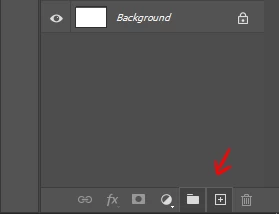
P: "New Layer" and "New Group" buttons in the Layers panel stay down after clicking on it

  • February 26, 2020
  • 56 replies
  • 3394 views

Hello,

since the last update, almost every time I click on the New Layer and/or New Group buttons in the Layers panel, the buttons become stuck and unusable. I have to restart Photoshop to reset their state.
Not game breaking but definitely annoying.


Regards
This topic has been closed for replies.

56 replies

March 10, 2020
ME TOO. I click on the Groups folder to start my new group and nothing happens. Tried in multiple files and same result - nothing. This is a HUGE need for a website designer... I have hundreds of layers in a given document that I need to put in to groups.
Participating Frequently
March 8, 2020
Seems there were some changes to the layer palette in this version. There's also this problem: https://feedback.photoshop.com/photoshop_family/topics/photoshop-cc-2020-v21-1-0-recessed-layer-thumbnails
RosaPerry
Inspiring
March 7, 2020
I would love to give you a reliable reproduce David, but it happens sporadically for me so I can't reproduce.
Rosa
David Mohr
Participating Frequently
March 6, 2020
Thank you for your details.  Please keep them coming; we still haven't isolated quite the problem, but I've logged the bug and we're discussing it.  A reliably reproducible case would be awesome.

Thanks,
David
Known Participant
March 6, 2020
Happens to me as well, also with the mask button.
Extremely annoying and time wasting
I am using Mac with Catalina
RosaPerry
Inspiring
March 5, 2020
No Julien, I always had a scrollbar because of the amount of layers I work with. I just couldn't reproduce your find with dragging a layer to create a new layer. My issue is with directly clicking on the Create Layer Button on the bottom. I don't often have no scroll bar. 

David Today I did finished another piece of artwork/photo-manipulation with 52 layers in groups. I had no issue what so ever with the Create Layer Button or Group button, they stayed responsive all during my work flow, but the crazy thing is, my Delete button on the bottom of the Layers Panel was unresponsive. So I really have no idea what's causing the issue. It's spooky.

What I did different today in my workflow, was hide the ruler tool. 


Rosa
Participating Frequently
March 5, 2020
David,

Doing this causes the bug 100% of the time for me. 
If I resize the layer window so there's no scrollbar, it stops happening.

Rosa, did you notice this happening when you have no scrollbar in your layer window?

And to answer your questions: 
- I tried both GPU and software rendering with no difference, even with legacy compositing
- I'm using the "Essentials" workspace
RosaPerry
Inspiring
March 5, 2020
David

I can't reproduce Julien's find at all. I have tried and tried many times creating a new layer or group by dragging a layer into the Create Layer button and the bug doesn't present itself. I also have a scroll bar because of my layer/group amounts but dragging a layer down onto the button doesn't reproduce the bug for me.

Mine bug thing does it unexpectedly in my workflow as described above. It's when I go to create a new layer from the button itself. I can't reproduce the bug as it does it randomly in my workflow.
Rosa
Participant
March 4, 2020
Late reply, but yes I also had chrome open
Inspiring
March 4, 2020
Yes, this allowed me to recreate the bug. Great find Julien.

Repeating that process will free the "stuck" shortcut icon, though if you have multiple icons stuck you have to do it one-by-one. Also, for a couple of the icons it took multiple attempts. FWIW, after using this antidote once, it took many more attempts to to "unstick" the icons after I recreated the problem a second time.

Answer to other question: Custom workspace, using GPU. Disabling the GPU did not prevent the problem from occurring or the behavior of the stuck/unstuck trick.