Participating Frequently
June 19, 2013

P: Scrub text leading jumps the value super high

  • June 19, 2013
  • 90 replies
  • 1950 views

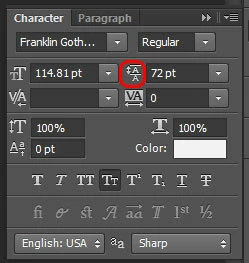
When I use the scrub method of adjusting on my leading, PS(win) unexpectedly jumps the number way up, even if I'm scrubbing left, even if i'm holding the alt key.
This topic has been closed for replies.

90 replies

David Mohr
Participating Frequently
September 10, 2013
Geoff,

First, sorry if my comment seemed offensive. That was not my goal at all.

Second, PLEASE comment on bugs you find and go ahead and echo things so the voices of all users can be heard. It's actually very helpful when getting bugs triaged to know if one person or many are having an issue.

Finally, that said, posting the exact same comment on many threads is NOT helpful and is actually sort of annoying. It just becomes noise that obscures the issue. My ps wasn't in regard to reports of this bug in general and I'm sorry if it seemed that way. I was actually referencing Charles' post asking for a CS6 fix in EACH thread where I had commented that there was a fix available for CC. Some people would delete all the SPAM comments; I would rather simply ask for self-restraint, so that the forums can be of better use to everyone, rather than cluttered with repetitive messages that have been asked elsewhere.

I posted the fix notice to probably 12 or more different threads (here and elsewhere) because users have asked me to do so AND I want to help as many people as possible find a solution. That's a little different that spamming a dozen threads with a specific request.

I am EXTREMELY aware that this bug is causing users loads of problems in both CS6 and CC, which is why the day we had a solution, I proposed these be rolled into a dot-release for CS6 as well. Unfortunately, this has not happened yet, but it is my hope to get these updates available for all users.

Thanks,
David
Inspiring
September 9, 2013
David,

I can't speak for everyone, but I added onto this chain to echo that I was also having this bug, to help Adobe know that it is/was affecting a lot of people. It was a large enough of a stone in my personal workflow that I started an account to log the bug on here with others, and I don't ever do that.

Maybe it wasn't your intent to insult everyone that is trying to help report this bug by calling them childish or spammers, just for saying that they also had this problem in this thread, but that's how that comes off.

I appreciate the bugfix- but maybe be a little bit more sensitive to how you address your end-users.
David Mohr
Participating Frequently
September 9, 2013
Hi Charles and everyone else,

Yes, we have not forgotten CS6. We are looking into putting these fixes into an upcoming dot-release for perpetual users. At this time, that's all I can say.

Meanwhile, for those who have switched to CC, the first round of fixes are available today.

Thanks,
David

p.s. -- posting the same complaint in every thread is annoying and sorta childish. It's also SPAM.
Inspiring
September 9, 2013
David-
What about CS6 users? This bug was introduced in a CS6 update. No fix for us?
It looks like Adobe has pulled the CS6 update that contained the bug. What are the steps to "downgrade" Photoshop CS6 to the version before the bug? Is this our only option?
David Mohr
Participating Frequently
September 9, 2013
Okay, I can finally post this:

We have made many fixes to the behavior of transformed text and they are now available in the latest release, Photoshop 14.1, which you can download RIGHT NOW. I will acknowledge, there are still a few lingering issues to resolve, but for most users, these fixes should handle their problems. We felt it was better to get a partial fix out now than a perfect fix in the future. We are still planning additional improvements for a coming release.

If you are still struggling with problems, by all means let us know so we can make sure we address them.

Thanks and enjoy!
David
Inspiring
September 9, 2013
Followed the whole thread and having the same issues with tracking and kerning. I put in "30" for tracking and it gives me "6". Not what I was looking for.

Crossing fingers for a speedy update to CC.

Thanks for all you guys do.
Inspiring
September 3, 2013
Please fix this soon! This is very critical, when you have a big project with a lot of text layers that needs to be adjusted!
Inspiring
August 29, 2013
Can't believe the adobe folks haven't fixed this yet.
el.gomezAuthor
Participating Frequently
August 29, 2013
Can anyone else confirm if this workaround works for them as well?
el.gomezAuthor
Participating Frequently
August 29, 2013
I have also noticed that the bug is pretty manageable. If you simply undo after the "jump bug" skips the slider around, it will take it to the last position before it skipped, but after it was adjusted. Hope that makes sense.
