



artemvodoriz
Known Participant
February 13, 2019

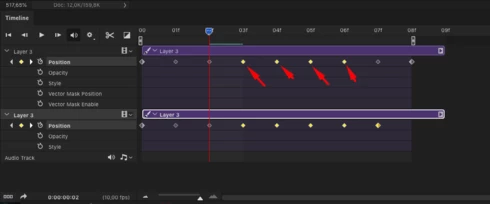
P: Selecting key frames for duplicated layer selects keyframes for previous layer in Timeline

  • February 13, 2019
  • 30 replies
  • 677 views

When I select the keys in the timeline in one layer, the keys in the layer with which I worked before are highlighted to.
I have to cancel selection, select keys again and the keys on another layer do not selected this time - this EXTREMELY slows down the work because i must to do this all the time! - (select- cancel selection - select again

Sometimes accidentally deleting or moving the keys where i didn't want it and having to go back many steps to correct the error
i think - this is not a feature - this is bug!
This topic has been closed for replies.

30 replies

Braniac
March 27, 2020
This issue should be addressed by the 21.1.1 update. Let us know if you're still having trouble.
artemvodoriz
Known Participant
March 9, 2020
21.1.0 Problem is still here.

artemvodoriz
Known Participant
March 7, 2020
21.1.0 Problem is still here.
artemvodoriz
Known Participant
March 6, 2020
21.1.0 Problem is still here.
artemvodoriz
Known Participant
March 6, 2020
21.1.0 Problem is still here.
artemvodoriz
Known Participant
March 4, 2020
21.1.0 Problem is still here.
artemvodoriz
Known Participant
March 3, 2020
21.1.0 Problem is still here.
artemvodoriz
Known Participant
March 2, 2020
21.1.0 Problem is still here.
artemvodoriz
Known Participant
March 1, 2020
21.1.0 Problem is still here.
artemvodoriz
Known Participant
February 29, 2020
21.1.0 Problem is still here.