
Participating Frequently
May 19, 2020

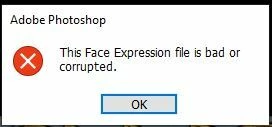
P: This Face Expression File is bad or corrupted

  • May 19, 2020
  • 93 replies
  • 178008 views

I keep gettting the following error when I launch Photoshop 2020 on a Windows 10 64bit machine


This Face Expression File is bad or corrupted


I assume it relates to the Default Face Expression Presets.p3f file, which a scan reveals to be OK. The application launches after I click OK but how can I get rid of the error?


I have reinstalled, tried the clean up tool and there has even been an update since it started but still it persists. Is there anywhere I can find a replacement file?


Thanks in advance


Steve


93 replies

Participant
June 5, 2024

When starting Photoshop I get the error message:This facial expression file is invalid or corrupted. Updating the system does not solve this issue. I can klik it away, but it keeps coming up by every startup. Is there any solution to fix this? This is the message in Dutch: 


Ged_Traynor
Community Expert
Community Expert
June 5, 2024
Known Participant
June 4, 2024

In my case after having deleted the file , the problem was solved. Photoshop start normally with no error message.

vinny dellay
Known Participant
June 4, 2024

Thois works... until th enext time you restart your computer.  I`'ve been dealing with this problem for a year now.  I must have deleted that file 30 times by now.  It's so frustrating..

Participant
June 3, 2024

Hallo

Meine Cloudanwendung"Photoshop 2024" startet nicht, bzw hängt sich beim Laden der Pinsel auf.

Habe schon mehrmals deinstaliert. Keine Verbesserung.

Manchmal geht es weiter mit der Fehleransage"Datei mit Gesichtern ist Fehlerhaft".

Brauche dringend HILFE !!!


VG Matthias

kglad
Community Expert
Community Expert
June 3, 2024

in the future, to find the best place to post your message, use the list here, https://community.adobe.com/

p.s. i don't think the adobe website, and forums in particular, are easy to navigate, so don't spend a lot of time searching that forum list. do your best and we'll move the post (like this one has already been moved) if it helps you get responses.


<"moved from cc desktop bugs">
Known Participant
May 31, 2024

I had the same problem having mjust started to use photoshop 2024 in windows 11. The answer from Jane-e is still the good one except for the location :  C:\Users\[username]\AppData\Roaming\Adobe\Adobe Photoshop 2024\Adobe Photoshop 2024 settings\FaceExpressionPresets.psp

Participant
May 21, 2024


When I try to open PS, this error appears but when I pick "ok" it works. 

BUT The new version of PS (ia) doesn't work.

Ged_Traynor
Community Expert
Community Expert
May 22, 2024
Participant
May 22, 2024

Thank you!!!

Participant
May 14, 2024

Version 25.7, Adobe Photoshop 2024, Windows 10 Pro version 22H2, Desktop PC 64-bit OS build 19045.4291


When I open photoshop I see the "Face Expression File is Bad or Corrupted" prompt. My recent files do not appear and my workspace is changed. 


I have an issue trying to get the troubleshooting fix I have found to work. I'm using photoshop on a work computer, and I do not have an "AppData" folder in my C:\Users\[username] folder. That folder has the following files: 3D Objects, Contacts, Creative Cloud Files, Desktop, Documents, Downloads, Favorites, Links, Music, OneDrive, Pictures, Saved Games, Searches, and Videos.


When I noticed my folders are not matching up to all of the online troubleshooters, I decdied to manually search for the "FaceExpressionPresets.psp" file. I do not have a file that has this exact name, which confuses me. I have a similar one that is titled "Default Face Expression Presets.p3f", but whenever I added ".old" at the end and tried opening Photoshop again I still get the "This Face Expression file is bad or corrupted." and THEN I get another one that says "Could not load default Face Expression presets because the file name was not valid." This is confusing, because it seems like the file I renamed should be correct because it literally says it IS the Face Expression file, but doing the rename fix doesn't work.


I have uninstalled and reinstalled as well as tried different versions on creative cloud (current version is 25.7 and I have tried 25.6, 25.5.1, and 25.5) but nothing has worked.


Anyone have any ideas?

Ged_Traynor
Community Expert
Community Expert
May 14, 2024
Kevin Stohlmeyer
Community Expert
Community Expert
May 10, 2024

@Belle35241866toh2 see the accepted answer. instead of adding "Old" to the file name - remove it. Restart your computer then launch Photoshop. The file will recreate automatically.

Participant
May 10, 2024

im having the same problem but resetting preferances and changing the name to .old doesnt fix the problem

Participant
May 1, 2024

I've had this issue before when loading Photoshop, it'd say, "Face expression file is bad or corrupted". I eventually found a way to resolve the issue by renaming the Face Presets file with .old at the end of it.


However, this issue came back, and when I tried that method again, this popped up.


I couldn't find any answers to this. I have the most recent version of Photoshop installed.  I've tried renaming it in different ways and each time, it seems to be invalid now. I've renamed it as:


  • FaceExpressionPresets.old
  • FaceExpressionPresets.old.psp
  • FaceExpressionPresets.psp.old


Would deleting this preset get rid of the problem? Is it necessary to use? Because I'm not sure how else to fix this.


jane-e
Community Expert
Community Expert
May 1, 2024

@defaultjsd0nzote9yv 


Did you quit PS before renaming the file? And relaunch afterwards? (You didn't say.) Photoshop should create a new, uncorrupted file on re-launch.


Jane


Participant
May 1, 2024

Yep. It was never open when I renamed it.