Inspiring
June 22, 2014

P: Various issues (Focus Area Selection)

  • June 22, 2014
  • 66 replies
  • 1108 views

Since downloading Photoshop 2014 yesterday, I've noticed a variety of issues that make the program almost unable to use.

1) Selection issues. All selection tools *seem* to work normally until I attempt to use the new focus-range selection tool. After doing so, any selection tool I use (lasso, rectangular marquee, etc) result in me getting selections such as these:
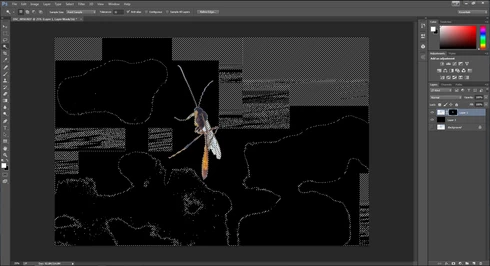


They consistently show up as selected rectangles of various sizes, spread out throughout the canvas. Any additional selections made from this point only amplify the errors.

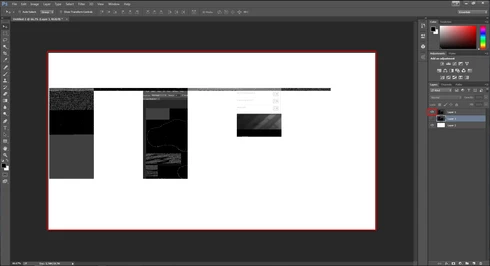
2) Also possibly caused by the same tool, I started to develop other issues like layers disappearing from the canvas, despite being visible in the layer panel and visible glitches/artifacts on the screen when opening separate windows (such as the save window).

(Artifacts and visibility issues after taking a screenshot, pasting into a new window, and cropping)

I'm currently using Windows 7 on an NVIDIA gtx 670. I have all of the latest drivers, and have no problems with the regular CC version of photoshop.

I have also tried re-installing twice, along with disabling the GPU. No luck.

Rather humorously and ironically, I've had to use the previous Photoshop CC just to make these screenshots at all.

If I notice any other issues, I'll be sure to post them here, unless directed otherwise.

This topic has been closed for replies.

66 replies

Participating Frequently
July 11, 2014
I just located the file and deleted it directly, restarted CC 2014 and it seems to be working now. I think it important to note that the CC2014 restart is important, as I tried the selection without having restarted CC 2014 and still got the artifacts. Thanks for insisting.
Participating Frequently
July 11, 2014
Resetting the prefs did not solve it for me. Just tried deleting the PSP file and it looks better. 16 bit file, tried painting both black and white in the mask and refining edges.... all things that used to fail. Looks good.
Inspiring
July 11, 2014
Mine didn't work either when using the shortcut.....did you try deleting the preferences file itself?
Participating Frequently
July 10, 2014
The issue still continues after using the "shift ctrl alt" approach. After having used it I used the Select>Focus Area selection again and all looked ok until I output the results. The results looks like this.

href="https://d2r1vs3d9006ap.cloudfront.net...">
Known Participant
July 10, 2014
On some of my images, switching to 8 bit from 16 was a solution.

If you need to work in 16, you can make a duplicate of the image (Image / Duplicate), convert the dupe to 8 bit, make the selection there and copy it over to the other image.
Participating Frequently
July 10, 2014
>Resetting prefs (ctrl+shift+alt) may have worked, first time I try anyway. Will test further.
Participant
July 10, 2014
Same here - deleting the preferences file seems to have stooped the problem
CR Henderson
Participating Frequently
July 10, 2014
Deleting the settings file solved the problem for me--or more precisely I cannot get the focus area selection to fail as it did prior to deleting the file. I'll revisit this thread when/if the problem returns.
Inspiring
July 10, 2014
Using the above shortcut didn't reset my preferences....so I hunted down the .psp file and deleted it. The selections tools seem to be working now...but we'll see if the problem comes back at any point.
Inspiring
July 10, 2014
As a general update since posting.....I've been following along as people have been posting. I've tried everything suggested in this thread so far.....and still no luck. Right now, some of these "workarounds" may solve the problems on some people's set-ups...but I don't think we'll see a general fix for everyone until we get a whole bug-fix update from Adobe at some point.