Inspiring
June 22, 2014

P: Various issues (Focus Area Selection)

  • June 22, 2014
  • 66 replies
  • 1108 views

Since downloading Photoshop 2014 yesterday, I've noticed a variety of issues that make the program almost unable to use.

1) Selection issues. All selection tools *seem* to work normally until I attempt to use the new focus-range selection tool. After doing so, any selection tool I use (lasso, rectangular marquee, etc) result in me getting selections such as these:
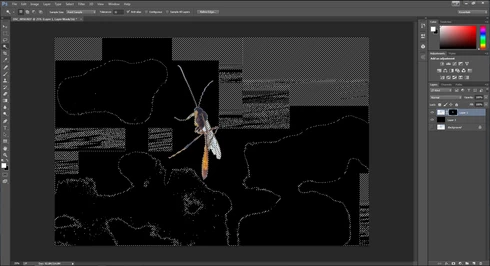


They consistently show up as selected rectangles of various sizes, spread out throughout the canvas. Any additional selections made from this point only amplify the errors.

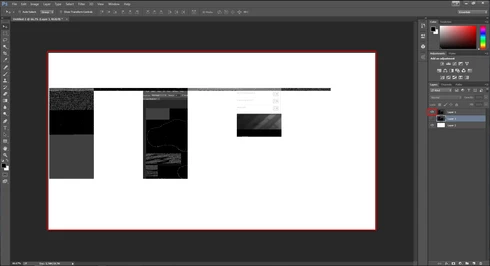
2) Also possibly caused by the same tool, I started to develop other issues like layers disappearing from the canvas, despite being visible in the layer panel and visible glitches/artifacts on the screen when opening separate windows (such as the save window).

(Artifacts and visibility issues after taking a screenshot, pasting into a new window, and cropping)

I'm currently using Windows 7 on an NVIDIA gtx 670. I have all of the latest drivers, and have no problems with the regular CC version of photoshop.

I have also tried re-installing twice, along with disabling the GPU. No luck.

Rather humorously and ironically, I've had to use the previous Photoshop CC just to make these screenshots at all.

If I notice any other issues, I'll be sure to post them here, unless directed otherwise.

This topic has been closed for replies.

66 replies

Inspiring
June 27, 2014
Tried workarounds. Nothing works.
Participating Frequently
June 27, 2014
We really do not need workarounds, we need the software fixed or just remove the focus area until it can be redesigned. Great idea just released before all the bugs were known.
Participant
June 27, 2014
If those previous work around a work or if you have any luck with any other work arounds a let us know.
Inspiring
June 27, 2014
Please read back about 2 posts.
Inspiring
June 27, 2014
Having same issue on IMac running OS 10.9. Has anyone heard of a solution. Has Adobe addressed this yet?
Participant
June 27, 2014
Tried that and no luck. I even discovered it also happens when using the quick selection tool after a few complex selection attempts are made. I'm a portrait retoucher and for most of the techniques I use won't work as an 8 bit file. It has to be 16.
Inspiring
June 26, 2014
Try converting your document to 8 bit / channel and see if the problem goes away.

Also try turning off OpenCL in Photoshop's preferences, then restart Photoshop and try it on your original 16 bit/channel document.
Participating Frequently
June 26, 2014
If you are an Employee I hope you are reading this string.
June 26, 2014
I have the same issue on my iMac and MacBook Air.
Using OSX 10.9.3 (with all possible updates installed which were available)
Participant
June 24, 2014
I've experienced this too. It seems to screw up a whole lot of stuff at once. If I use the brush on a document after using the Focus Area Selection it creates these smeary blocky patterns, and fill results in crazy rectanglish shapes with hints of my background layer's shape thrown in at random.

It only appears to affect the document on which the selection was run.

Using ATI Radeon 4500 (admittedly an old and underpowered card) driver 8.970.100.7000 which ATI and MS both report as being the latest version