
steveharrington1974
Known Participant
April 22, 2025

P: Photoshop 2025 v26.6 Bug - black document window

  • April 22, 2025
  • 179 replies
  • 36074 views

Photoshop 2025 v26.5 was working absolutely fine, then I made the mistake of updating to the latest patch, version 26.6.0 on my M4 Mac Mini.


After updating to 26.6, the actual document window is solid black - even if I open a photo or previous document...
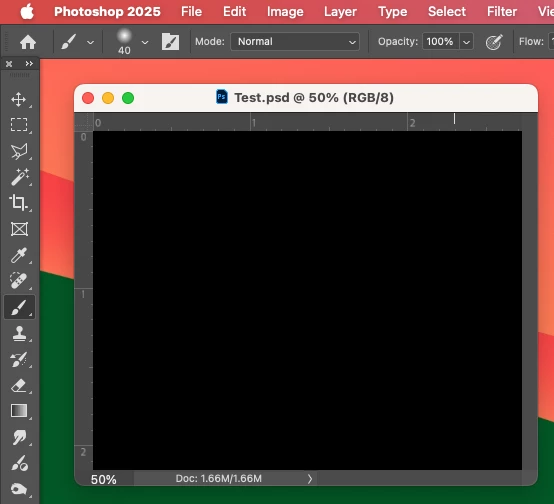


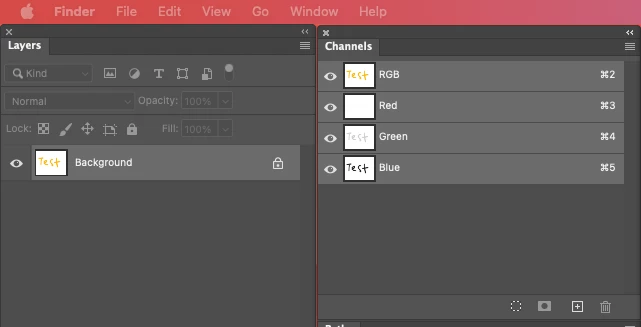
Even though the Layers and Channels palette preview thumbnails are showing what's in the document...


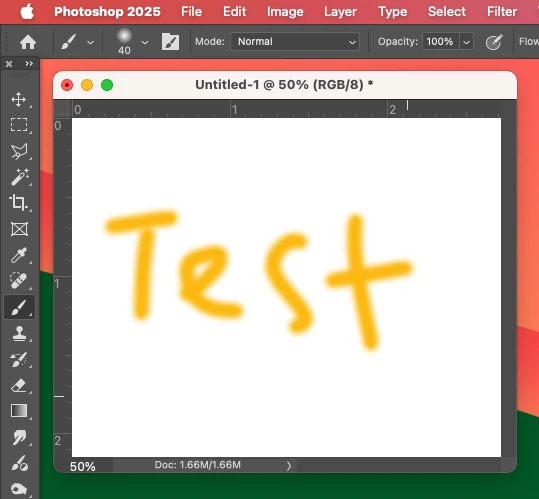
After digging around in Preferences, I tried turning off the "Use Graphics Processing" option and relaunching Photoshop afterwards, and it's working fine again...


I'm just wondering if this is a bug related to the M4 Mac Mini graphics driver compatibility with the version 26.6.0 release? And, if so, when can we expect a fix from Adobe. 


I've discovered the workaround for now, but obviously turning off the Graphics Processing setting will affect perfomance. Like I say, with this option switched on previously to the latest 26.6.0 release, it was working fine so it must be a new bug with 26.6.


I'm never updating this software ever again!!

179 replies

Participant
May 11, 2025

Thanks Jeff, this fixed it for me.

Inspiring
May 10, 2025

Adobe Photoshop 26.6.1 fixed this bug for me.

Participant
May 10, 2025

Acaba de llegarme la actualización 26.6.1, y como suponía, arreglo el error que reporté hace unos dias. 

Por si a alguien le sirve, mientras utilicé una versión de hace unos meses. 


Gracias, a todos.

Known Participant
May 10, 2025

It's ocurring in the latest update (26.7 which was fine, to 26.8). MacMini M4. Additionally I can't access the prefferences to turn off GPU, I get warning sounds when clicking on any pallette, or menu.

Reinstalled 26.7 and all is good.

jongo.studio
Participating Frequently
May 9, 2025

I hear you, and every. single.time. I try ANY of these suggestions for workarounds I get bupkis in the Library.  NOT COOL ADOBE.

Sameer K
Community Manager
Community Manager
May 9, 2025

Hi all! The team has released a fix for this issue with the latest update for Photoshop to v26.6.1.
To update Photoshop, click "Update" in the Creative Cloud desktop app next to Photoshop. More detailed instructions for updating

Thanks!
Sameer K

Participating Frequently
May 8, 2025

Well, I'll be . I thought foir sure this would not work cuz I thought it would reset the "Use Graphic Processor" to uncheck. But I'll be. It worked. Thanks so much

Participant
May 8, 2025

Thank you, Steve. 

Participating Frequently
May 8, 2025

I have found a solution that has worked for me.  Open Photoshop and go to the "General" tab of Settings.  There is a button to Reset Preferences On Quit.  Click this, exit Photoshop.  Now, when I open files or come from Lightroom, the picture shows up normally...no black box.

Participant
May 8, 2025

I decided to update Photoshop BETA, and now all images are solid black and the program is therefore unusable. Please advise. 


Participant
May 8, 2025

Same here, I have also just updated the app and my images are also black. 

Please help.

Pixel Relish
Participating Frequently
May 8, 2025

You can try the MachinePref.psp thing pinned as "correct answer" in this thread, however that method didn't work for me. This morning (May 😎 I'd updated PSD Beta from 26.7 to 26.8; got the black artboard issue. Tried the MachinePref.psp fix. Didn't work, so I uninstalled 26.8 then reinstalled 26.7, and all is working fine for me (Macbook Pro M3max running Sequoia 15.4.1). Luck!

Participating Frequently
May 9, 2025
I went back to former release as well.
Sent from my iPhone