Participating Frequently
June 27, 2023
Answered

Photoshop tool icons are missing

  • June 27, 2023
  • 52 replies
  • 39037 views

Recenlty my Photoshop tool icons simply do not appear on the toolbar. they function fine but it is troublesome to find the right tool. The only way I could solve this is to reinstall photoshop but I cannot possibly do that every day.

Correct answer Sameer K

Hey, @Stefan31701036zdnm. Welcome to the Photoshop Community. I'll help you figure this out.

What version of Photoshop are you working on? Moving this to discussions for now.


Try this:
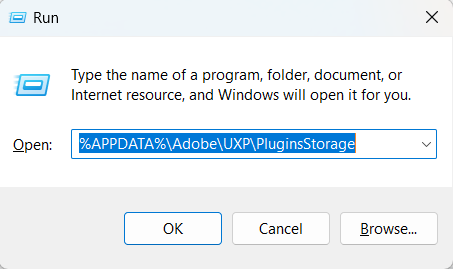
  • Go to the following location on Windows 10/11: Users/[user name]/AppData/Roaming/Adobe/UXP/PluginsStorage/PHSP
  • Press Windows + R & type this is the Run Window - %APPDATA%\Adobe\UXP\PluginsStorage


  • In the PHSP Folder, rename the 24 folder by adding a .old at the end. ('24' > Rename > '24.old')

These changes will give a refresh to panels in Photoshop. Let me know how it goes.

Thanks!

Sameer K

52 replies

Participant
August 23, 2025

Yep, I have had the same problem with PS2025 version

I just stopped using that version, my favorite is PS2021 version.

Participant
August 20, 2025

@Sameer K 

thank you sameer bhai

Participant
August 1, 2025

Big Thanks 

Participant
July 31, 2025

Photoshop. Fix it please. And fonts don't work either, I'm having to use arrow keys to scroll through them. There's other stuff too. It's frustrating. None of the temp fixes really work. You need to hire someone to Bob the builder it. Artists are in pain here. 

Known Participant
July 31, 2025

It works until the next time I use PS pos. Several versions on my computer. They all do it sometimes and other times they work.

Participating Frequently
July 31, 2025

Thx. Problem solved!

Participant
July 18, 2025

It works! Thanks a lot

Participating Frequently
July 4, 2025

Sameer K's solution absolutely worked for me! 

Participant
July 2, 2025

Thakssssssss

Participant
June 12, 2025

Anyone know how to stop this headache? All the tools are greyed out. I have to literally right click them to see what tools are there and even sometimes that doesn't work. I spend every day opening and closing photoshop to maybe get one or tools to appear. It's not right? Am I doing something wrong? 

Ged_Traynor
Community Expert
Community Expert
June 12, 2025
