Participating Frequently
June 27, 2023
Answered

Photoshop tool icons are missing

  • June 27, 2023
  • 63 replies
  • 40527 views

Recenlty my Photoshop tool icons simply do not appear on the toolbar. they function fine but it is troublesome to find the right tool. The only way I could solve this is to reinstall photoshop but I cannot possibly do that every day.

Correct answer Sameer K

Hey, @Stefan31701036zdnm. Welcome to the Photoshop Community. I'll help you figure this out.

What version of Photoshop are you working on? Moving this to discussions for now.


Try this:

  • Go to the following location on Windows 10/11: Users/[user name]/AppData/Roaming/Adobe/UXP/PluginsStorage/PHSP
  • Press Windows + R & type this is the Run Window - %APPDATA%\Adobe\UXP\PluginsStorage
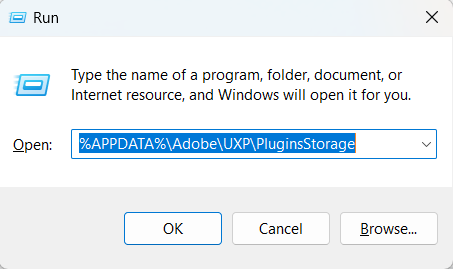
    image.png


  • In the PHSP Folder, rename the 26 folder by adding a .old at the end. ('26' > Rename > '26.old')

These changes will give a refresh to panels in Photoshop. Let me know how it goes.

Thanks!

Sameer K

63 replies

Ged_Traynor
Community Expert
Community Expert
July 3, 2026

@Rahul Kumar38269966wkze have a look at the correct answer in this thread to see if it helps


Participant
July 3, 2026
Tools icons invisible


AgDeuCerto
Participant
June 27, 2026

Olá, @Stefan31701036zdnm. Bem-vindo à Comunidade Photoshop, vou te ajudar a resolver isso.

Se a sua versão do Photoshop for v27.8 siga os próximos passos.


Experimente isto:

  • No Windows 10/11, acesse o seguinte local : Usuários/[nome de usuário]/AppData/Roaming/Adobe/UXP/PluginsStorage/PHSP
  • Pressione Windows + R e digite o seguinte para abrir a janela Executar: %APPDATA%\Adobe\UXP\PluginsStorage

     
  • Na pasta PHSP, renomeie a pasta 27 adicionando ".old" ao final. ('27' > Renomear > '27.old')
Participant
June 22, 2026

has anyone found a solution to this? I am dealing with this regularly. I’m running the latest version.

Ged_Traynor
Community Expert
Community Expert
April 14, 2026

@Snowdrop_1 I replied to your other post, see if the correct answer in the link I posted helps with this issue as well

Snowdrop_1
Participating Frequently
April 15, 2026

I click on the link, and it tells me there's no such page. I just started using the forum. I click on the message in the notification. Is there some way to show me this link again?

jane-e
Community Expert
Community Expert
April 16, 2026

@Snowdrop_1 wrote “Is there some way to show me this link again?”


Your post was merged with the longer thread that Ged linked to.

https://community.adobe.com/questions%2D712/photoshop%2Dtool%2Dicons%2Dare%2Dmissing%2D1183294?postid=7538645#post7538645


Scroll to the top of this thread to see the answer (highlighted in green) that is marked Correct — or use this link:

https://community.adobe.com/questions-712/photoshop-tool-icons-are-missing-1183294?postid=4842421#post4842421


Jane


Ged_Traynor
Community Expert
Community Expert
April 14, 2026

@Snowdrop_1 have a look at the correct answer in this thread to see if it helps


Snowdrop_1
Participating Frequently
April 15, 2026

Thank you, the icons on the toolbar are now visible.

Snowdrop_1
Participating Frequently
April 14, 2026

The icons in the Adjustments window aren't showing up. I've been struggling with this for about six months now. All the icons in this window have disappeared, and I don't understand why. I've tried completely uninstalling Photoshop and reinstalling it, but nothing helps. Can you help me with this problem? It's incredibly inconvenient. I use this window very often, but due to some error, I have to endure it.

Unfortunately, my interface language is in Russian, and I can't change it to English.

Snowdrop_1
Participating Frequently
April 14, 2026

When I first launch Photoshop, the toolbar icons don't appear. If I restart the program, they may appear, but they may not, forcing me to restart it again.

I've tried completely uninstalling Photoshop and reinstalling it, but nothing works. The program has the latest updates.

theheredia
Participant
April 9, 2026

This actually worked for me. I’ve tried many other suggestions. Thanks for your help.

I renamed the 27 folder, and everything works now.

Claire H.
Community Manager
Community Manager
April 9, 2026

@theheredia glad to hear the solution worked for you! Please don’t hesitate to reach out if you have any other questions or encounter any issues. Happy editing! ^CH

Ged_Traynor
Community Expert
Community Expert
March 19, 2026

@nguyenkt08 have a look at the correct answer in this thread to see if it helps


