Known Participant
October 2, 2023
Answered

Photoshop 2024 [v25.1] - Color Sliders don't work [Color picker issue -merged]

  • October 2, 2023
  • 142 replies
  • 50838 views

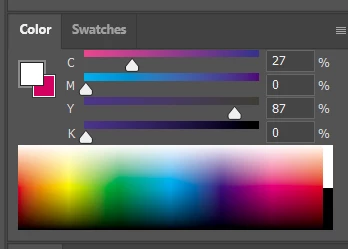
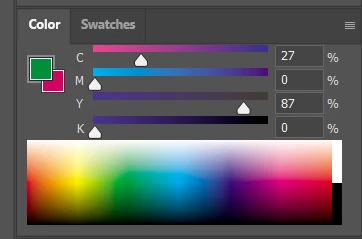
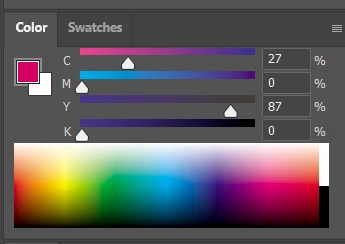
Color Sliders in my new Photoshop 2024 don't work at all - they don't change when i pick a color from the Spectrum or when i change Foreground/Bacground color with X key.

I reset Preferences, reinstaled PS and nothing works. Any ideas?

Photoshop 25.1.0, Windows 10.


This topic has been closed for replies.
Correct answer Kevin Stohlmeyer

@robzartworx there is a phased roll out for update 25.2 happening globally.

If you are in a managed environment (Enterprise/Teams/Edu) you may have to reach out to your plan admin to allow access to new updates within 30 days of release.

142 replies

Participant
November 2, 2023

I need help pls !!! This just broke out of nowhere....
(im on the newest version of Photoshop, and im on Windows)
Whenever I use the color picker tool and select a color, only the little box (top left circle) changes color with it; the color wheel and value box thingy doesnt change with it.
It used to work fine (fine being using the color picker and the color wheel matching it), and im afraid I accidentially clicked something to disable it and I dont know how to undo it. Ive restarted my computer and photoshop, and it hasnt fixed it. Ive also tried searching online, but I dont know the correct terminology for theses things, so it was a dead end.......
Can someone help please? its really frustrating to try and guess colors lol...


mjmdvm
Inspiring
November 3, 2023

Update.. I can confirm that going back to version 25 fixes the problem. The color picker, color wheel and color sliders are all working! 

Participant
November 2, 2023

This is a BASIC feature that should be fixed IMMEDIATELY or I will cancel my subscription.  Terrible quality control, since this is an incredibly vital feature. Adobe's competietors can all do this.  Why not Adobe? Every update adds new bugs, but does not seem to fix old ones.  So the sofware is getting worse and worse with every update.

Abysmic
Participant
November 2, 2023

update, it stopped working again. idk what the deal is.

Abysmic
Participant
November 2, 2023

i'm having the same problem, it started out of nowhere and it's infuriating. i uninstalled the 25.1 version and went back to the 25.0 though and now it's working, i'd advise you to do the same!

Delkin525
Known Participant
November 2, 2023

This is an extremely frustrating issue. I'm also shocked by how many of the recent updates are just breaking big parts of Photoshop for me like never before.


I made a video showcasing the bug and how annoying it is.


Here it is BROKEN in PS v25.1: https://youtu.be/XkwjqW5luw0


Here it is working as intended in PS v25.0: https://youtu.be/kR2QICTcAG4


Adobe, can you please confirm that this is being fixed? I can't update until it is.

Participant
November 2, 2023

Pude solucionar temporalmente el problema, instala la versión 24.7.2  desde el creative cloud dandole a los 3 puntitos del photoshop instalado, buscar versiones antiguas y lo instalas

Participant
November 2, 2023

yeah, I have this issue as well. It's so annoying

Participant
November 1, 2023

Same issue for me !

Participant
October 31, 2023

This is the exact thing that happened to me with the latest update. It's definitely a bug that makes it 50x harder to work with Photoshop. The color wheel and hue box no longer change when using the eyedropper. This makes it impossible to tell if I have the correct hue in place now. 

Participant
October 31, 2023

Thank you, tried it amd it worked, really appreciate it.