


Known Participant
June 30, 2013
Answered

100% zoom is too small on screen (designers don't get high resolution displays)

  • June 30, 2013
  • 62 replies
  • 294460 views

Hello, I'm using photoshop CC on amacbook pro retina. I mainly use photoshop for web design and when I open a document that is 300x200 px, the 100% view is too small on screen. Any ideas, It was this way on PS cs6 also before I upgraded. I just tried to delete the prefs file and restarted PS and it did not change. I have also tried to change my screen resolution to "best for retina" and it is still the same.

Steve
This topic has been closed for replies.
Correct answer D Fosse

...and just for kicks, I started to read from the beginning of this endless thread. It turns out that the whole "problem" was fully explained inside 20 posts or so. The rest of the thread, 360 or so posts by now, is just repetition, over and over and over again.

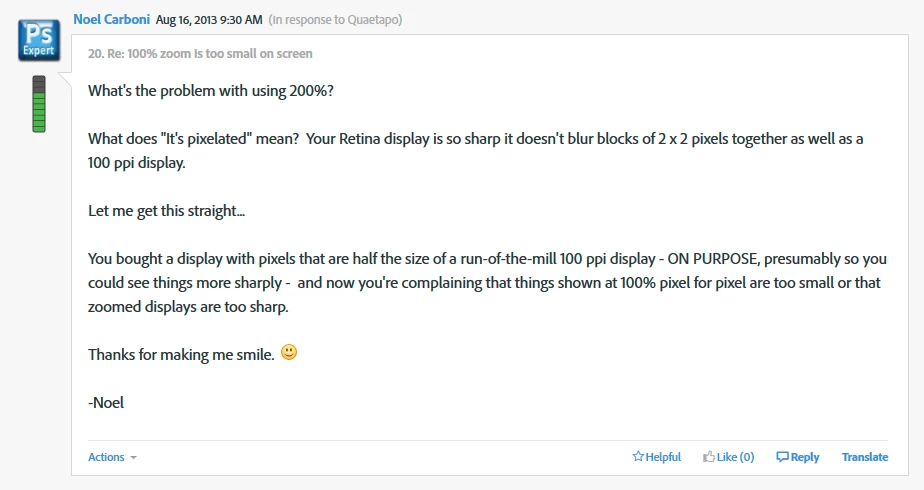
This one, post #20, from Noel Carboni, gave me an acute sense of déjà vu...

And two posts later, he went all in with a detailed and comprehensive rundown on every aspect of high resolution displays. Read it, everyone, please. And when you've read it, read it again, and again, until it's understood:

https://forums.adobe.com/message/5601271#5601271

Case closed, you might think...

62 replies

Participating Frequently
December 18, 2015

The only solution here is for Adobe to get with the times and build in this feature.

Sheena Stuart-Milburn
Participant
December 14, 2015

HiDPI and Retina Display support FAQ for Photoshop‌ - Here Adobe message about Retina screen. Should be seen at 200% for the "actual size". Even it will turn out pixelated, it won't look that way when saving as jpg and posting it or printing it out. You can use an older computer that has non-retina screen if that helps you with designing mockups.

Yes, it is unfortunate that Adobe has yet to developed a "non-retina" or "general computers monitors" actual size appearance and that would still look sharp on photoshop.

Here are other helpful resources:

Other form discussion about it - http://graphicdesign.stackexchange.com/questions/49734/measurements-in-photoshop-do-not-match-100-print-view-size

https://forums.adobe.com/thread/1245069?tstart=0

Understand resolution -  http://www.vsellis.com/understanding-dpi-resolution-and-print-vs-web-images/

Calculate your screen's DPI here - http://dpi.lv/

Hope this helps and saves time for someone. I end up wasting a good hour running around different unanswered forms to finally get it.

Participant
December 14, 2015

Count me in for frustration and disbelief that Adobe has been so slow to address this issue when their most popular image manipulation program has a major, MAJOR issue for the designers who use it on a daily basis. Maybe they're slow to tackle it because the complaints didn't reach to the critical mass point due to relatively slow penetration of retina display screens? I don't know, but VERY disappointing.

(And some offensive comments from some self-proclaimed Photoshop experts who are clearly not designers in this thread have no place in a constructive conversation. Just had to get that out of my chest.)

So, waiting for action from Adobe.

Participating Frequently
December 14, 2015

+1 that this is a huge problem.

I find it staggering that this conversation has been going on for 2 years and no suitable solution from Adobe.

Most of the time I have an external (standard DPI) monitor that I work off, so no issue. But when I do occasionally work off my MBPR display, it IS a problem as describe many times previously.

Participant
November 17, 2015

Wow... I had to create an account just to reply to this thread. I clearly have the same issue which is why I am here. The fact of the matter is, as designers, we cannot and should not have to work with document sizes that are microscopic. I couldn't care less about the damn "retina quality" of the screen if I can't even see what it is I am doing when editing a document because it's so small. No one here is complaining about the quality of the screen.

They are complaining about the fact that we have to work on a zoomed in pixelated document to even see what we are doing. For a huge screen I think that is something that should be understood and compromised.

We are here for help because it makes it difficult to do our job when things are not functioning the way we are used to. If having a retina screen means I have to give up the ability to see the graphics I am working on properly and at an acceptable view, then no, its not worth it to me. I wish I knew about this problem before I bought it.

I was shocked by how rude and yes condescending some of these responses were. When they clearly dont understand why this is a problem.

Thanks for the "super clear and amazing screen" but this still is a frustrating issue to any designer using photoshop specifically. If I am watching a movie, then thumbs up, this screen rules.

Participant
November 21, 2015

Ok so I only just got a Retina display and needed help with this too.  Ridiculous what so many have said over the years when this is still an issue.  But I have a found a RIDICULOUS workaround ... ridiculous that it actually has to happen to help you use your retina display and still get it to SAVE in an fashion that will not be upscaled by the browser and pixilate it.

So simply do this:
- Add a non Retina display to your computer
- Mirror those displays (because your non retina display is lower res the Retina display will lower to your monitor settings)

It now treats your images as WE want it to and saves exactly what you see on screen and in the full 100% quality you are looking at it.  Thought some (who happen to have a extra monitor in the closet collecting dust like me) might appreciate seeing this will work. 

Participant
December 10, 2015

Meanwhile Affinity Photo have a good solution! Bye, bye Adobe!
On a retina macbook pro fonts and pictures by 100% are not pixelated! That´s Great!

(Sry for my bad english! Greetings from Munich, Germany)

Participant
August 31, 2015

Hi guys! I know this is an old thread but as I see I am not the only one who had to look this up, I thought I'd fill you in on a feature Adobe added specifically for this reason.

If you check your preferences (at least in CC), there's a Technology Previews section. If you check the box next to "Enable Design Space (Preview), it'll send you to a photoshop workspace specifically for mobile/web. It'll look weird at first, and once you skip the tutorial, you can go to Window > Return to Standard Photoshop. Voila! 100% preview in the same reign as your browsers. This isn't a true 100% due to the explanations above on how retina screens work, but it is the 100% we need as web developers/designers and it isn't blurry.

gener7
Community Expert
Community Expert
August 31, 2015

Thanks. I'm not a web developer, but I'll pass it on.

Why don't you start a new post on it?  Give it a descriptive title and unmark it as a question. That way everyone gets a heads up.

"Web workflow now easy on High Resolution (HiDpi, Retina) screens with Enable Design Space"  is one suggestion.

Gene

Participant
August 31, 2015

Thanks, Gene, will do.

Participant
July 7, 2015

1) Navigate to the PSD app in applications

2) Right click - "Get Info"

3) Check "Open in Low Resolution"

4) Open App

Participant
June 25, 2015

I primarily design for large LED screens which by their nature are surprisingly low resolution. As low as 288x192 in some instances. At this size, much like as in web design, it's vital to know what each pixel is doing as there really is no space to waste. So why I just upgraded to a 27 inch retina iMac I have no idea. That stupidity aside, I do actually know what I'm doing and I know what a pixel is.

I get that at 100% my image will be half the physical/real-world size that it was on my old iMac of the same size (27inch) and half the resolution. I'd be disappointed and confused if it wasn't. What I don't get is why it looks so bad when I zoom in to 200%? I am looking at the same image in photoshop, side by side on my old mac at 100% and also on my retina screen at 200%.  If it's the same source image, displayed at the same physical size in the real world I would have expected pretty much an identical image, no? The difference is vast.

I would expect the zoomed image on retina to look more pixelated relative to everything else on the screen around it of course, but that's not what's happening here. I guess it's bad interpolation that's causing the loss of quality? I would expect a single pixel from the image to simply now be displayed over 4 pixels on the retina display, effectively doubling it's width and height. Not at 100% obviously, 100% should be 100%, I'm on board with that. But whether it's a new setting in Photoshop, or a more accurate zoom to 200%, I want to be able to see what it is I'm doing.


Am I missing something?!

Participant
June 21, 2015

For anyone who is still looking for a solution to this issue, I have found one.

1. Google search and download SwitchResX

2. Install SwitchResX

3. Launch SwitchResX from System Preference

4. Click on Color LCD

5. Click on Current Resolution

6. Select one of the none HiDPI resolutions

7. Save it and you are set.

I found 2880 x 1800 is what works best for me.

If you would like to keep the 1920 x 1200 resolution, then select the 1920 x 1200 none HiDPI one.

I hope this helps.

rossul
Participating Frequently
June 17, 2015

Zoom isn't the main issue.  What we need is a proper support for density-independent pixels (dp).
Adobe has updated the UI to HD screens, but Photoshop still renders the files based physical pixels as if all screens in the world were 72 PDI.