


Gibson Editions
Inspiring
December 19, 2022
Question

2 up vertical duplicate image colour shift (bug?)

  • December 19, 2022
  • 5 replies
  • 3019 views

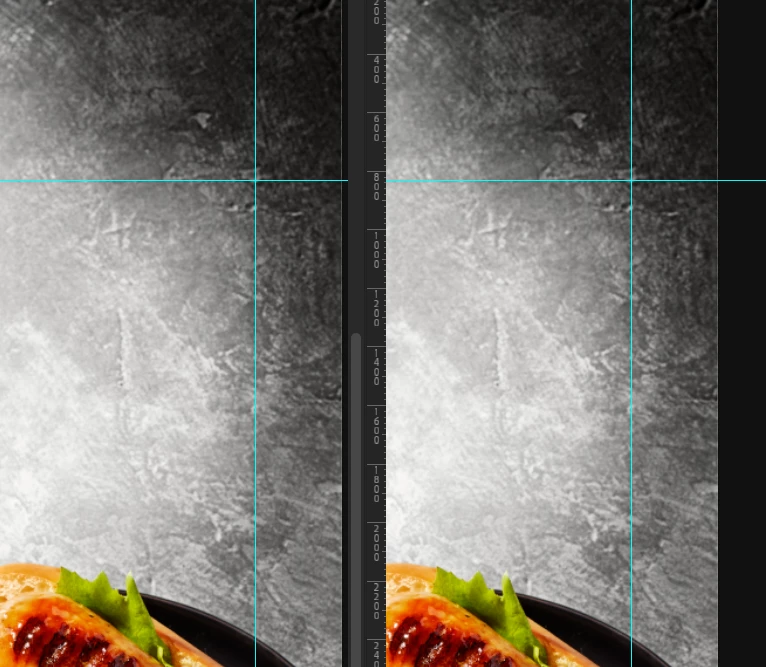
I am trying to resolve an issue. I am seeing a color/ luminance shift when viewing two identical images created with image>duplicate in two up vertical view. (see screenshot attached)


Is this a known issue?


PS V 24.1.0

OSX 12.6.2

M1 Max processor (macbook pro 16")

Eizo CG279X monitor

Custom color profile 90cd,0.4cd, 6800k, 2.2 (v4 profile)
 

This topic has been closed for replies.

5 replies

Gibson Editions
Inspiring
December 19, 2022

Basically any image i take and duplicate and view side by side shows a difference. Can anyone else repicate this on their setup. 


Currently i have been able to replicate the issue on a M1 mac with CG279X and  Intel Mac pro 6.1 with CG277 both running PS24.1

TheDigitalDog
Inspiring
December 19, 2022
quote

Basically any image i take and duplicate and view side by side shows a difference. Can anyone else repicate this on their setup. 


Currently i have been able to replicate the issue on a M1 mac with CG279X and  Intel Mac pro 6.1 with CG277 both running PS24.1


By @Gibson Editions


I cannot. I'm using an NEC SpectraView PA271Q. M1 Mac, 24.1 version of Photoshop, the latest version of macOS. 

FWIW, I'm using a much, much better test image to compare:

http://www.digitaldog.net/files/Gamut_Test_File_Flat.tif

Author “Color Management for Photographers" & "Photoshop CC Color Management/pluralsight"
Gibson Editions
Inspiring
December 19, 2022

Many Thanks for having a look, I really appreciate it. I will use your test image for comparision in future. 

TheDigitalDog
Inspiring
December 19, 2022

V4 profiles bring nothing to the party! I know of no software creating them that supports the PRMG. Just select V2, your life will be easier 😋

Author “Color Management for Photographers" & "Photoshop CC Color Management/pluralsight"
Gibson Editions
Inspiring
December 19, 2022

and what about LUT vs Gamma EOTF ?

TheDigitalDog
Inspiring
December 19, 2022
quote

and what about LUT vs Gamma EOTF ?


By @Gibson Editions

YMMY, depending on software (making and using) LUTs. 

Mine are in the panel; better.

Author “Color Management for Photographers" & "Photoshop CC Color Management/pluralsight"
D Fosse
Community Expert
December 19, 2022

There is no difference. Here's an overlay with zebra-striped mask:

Gibson Editions
Inspiring
December 19, 2022

Many thanks for checking, In theory they are identical

Gibson Editions
Inspiring
December 19, 2022

Many Thanks i will try this. However surely, LUT based profiles should be theoretically more accurate than Matrix based ? 


see attached a 100% view. To my eye the left hand side is reading cooler and darker/ slightly more contrast than the right. I am talking very subtly. Probably not viewable in difference unless applified 


Gibson Editions
Inspiring
December 19, 2022

So ive just had a colleague using the same test image duplicated and displayed 2 up vertical. this time on a different machine (Mac pro 6.1) with a different Eizo CG277 and same calibration target and they are seeing the same shifts that i am on screen. 


"left hand side is reading cooler and darker/ slightly more contrast than the right." 


Any ideas Adobe? 


Michael J. Hoffman
Community Expert
December 19, 2022

When you see the image on the left as cooler, can you swap the position of the two images? Does the anomaly stay in the same are of the screen? Sounds to me more like a screen/environment issue, as the images you are posting here are completely identical.


D Fosse
Community Expert
December 19, 2022

When I overlay these two and flip between them, I am absolutely unable to discern any difference whatsoever. Difference blend mode is pitch black until finally with a maximum curve you get a very faint uniform noise, probably because the screenshot isn't at 100%. Using an Eizo CG2730.


Generally, v4 is slightly risky, but LUT-based profiles can be problematic even in Photoshop. Both are defaults in ColorNavigator. Matrix profiles (called  gamma (eotf) value in CN) are much safer and much more reliable, and I would recommend you change this in Preferences.