



FatherJohnNC
Participating Frequently
May 14, 2021
Answered

22.4 crashes every time I use it - HOW DO I REVERT TO PRIOR VERSION?

  • May 14, 2021
  • 5 replies
  • 2211 views

How do I revert to a prior version? This one is AWFUL!!! It crashes (6 times in a row now) every time I try to import pieces to put them together in a new document. It is unuseable right now. I am VERY unhappy. In 26+ years as a PS user, I have never experienced such a bad update.
Correct answer Ged_Traynor

Hi

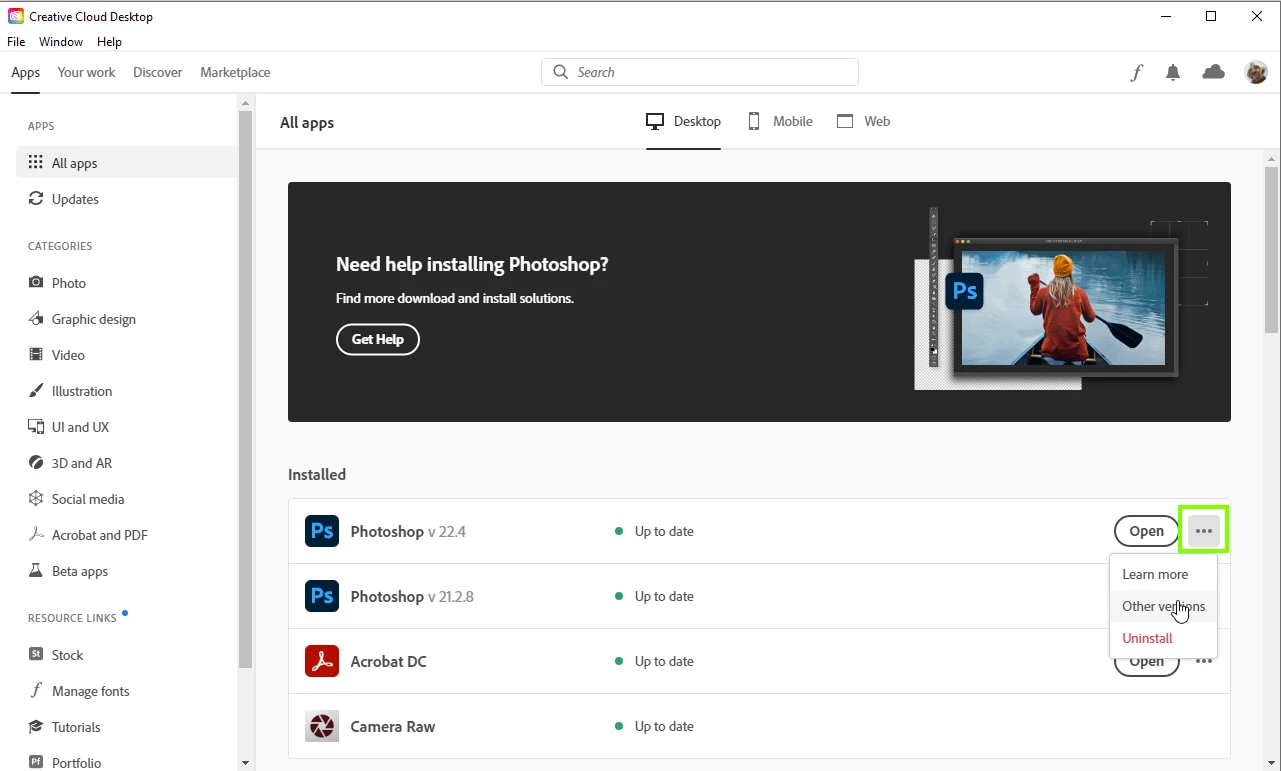
You can do that from the Creative Cloud app

5 replies

Participant
May 3, 2025

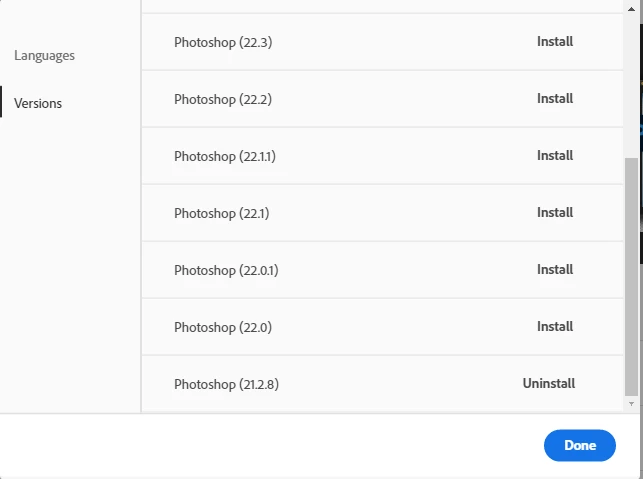
To revert to a prior version of Adobe Photoshop, you can use the Adobe Creative Cloud app to install an older version. Open the Creative Cloud app, go to the "Apps" tab, and click on the three dots next to Photoshop. Select "Other Versions" and you'll see a list of previous versions available for download. Choose a stable version  that you were happy with and install it. If the crashing issue persists, it might be worth checking for any conflicting plugins or resetting your preferences in Photoshop (hold Ctrl+Alt+Shift while launching Photoshop to reset preferences). Additionally, make sure your system meets the latest requirements for Photoshop to avoid any compatibility issues.

AxelMatt
Community Expert
Community Expert
May 3, 2025

This thread is 4 years old and it's unlikely that the owner ready your answer.

I closed this thread.


My System: Intel i7-8700K - 64GB RAM - NVidia Geforce RTX 3060 - Windows 11 Pro 25H2 -- LR-Classic 15 - Photoshop 27 - Nik Collection 8 - PureRAW 5 - Topaz Photo
Known Participant
May 17, 2021

Same experience, though I have also experienced crashes with the previous version, only a little less frequently. 

Ged_Traynor
Community Expert
Ged_TraynorCommunity ExpertCorrect answer
Community Expert
May 14, 2021

Hi

You can do that from the Creative Cloud app

FatherJohnNC
Participating Frequently
May 14, 2021

I found the answer: You can revert to a prior version through the Adobe Creative Cloud Desktop app.

Be aware, 22.4 is NOT a good update!

Known Participant
February 18, 2022

22.4 is completely broken and unusable

TheDigitalDog
Inspiring
February 18, 2022

@jcazzie wrote:

22.4 is completely broken and unusable


Well you can try updating to the latest version and examine the bug fixes here:

https://community.adobe.com/t5/photoshop-ecosystem/ct-p/ct-photoshop?page=2&sort=latest_replies&lang=all&tabid=all

Author “Color Management for Photographers" & "Photoshop CC Color Management/pluralsight"
c.pfaffenbichler
Community Expert
Community Expert
May 14, 2021

Try »Other versions« 


But make sure to back-up your Presets first.