



Pikamon101
Known Participant
May 6, 2018
Question

3D Text Help

  • May 6, 2018
  • 1 reply
  • 1376 views

Hi everybody!

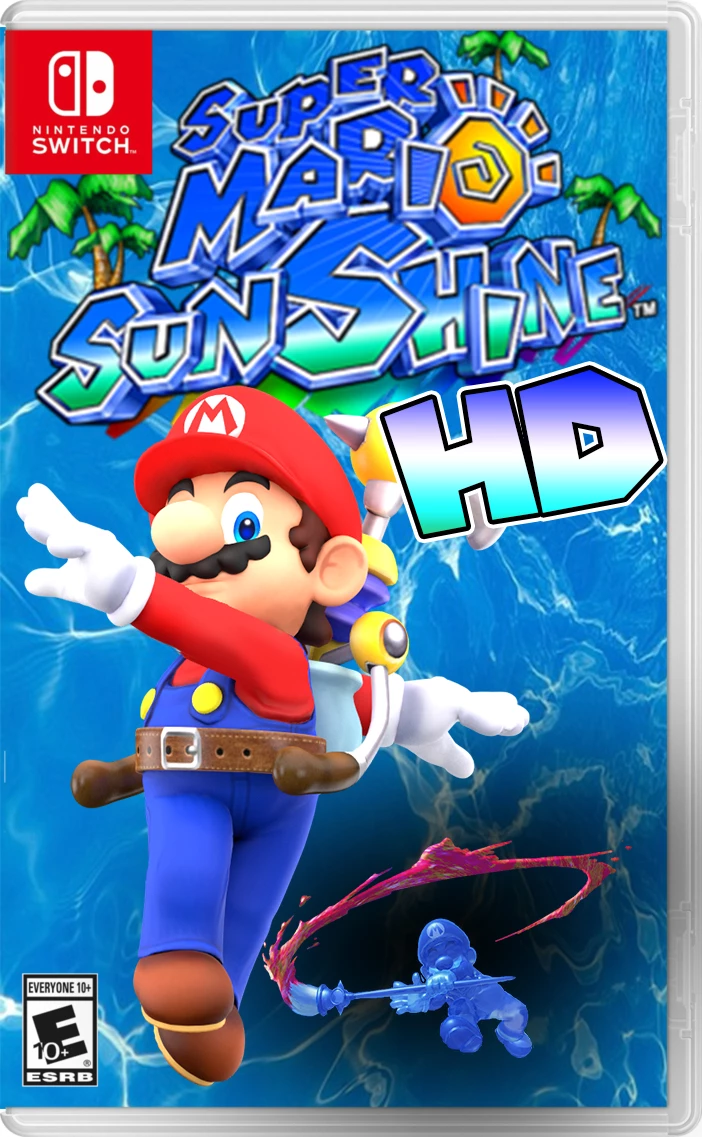
I need help with Adobe Photoshop 2018 CC, I'm really good at editing and photoshopping but I'm new to 3D Text and I created a fake box art image of "Super Mario Sunshine HD for Nintendo Switch" just for fun but I want the "HD" text part in the text to be 3D and I know how to covert it to 3D and rotate it around and stuff but as you can see from the picture down below, I made the "HD" text look like the original logo and I even have the same Gradient as the original logo but I just want the "HD" part to be a little bit more 3D-Ish and have a black & white outline like the original logo. I have tried watching/reading Tutorials about 3D Text but none of them help because they aren't that clear and usually most of the footage they show is on older versions of Adobe Photoshop. If somebody could comment detailed clear instructions down below I would extremely appreciate it! Thank you, have a great day and God bless!
This topic has been closed for replies.

1 reply

davescm
Community Expert
May 6, 2018

Hi

You can make the "HD" lettering into a 3D extrusion by tracing with the pen tool,  copying it onto it's own layer and making a 3D extrusion from the pen path. To get the black line around the whole extrusion use Layer Effects >Stroke after rendering.

Dave

Pikamon101
Known Participant
May 7, 2018

Hi Dave!

Thank you for responding!

I found your answer a little helpful but it's confusing to me since I'm an idiot, haha.

You made the "HD" text look awesome and you made it look just like to original logo!

Do you mind giving me a "Step-By-Step" reply with tons of pictures or a video so I can understand it more.

I apologize and I'm not new to photo editing and I'm pretty tech savvy and great with computers and I can even make NES games but usually the only way I learn new stuff is by reading/watching really detailed instructions because I get so confused or distracted..

If you have a YouTube Channel I will give you a shoutout and tell everybody to Subscribe to you!

Thank you, have a great day and God bless!

-Pikamon101

davescm
Community Expert
May 7, 2018

Hi Dave!

I had it at this menu and was changing the Extrusion Depth...

And then this happened and I tried Window > Workspace > Reset 3D and it still didn't do anything...


Hi

That is a bug which occasionally surfaces in the recent versions of Photoshop. Just click on the 3D camera in the 3D panel and the properties should re-appear. Then go back to the mesh/material

Dave