Inspiring
August 29, 2018
Answered

A bug with Image size resize?

  • August 29, 2018
  • 10 replies
  • 12515 views

Photoshop CC and CS6

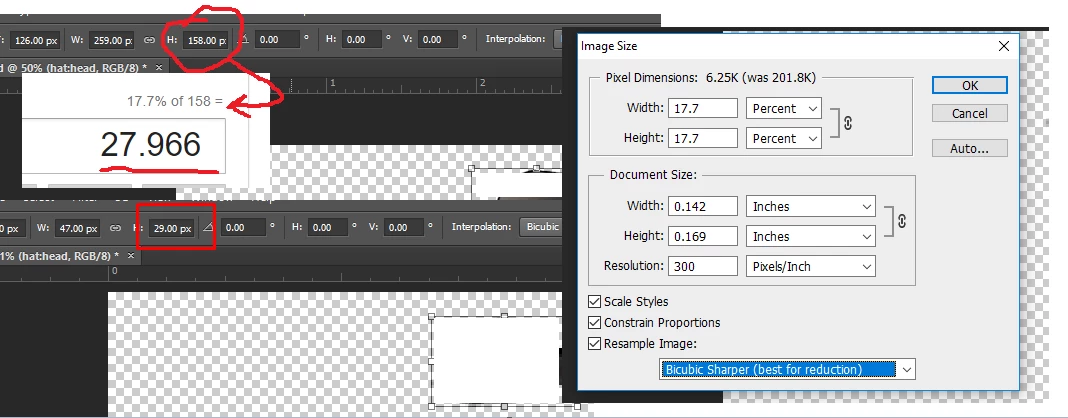
I have a image with a width of 158px I'm trying to perform a rescale down 17.7% of the original 158. That should be ((158 * 17.7) / 100) = 27.96 Now That's what I'd like (I'm looking for it to ceiling up / round up) to 28 and that's the new size I want.

(but nothing seems that simple with PS) When I try this is PS I get 29 px once the image has been rescaled:

Can you help me understand where the extra pixel comes from and what the solution would be to get the actual CORRECT transform values?

This topic has been closed for replies.
Correct answer r-bin

While I appreciate everything even converting the JS to C++ is a task in itself and I can't test the given code easily (It may work in JS but the C++ API is different) I do have all the access to the descriptors you're using I'm not 100% that all the functions work with the C++ API.

"And now it turns out you need to accurately scale down many layers"


Yes my original question should be able to be performed synchronously on as many or little layers as needed. I'm not saying the way you did it is wrong and I thank you for your time! I just need a solution that is more than a hack to the API.

I have fixed my problem but I literally have to append padding to the byte array on export.

If I was to ask this question again I would ask "How can you scale down a layer to make it's bounds (width and height) divisible by 2 / even"


I do not know how to resizet layers with even dimensions in one pass

and what opportunities do you have in the Plugin's API other than just duplicate the code for AM.

The last sentence.

Try this script. It processes all layers. It is desirable that there are no empty layers or layers with a mask.

If you specify use_even = true, then all the end dimensions of the layers will be even

Good luck.

var pcnt = 17.7; 

var use_even = false;

app.preferences.rulerUnits = Units.PIXELS; 

var ok = true;

app.activeDocument.suspendHistory("Transform", "scan_layers(transform_layers, activeDocument.artLayers, activeDocument.layerSets); transform_canvas(pcnt);");

/////////////////////////////////////////////////////////////////////////////// 

if (!ok) alert("Some layers are not accurately resized")

else alert("All layers are successfully resized to " + pcnt + " %" + (use_even?" with even sizes":""))

/////////////////////////////////////////////////////////////////////////////////////////////////

function scan_layers(func, layers, sets)

    {

    function scan_func(func, layers, sets)

        {

        func (layers);

        var length = sets.length;

        for (var i = 0; i < length; i++)

            {  

            var set = sets;

            scan_func(func, set.artLayers, set.layerSets);

            }

        }

    scan_func(func, layers, sets);

    }

/////////////////////////////////////////////////////////////////////////////// 

function transform_layers(layers) 

    {

    for (var i = 0; i < layers.length; i++)

        {

        activeDocument.activeLayer = layers;

        if (!transform_layer(pcnt)) ok = false;

        }

    }

/////////////////////////////////////////////////////////////////////////////// 

function transform_layer(pcnt) 

    { 

    try { 

        switch (activeDocument.activeLayer.kind)

            {

            case LayerKind.SMARTOBJECT:

            case LayerKind.NORMAL:

                break;

            default:

                return true;

            }

        executeAction(stringIDToTypeID("newPlacedLayer"), undefined, DialogModes.NO); 

        var w = Number(activeDocument.activeLayer.bounds[2].value - activeDocument.activeLayer.bounds[0].value); 

        var h = Number(activeDocument.activeLayer.bounds[3].value - activeDocument.activeLayer.bounds[1].value); 

        var w_calc = Math.round(w*pcnt/100); 

        var h_calc = Math.round(h*pcnt/100); 

        if (use_even)

            {

            w_calc = Math.round(w_calc/2)*2;

            h_calc = Math.round(h_calc/2)*2;

            }

        if (!transform(pcnt, pcnt, true)) return false;

        var ok = false;

        for (var i = 0 ; i < 5; i++)

            {

            w = Number(activeDocument.activeLayer.bounds[2].value - activeDocument.activeLayer.bounds[0].value); 

            h = Number(activeDocument.activeLayer.bounds[3].value - activeDocument.activeLayer.bounds[1].value); 

            if (w != w_calc || h != h_calc)

                transform(w_calc/w*100, h_calc/h*100, false); 

            else   

                {

                ok = true;

                break;

                }

            }

        if (!ok) for (var i = 0 ; i < 5; i++)

            {

            w = Number(activeDocument.activeLayer.bounds[2].value - activeDocument.activeLayer.bounds[0].value); 

            h = Number(activeDocument.activeLayer.bounds[3].value - activeDocument.activeLayer.bounds[1].value); 

            if (w != w_calc || h != h_calc)

                transform((100+w_calc/w*100)/2, (100+h_calc/h*100)/2, false); 

            else   

                {

                ok = true;

                break;

                }

            }

        if (!ok) for (var i = 0 ; i < 5; i++)

            {

            w = Number(activeDocument.activeLayer.bounds[2].value - activeDocument.activeLayer.bounds[0].value); 

            h = Number(activeDocument.activeLayer.bounds[3].value - activeDocument.activeLayer.bounds[1].value); 

            if (w != w_calc || h != h_calc)

                transform((200+w_calc/w*100)/3, (200+h_calc/h*100)/3, false); 

            else   

                {

                ok = true;

                break;

                }

            }

        var d = new ActionDescriptor(); 

        var r = new ActionReference(); 

        r.putEnumerated(stringIDToTypeID("layer"), stringIDToTypeID("ordinal"), stringIDToTypeID("targetEnum")); 

        d.putReference(stringIDToTypeID("null"), r); 

        executeAction(stringIDToTypeID("rasterizeLayer"), d, DialogModes.NO); 

        w = Number(activeDocument.activeLayer.bounds[2].value - activeDocument.activeLayer.bounds[0].value); 

        h = Number(activeDocument.activeLayer.bounds[3].value - activeDocument.activeLayer.bounds[1].value); 

        if (w != w_calc || h != h_calc)

            {

            alert(w + " x " + h + "\n\n" + w_calc + " x " + h_calc);

            return false;

            }

        return true;

        } 

    catch (e) { throw(e); } 

    } 


/////////////////////////////////////////////////////////////////////////////// 

function transform(w, h, pos) 

    { 

    try { 

        var d = new ActionDescriptor();   

        var r = new ActionReference();   

        r.putEnumerated(stringIDToTypeID("layer"), stringIDToTypeID("ordinal"), stringIDToTypeID("targetEnum"));   

        d.putReference(stringIDToTypeID("null"), r);   


        d.putEnumerated(stringIDToTypeID("freeTransformCenterState"), stringIDToTypeID("quadCenterState"), stringIDToTypeID(pos?"QCSIndependent":"QCSAverage"));   


        var d1 = new ActionDescriptor();   


        if (pos) 

            { 

            d1.putUnitDouble(stringIDToTypeID("horizontal"), stringIDToTypeID("pixelsUnit"), 0);   

            d1.putUnitDouble(stringIDToTypeID("vertical"),   stringIDToTypeID("pixelsUnit"), 0);   

            d.putObject(stringIDToTypeID("position"), stringIDToTypeID("point"), d1);   

            var d2 = new ActionDescriptor();   

            } 


        d.putUnitDouble(stringIDToTypeID("width"),  stringIDToTypeID("percentUnit"), w);   

        d.putUnitDouble(stringIDToTypeID("height"), stringIDToTypeID("percentUnit"), h);   


        d.putBoolean(stringIDToTypeID("linked"), false);   

        d.putEnumerated(charIDToTypeID("Intr"), stringIDToTypeID("interpolationType"), stringIDToTypeID("bicubic"));   

        executeAction(stringIDToTypeID("transform"), d, DialogModes.NO);   

        return true;

        } 

    catch (e) { return false; } 

    } 


/////////////////////////////////////////////////////////////////////////////// 

function transform_canvas(pcnt) 

    { 

    try { 

        var d = new ActionDescriptor();   

        d.putUnitDouble(stringIDToTypeID("width"),  stringIDToTypeID("percentUnit"), pcnt);   

        d.putUnitDouble(stringIDToTypeID("height"), stringIDToTypeID("percentUnit"), pcnt);   

        d.putEnumerated(stringIDToTypeID("horizontal"), stringIDToTypeID("horizontalLocation"), stringIDToTypeID("left"));   

        d.putEnumerated(stringIDToTypeID("vertical"), stringIDToTypeID("verticalLocation"), stringIDToTypeID("top"));   

        executeAction(stringIDToTypeID("canvasSize"), d, DialogModes.NO);   

        } 

    catch (e) { throw(e); } 

    } 

10 replies

Tom Ruark
Inspiring
September 26, 2018

You gotta love Photoshop. Not sure this will help or just cause more problems. The 100% pixels (all blue, see picture below) is actually 45 x 27, the round down answer you probably want and my engineers here would argue "is correct." You have a rounding problem. Should it be bigger or smaller? Depends on who you ask. Photoshop decided to "add opacity" (not really but trying to make my point) to the rounding problem, giving you an extra pixel in all directions = 47 x 29. Also, test with changing the resample dropdown. That will give you a different answer for the "extra" pixels. The eye dropper is on top of the top left pixel (not blue). Hopefully the scripts above will give you the "answer I want." A perfect "problem" for a script to solve!

i73Author
Inspiring
September 26, 2018

Tom you relapsed my Photoshop PTSD.

"the round down answer you probably want and my engineers here would argue "is correct." You have a rounding problem. Should it be bigger or smaller"

I completely agree with you, but I would like to know the algorithm and how it figures it should be rounded to the ceiling or floor (Should it be bigger or smaller).

I did end up solving this by padding my own pixel to the byte array on export, it's a work around but I do wish that the API could be more precise on how it handles operations like these. 

Thanks for everything guys!

Kukurykus
Brainiac
August 31, 2018

I don't know it's some way related but I just found a bug. When you place (by script) an image into other image in 'Full Screen Mode', it places image one pixel lower than it should, so for ex. in 'Normal Screen Mode' in CS6. Not in CC 2018.

Brainiac
August 31, 2018

Kukurykus 

I don't know it's some way related but I just found a bug. When you place (by script) an image into other image in 'Full Screen Mode', it places image one pixel lower than it should, so for ex. in 'Normal Screen Mode' in CS6. Not in CC 2018.

Give the parameters of your files. I have everything OK in CS6.

Kukurykus
Brainiac
August 31, 2018

Create new 450 * 525 * 72 pixels document. Don't zoom however I don't know it changes anything, draw anything in center to get reference. Save to desktop and then from 'File' menu choose 'place'. Choose that file and when opened in document apply by Enter. Copy code from Script Listener and paste to ESTK. Go back to Photoshop, hit F key twice to set Full Screen Mode. Then AltTab to ESTK and play pasted code. You can also save it to disk with targeted Ps and run from desktop after you leave Ps by Win-D. You'll see there's one px difference. Actually it's pushed up (not down), but still moved. btw I had placing as SO turned off.

i73Author
Inspiring
August 30, 2018

And your script is working almost perfectly, I just need to know how it ends up rounding, When I use 261x159

Original size before using your script:

After using your script:

the final size will be 47x28 (You're correct) but if we do this:

w = 261

h = 159

w * 17.7 / 100 = 46.197

h * 17.7 / 100 =  28.143

The final (after rounding) should be (46x28) but its not, I need to know how it comes to (47x28).

Brainiac
August 30, 2018

I have w = 261 h = 159 ==> w = 46 h = 28

Checked in CS6 and CC2018.
Give your file.

Brainiac
August 30, 2018

Is your document 1358x1620?


Yes.


Do you fulfill the condition that I said?
Active layer should be your VIP layer))
It is important that the active layer is your layer, not some other one.

UPD. It's time to sleep )

Brainiac
August 30, 2018

In some cases, when the layer has thin pixel threads, reducing the layer to the specified size (especially with a large decrease) causes the layer to be smaller because the single pixel-threads partially disappear completely. For such a case, there is a special, but complex algorithm. But it is designed to set the size of the layer, but not the whole image.
The above script can sometimes give a layer less than what was specified.

i73Author
Inspiring
August 30, 2018

Thanks r-bin but yeah I need to know this exact algorithm, (to me it just adds another pixel here and there) I never seen it actually lower the bounds of the VRect of a layer.

The only work around I have right now is using 20% as the base to scale down the document to get the correct layer size after re scale.

I'm preforming the same operation as you (C++ API) after listening to the operation:

static SPErr EventLayerTransform(string selectedLayer, int eventKeyID, real64 value)

{

char* layerName = (char*)selectedLayer.c_str();

value = (value / (value + 1)) * 100;

EventSelectLayer(layerName);

PIActionDescriptor result = NULL;

DescriptorTypeID runtimeKeyID;

DescriptorTypeID runtimeTypeID;

DescriptorTypeID runtimeObjID;

DescriptorTypeID runtimeEnumID;

DescriptorTypeID runtimeClassID;

DescriptorTypeID runtimePropID;

DescriptorTypeID runtimeUnitID;

SPErr error = kSPNoError;

PIActionDescriptor desc0000000000000188 = NULL;

PIActionReference ref0000000000000068 = NULL;

PIActionDescriptor desc0000000000000190 = NULL;

error = sPSActionDescriptor->Make(&desc0000000000000188);

if (error) goto returnError;

error = sPSActionReference->Make(&ref0000000000000068);

if (error) goto returnError;

error = sPSActionDescriptor->Make(&desc0000000000000190);

if (error) goto returnError;

error = sPSActionReference->PutEnumerated(ref0000000000000068, classLayer, typeOrdinal, enumTarget);

if (error) goto returnError;

error = sPSActionDescriptor->PutReference(desc0000000000000188, keyNull, ref0000000000000068);

if (error) goto returnError;

error = sPSActionDescriptor->PutEnumerated(desc0000000000000188, keyFreeTransformCenterState, typeQuadCenterState, enumQCSAverage);

if (error) goto returnError;

error = sPSActionDescriptor->PutObject(desc0000000000000188, keyOffset, classOffset, desc0000000000000190);

if (error) goto returnError;

error = sPSActionDescriptor->PutUnitFloat(desc0000000000000188, eventKeyID, unitPercent, value);

if (error) goto returnError;

error = sPSActionDescriptor->PutEnumerated(desc0000000000000188, keyInterfaceIconFrameDimmed, typeInterpolation, enumBicubic);

if (error) goto returnError;

error = sPSActionControl->Play(&result, eventTransform, desc0000000000000188, plugInDialogSilent);

if (error) goto returnError;

returnError:

if (result != NULL) sPSActionDescriptor->Free(result);

if (desc0000000000000188 != NULL) sPSActionDescriptor->Free(desc0000000000000188);

if (desc0000000000000190 != NULL) sPSActionDescriptor->Free(desc0000000000000190);

return error;

}

So I don't think that your code is any different than mine, the issue still persists by giving the wrong value to (x * P% / 100).

Brainiac
August 30, 2018

At you something not that.
Have you checked the script?
For your case, 1358x1620 and the layer 259x158 gives 46x28 always.
At you not so?

i73Author
Inspiring
August 30, 2018

While it's not the ideal solution since 17.7% is the exact dimensions we have to scale from, I found using a whole number (20) as a base works (it correctly will ceiling the rescaled value)

If anyone has any update in the future why 17.7 does not work, I'd still love to hear it.

i73Author
Inspiring
August 30, 2018

I may have confused you, when I say I have a image in my document I have a layer that I need to pre calculate the bounds.

My original (Unscaled document size) is: 1358x1620

Layer size (Unscaled): 259x158

What I'm trying to do is scale the document size (1358x1620) down by 17.7% (I'm going to use the width as the example) and when I do the new layer width after the document has been scaled should be: ((158 * 17.7) / 100) = 27.96 so 28 (with ceiling preformed) but it's not it becomes 29 in photoshop, this is happening in both the Image UI and my C++ plugin.

@Chuck Uebele I'm not understanding what you are unable to do.

@JJMack I'm using CS6 'As my plugins paths are able to be pointed to and that contains a 'pixel resolution' that (as far as I'm concerned defeats the purpose of a pixel height and width) and I'm able to set the pixel resolution, I'm not sure what you're saying with the photos, since the problem is between the final size, of my layer (Showing just with the width)

r-bin​ You're correct, and I need to figure out how to solve this since this is the only other way I can pre calculate the bounds of a layer so I can make sure the scaled down layer is within a bounds I need. So this is a bug?

JJMack
Community Expert
August 30, 2018

i73  wrote

What I'm trying to do is scale the document size (1358x1620) down by 17.7% (I'm going to use the width as the example) and when I do the new layer width after the document has been scaled should be: ((158 * 17.7) / 100) = 27.96 so 28 (with ceiling preformed) but it's not it becomes 29 in photoshop, this is happening in both the Image UI and my C++ plugin.

If you are using Image size to resize a layered document that has a canvas 1358x1620 size to 17.7% of its current document size all layers will be resized to 17.7 if their current size..  Only the Background layer needs to be canvas size. All other layer can be any size and can have any aspect ratio,    Photoshop knows all the layers bounds whatever they are.  If you add a new layer to a document it will be empty. If you fill a centered 5px by 5px Selection with colored pixels the empty layers bounds will now be 5px wide by 5px high a 1:1 aspect ratio.  Since you can no have a document element size less then a pixel  17.7% of x may require the result to be rounded to the nearest pixel.

JJMack
i73Author
Inspiring
August 30, 2018

If you are using Image size to resize a layered document that has a canvas 1358x1620 size to 17.7% of its current document size all layers will be resized to 17.7 if their current size.

That's my problem, yes I agree with you that the layer should be 17.7 of the current document size but it's not. You can see in this photo that the new layer size becomes 29 and not 28 (rounded from 27.966):

Brainiac
August 30, 2018

I think I understand what he's up to.
Most likely there is an image with a large canvas, for example 1000x1000, and a layer with a 259x158 frame. If you reduce the size of the entire image to 17.7%, you get such an "incorrect" result for a particular layer.

I do not know yet how to overcome this

Chuck Uebele
Community Expert
August 30, 2018

Is this issue when you are running a script or just using resize though the dialog box?

i73Author
Inspiring
August 30, 2018

I'm now realizing that the pixel resolution will also be a determining factor.

JJMack
Community Expert
August 30, 2018

Do you mean pixel aspect ratio  or print resolution.  When you resample an image your resampling the images pixels resolution should not be involve if you are using percent.  If you were resize to some dementional unit  like inches  that would be calulate into pixels using the current resolution.  Resample resample

your Image size shows width  .140" height .169" at 300ppi or width 42.6px by height 50.7px

JJMack
Brainiac
August 30, 2018

Image resize works as it should.

What are the numbers in the pictures? Specify.

i73Author
Inspiring
August 30, 2018

@r-bin The original image width = 259 and the height = 158

Both the width and height outputs are wrong.

Chuck Uebele
Community Expert
August 30, 2018

I'm not seeing this with either CS6 or CC 2018.