



Moorphism LTD
Known Participant
June 17, 2021
Answered

A Script to clone/copy a folder that contains multi folders and files to another folder

  • June 17, 2021
  • 4 replies
  • 5586 views

Hello, I have a folder that contains multi folders and I want to clone it to another path (myDocuments or userData) but the method .copy() doesn't do that, it's copy only the files, i tried to create a new folder with .create method but my knowledge in coding helps me to do that only for 01 folder but i have multi folders and each one of them contains image files. i know that complex but please if someone can help to do that, 

Thanks on advanced! 


- Here's a small preview of my code: 


function PackPreviewsFilesCopier(packName, packPath) {
var mainPackPreviewsLocate = Folder(
packPath + "/Prism Preview Assets"
).getFiles();
var mainPackPreviewsDest = Folder(
Folder.userData + "/" + packName + "/Prism Preview Assets"
).getFiles();

if (mainPackPreviewsDest.exists) {
for (var c = 0; c < mainPackPreviewsLocate.length; c++) {
var FxNamesLocate = mainPackPreviewsLocate[i].name;
}
for (var d = 0; d < mainPackPreviewsDest.length; d++) {
var FxNamesDest = mainPackPreviewsDest[i].name;
}
if (FxNamesLocate === FxNamesDest) {
// I'm blocked here 😞
}
}
}


- Here's the tree of my folders: 
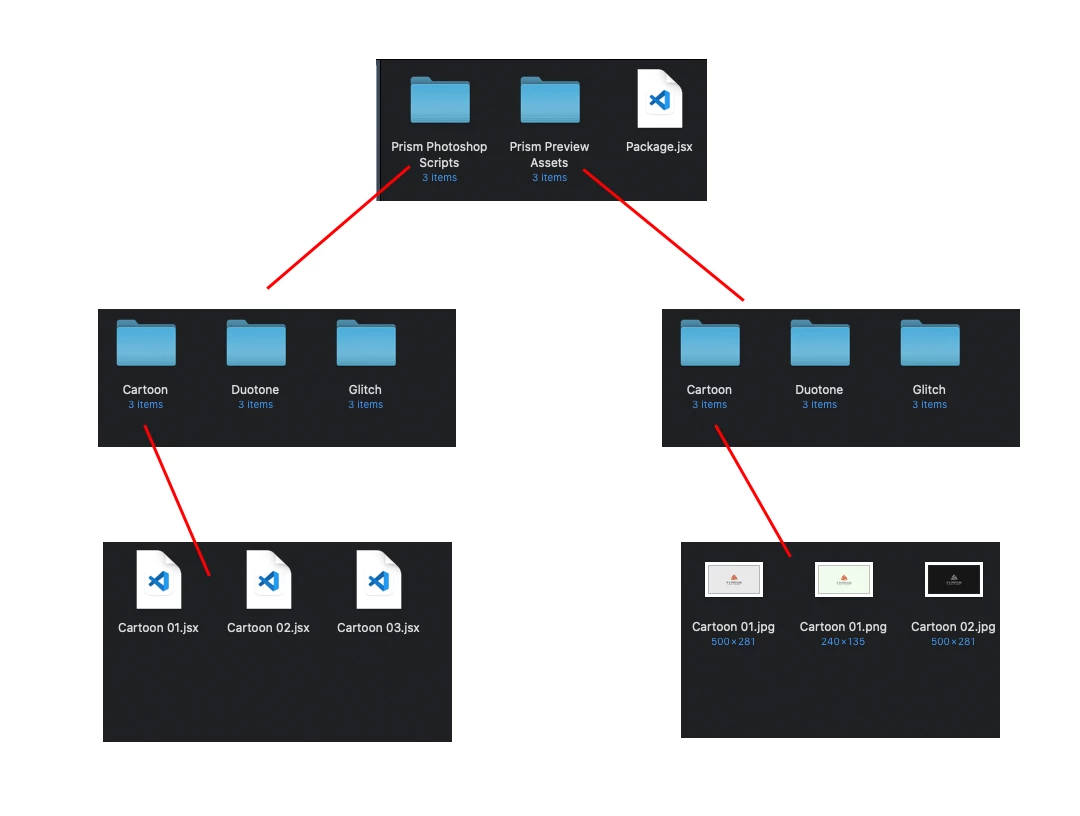
 

This topic has been closed for replies.
Correct answer r-bin

Copies everything from the first folder to the second, including subfolders.


var ret = copy_folder("c:/1", "c:/2"); 

alert(ret);

function copy_folder(src_path, dst_path) 
    {
    try {
        var f = (new Folder(src_path)).getFiles();

        for (var i = 0; i < f.length; i++) if (!copy_file(f[i], dst_path)) return false;

        return true;
        }
    catch(e) { alert(e); }
    }

function copy_file(full_path, new_path)
    {
    try {
        var file = new File(full_path);

        var folder = new File(new_path);

        if (file.length < 0)
            {
            if (!create_path(new_path + "/" + file.name)) return false;
            if (!copy_folder(full_path, new_path + "/" + file.name)) return false;

            return true;
            }
        else
            {
            if (!create_path(new_path)) return false;
            if (!file.copy(new_path + "/" + file.name)) return false;

            return true;
            }

        function create_path(path)
            {
            var folder = new Folder(path);

            if (!folder.exists)
                {
                var f = new Folder(folder.path);
                if (!f.exists) if (!create_path(folder.path)) return false;

                if (!folder.create()) return false;
                }

            return true;
            }
        } 
    catch(e) { throw(e); }
    }


upd. was edited

4 replies

Legend
June 18, 2021

Simplified version.

The first argument is folder, the second string with the path.


var ret = copy_folder(new Folder("c:/1"), "c:/2/3"); 

alert(ret);

function copy_folder(folder, path) 
    {
    try {
        var f = folder.getFiles();

        for (var i = 0; i < f.length; i++) 
            {
            if (f[i] instanceof File) 
                {
                var fld = new Folder(path);

                if (!fld.create()) return false;
                if (!f[i].copy(path + "/" + f[i].name)) return false;
                }
            else 
                {
                var fld = new Folder(path + "/" + f[i].name);

                if (!fld.create()) return false;
                if (!copy_folder(f[i], fld.fullName)) return false;
                }    
            }

        return true;
        }
    catch(e) { alert(e); }
    }


upd. was edited ))


Legend
June 18, 2021

Honestly if this is for Windows, I would have written the copy routine in Powershell and called that with app.system().

Kukurykus
Legend
June 18, 2021

From the screenshots of original user I see he's on Macintosh, otherwise I would use command line.

r-binCorrect answer
Legend
June 17, 2021

Copies everything from the first folder to the second, including subfolders.


var ret = copy_folder("c:/1", "c:/2"); 

alert(ret);

function copy_folder(src_path, dst_path) 
    {
    try {
        var f = (new Folder(src_path)).getFiles();

        for (var i = 0; i < f.length; i++) if (!copy_file(f[i], dst_path)) return false;

        return true;
        }
    catch(e) { alert(e); }
    }

function copy_file(full_path, new_path)
    {
    try {
        var file = new File(full_path);

        var folder = new File(new_path);

        if (file.length < 0)
            {
            if (!create_path(new_path + "/" + file.name)) return false;
            if (!copy_folder(full_path, new_path + "/" + file.name)) return false;

            return true;
            }
        else
            {
            if (!create_path(new_path)) return false;
            if (!file.copy(new_path + "/" + file.name)) return false;

            return true;
            }

        function create_path(path)
            {
            var folder = new Folder(path);

            if (!folder.exists)
                {
                var f = new Folder(folder.path);
                if (!f.exists) if (!create_path(folder.path)) return false;

                if (!folder.create()) return false;
                }

            return true;
            }
        } 
    catch(e) { throw(e); }
    }


upd. was edited

Moorphism LTD
Known Participant
June 18, 2021

Hi there r-bin! Thanks for your help. 

I use your code but i get a horrible result i don't know if it's a mistake from me but here's how i test the code: 


function Tester() {
var src=Folder("~/Desktop/main");
var dst = Folder("~/Desktop/Dest");
copy_folder(src, dst);
}


function copy_folder(src_path, dst_path) {

..... 

}


function copy_file(full_path, new_path){

..... 

}


When I execute the function all my folders and files on the desktop get duplicated many times. I'm sure I didn't change anything in the "copy_folder" & "copy_file" functions. 


Thanks. 

Legend
June 18, 2021

What did you fail?

Give an example of the structure in the "main" folder and what you got in the "Dest" folder.


What OS do you have?

JJMack
Community Expert
Community Expert
June 17, 2021

I think what you want to do would be a job for  Windows File Explorer, Mac Finder and Adobe Bridge. Why do you want to manage your files via Photoshop?

JJMack
Moorphism LTD
Known Participant
June 18, 2021

Hi JJMack, 

My project is a photoshop extension that will help the user to generate the Effects in 01 click, so the idea is to create a package and include all the examples kind of images scripts and all assets. and in order for the user not to lose its package, I'm trying to copy the package folders to a safe place (MyDocuments or userData) and this is why I need this script. 


Thanks!