



Copy link to clipboard
Copied
Hello, I have a folder that contains multi folders and I want to clone it to another path (myDocuments or userData) but the method .copy() doesn't do that, it's copy only the files, i tried to create a new folder with .create method but my knowledge in coding helps me to do that only for 01 folder but i have multi folders and each one of them contains image files. i know that complex but please if someone can help to do that,
Thanks on advanced!
- Here's a small preview of my code:
function PackPreviewsFilesCopier(packName, packPath) {
var mainPackPreviewsLocate = Folder(
packPath + "/Prism Preview Assets"
).getFiles();
var mainPackPreviewsDest = Folder(
Folder.userData + "/" + packName + "/Prism Preview Assets"
).getFiles();
if (mainPackPreviewsDest.exists) {
for (var c = 0; c < mainPackPreviewsLocate.length; c++) {
var FxNamesLocate = mainPackPreviewsLocate[i].name;
}
for (var d = 0; d < mainPackPreviewsDest.length; d++) {
var FxNamesDest = mainPackPreviewsDest[i].name;
}
if (FxNamesLocate === FxNamesDest) {
// I'm blocked here 😞
}
}
}
- Here's the tree of my folders:
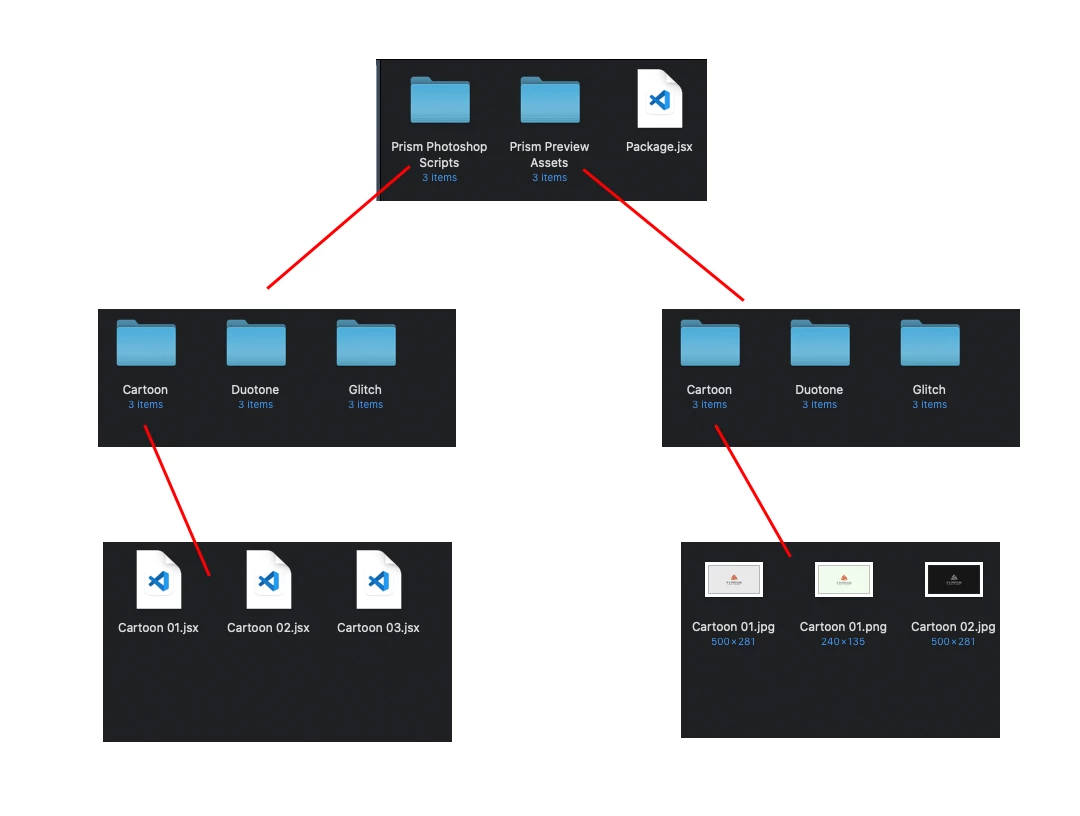
Copies everything from the first folder to the second, including subfolders.
var ret = copy_folder("c:/1", "c:/2");
alert(ret);
function copy_folder(src_path, dst_path)
{
try {
var f = (new Folder(src_path)).getFiles();
for (var i = 0; i < f.length; i++) if (!copy_file(f[i], dst_path)) return false;
return true;
}
catch(e) { alert(e); }
}
function copy_file(full_path, new_path)
{
try {
var file = new File(full_path);
...
Copy link to clipboard
Copied
I think what you want to do would be a job for Windows File Explorer, Mac Finder and Adobe Bridge. Why do you want to manage your files via Photoshop?
Copy link to clipboard
Copied
Hi JJMack,
My project is a photoshop extension that will help the user to generate the Effects in 01 click, so the idea is to create a package and include all the examples kind of images scripts and all assets. and in order for the user not to lose its package, I'm trying to copy the package folders to a safe place (MyDocuments or userData) and this is why I need this script.
Thanks!
Copy link to clipboard
Copied
Copies everything from the first folder to the second, including subfolders.
var ret = copy_folder("c:/1", "c:/2");
alert(ret);
function copy_folder(src_path, dst_path)
{
try {
var f = (new Folder(src_path)).getFiles();
for (var i = 0; i < f.length; i++) if (!copy_file(f[i], dst_path)) return false;
return true;
}
catch(e) { alert(e); }
}
function copy_file(full_path, new_path)
{
try {
var file = new File(full_path);
var folder = new File(new_path);
if (file.length < 0)
{
if (!create_path(new_path + "/" + file.name)) return false;
if (!copy_folder(full_path, new_path + "/" + file.name)) return false;
return true;
}
else
{
if (!create_path(new_path)) return false;
if (!file.copy(new_path + "/" + file.name)) return false;
return true;
}
function create_path(path)
{
var folder = new Folder(path);
if (!folder.exists)
{
var f = new Folder(folder.path);
if (!f.exists) if (!create_path(folder.path)) return false;
if (!folder.create()) return false;
}
return true;
}
}
catch(e) { throw(e); }
}
upd. was edited
Copy link to clipboard
Copied
Hi there r-bin! Thanks for your help.
I use your code but i get a horrible result i don't know if it's a mistake from me but here's how i test the code:
function Tester() {
var src=Folder("~/Desktop/main");
var dst = Folder("~/Desktop/Dest");
copy_folder(src, dst);
}
function copy_folder(src_path, dst_path) {
.....
}
function copy_file(full_path, new_path){
.....
}
When I execute the function all my folders and files on the desktop get duplicated many times. I'm sure I didn't change anything in the "copy_folder" & "copy_file" functions.
Thanks.
Copy link to clipboard
Copied
What did you fail?
Give an example of the structure in the "main" folder and what you got in the "Dest" folder.
What OS do you have?
Copy link to clipboard
Copied
Hi! here's the structure:
Here are The Results, as you see the function duplicates the files and folders from the desktop, not from the main folder. I'm using MACOS.
Copy link to clipboard
Copied
alert((new Folder("~/Desktop/main")).getFiles().length);
Copy link to clipboard
Copied
alert(new Folder("~/Desktop/main").getFiles().length);
This alert 4 (.Dstore file is hidden).
and when i use the function as you tell me i get the same result.
Copy link to clipboard
Copied
Show what it says
var f = (new Folder("~/Desktop/main")).getFiles();
var s = "";
for (var i = 0; i < f.length; i++) s += f[i].length + "\n";
alert(s);
Copy link to clipboard
Copied
This:
Copy link to clipboard
Copied
Well..., everything is correct.
I don't even know what kind of glitch this is. Something special in MACOS.
Try to replace in the code + "\\" + with + "/" +
I can't think of anything else yet. : (
Copy link to clipboard
Copied
I replace it, but when I execute the function nothing happened 😕
Copy link to clipboard
Copied
Anyway Thank you very much Mr. @r-bin you help me a lot and I get some new knowledges.
Copy link to clipboard
Copied
Maybe you have a bug in your code?
Show exactly the code (script file) that you run.
It would also be nice if someone on the MAC could test the behavior of the script.
JJMack, do You have MACOS?
Copy link to clipboard
Copied
Good news the code is worked with me and here's the final code that i write:
function Copier() {
var src=Folder.desktop + "/main";
var dst = Folder.desktop + "/Dest";
copy_folder(src, dst);
}
function copy_folder(src_path, dst_path) {
try {
var f = new Folder(src_path).getFiles();
for (var i = 0; i < f.length; i++)
if (!copy_file(f[i], dst_path)) return false;
return true;
} catch (e) {
alert(e);
}
}
function copy_file(full_path, new_path) {
try {
var file = new File(full_path);
var folder = new File(new_path);
if (file.length < 0) {
if (!create_path(new_path + "/" + file.name)) return false;
if (!copy_folder(full_path, new_path + "/" + file.name)) return false;
return true;
} else {
if (!create_path(new_path)) return false;
if (!file.copy(new_path + "/" + file.name)) return false;
return true;
}
function create_path(path) {
var folder = new Folder(path);
if (!folder.exists) {
var f = new Folder(folder.path);
if (!f.exists) create_path(folder.path);
folder.create();
}
return true;
}
} catch (e) {
throw e;
}
}
Here are the changes:
01: I replace "\\" with "/"
02: I replace var src="~/Desktop/main"; with var src=Folder.desktop + "/main"; and the same for var dst = Folder.desktop + "/Dest";
I think I was missing something but when I checked the code again I found those mistakes.
Thank you very much!
Copy link to clipboard
Copied
Copy link to clipboard
Copied
Yes, everything is worked fine and I get what I'm looking for.
Copy link to clipboard
Copied
Time to mark r-bin post as correct solution. You won't find better answer.
Copy link to clipboard
Copied
Maybe you use mistakenly same source and destination?
Copy link to clipboard
Copied
I'm sure I'm using different folders.
Copy link to clipboard
Copied
Do you think double occurence of double r in return makes any difference for empty folder? 😛
Copy link to clipboard
Copied
No i make a correction on returrn to return 🙂
Copy link to clipboard
Copied
That was to r-bin who seems to love this kind of humour 😄
Copy link to clipboard
Copied
To be honest I didn't understand anything : )))
Get ready! An upgraded Adobe Community experience is coming in January.
Learn more