
Known Participant
August 22, 2025
Pregunta

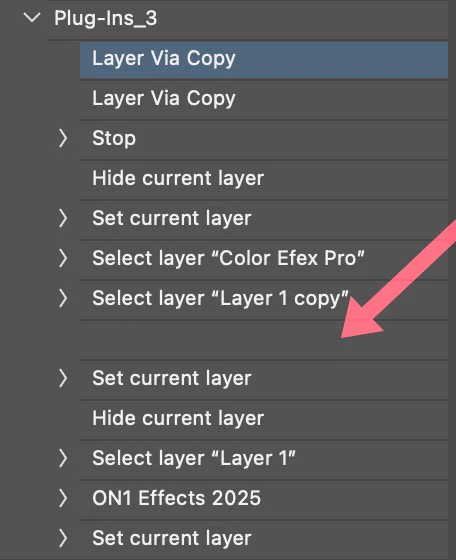
Action stopped working, Record New creates Blank Space

  • August 22, 2025
  • 2 respuestas
  • 142 visualizaciones

I have an action that runs a few plug-ins, NIK, Luminar and On1. Today, when I tried running the action and when it gets to Luminar, I was getting an alert about "Luminar can't be run", or words to that effect. So I deleted the Luminar plugin part of the action and then tried to re-record that filter, now, the space with that plugin is left blank, (no description). It does work, it's just weird that there is no descriptor there. I have reset the setting for Photoshop, deleted and reloaded Luminar, but still with the same issue.

PS 26.10.0, Mac Studio M4 Max,

Thanks in advance.


2 respuestas

Known Participant
August 23, 2025

Thanks D fosse, double-click doesn't work, I think there has to be something there in the first place to make the name change.

I did place an (ongoing) support request with Luminar, they replied that there are some plugin issues with Luminar and M4 Mac...

D Fosse
Community Expert
Community Expert
August 23, 2025

Ah yes, just saw that the name of the step isn't editable.


Probably just a minor bug in the plugin.

D Fosse
Community Expert
Community Expert
August 23, 2025

Name it manually, just double-click the step and type.


Apparently the plugin isn't returning a name when Photoshop asks for it.


You should probably consider yourself lucky that it works at all - even some Photoshop functions can't be recorded in actions, notably Export As.