Mohamed Hameed21513110
Inspiring
August 13, 2023
Answered

activate the group layer by name

  • August 13, 2023
  • 2 replies
  • 2952 views

welcome everybody
I want to select and activate the group layer by name

I tried this code but it didn't work
It only works on layers, but not on groups

What is the code responsible for identifying the group by name and activating it?


I have tried these lines

 var aDoc = app.activeDocument;
aDoc.activeLayer = aDoc.layers.getByName("Hameed")
var set=aDoc.activeLayer


This topic has been closed for replies.
Correct answer c.pfaffenbichler

@c.pfaffenbichler 

Yes sir
The group layer is excluded from the selection

Why are the layers inside the group not excluded as the group was excluded?
- This is a suggestion


Another suggestion
- I want when selecting a group by name, all layers within the group are also selected

Is this simple or complicated


Your descriptions are really hard for me to comprehend. 

Screenshots that illustrate what you actually want to achieve might be helpful. 


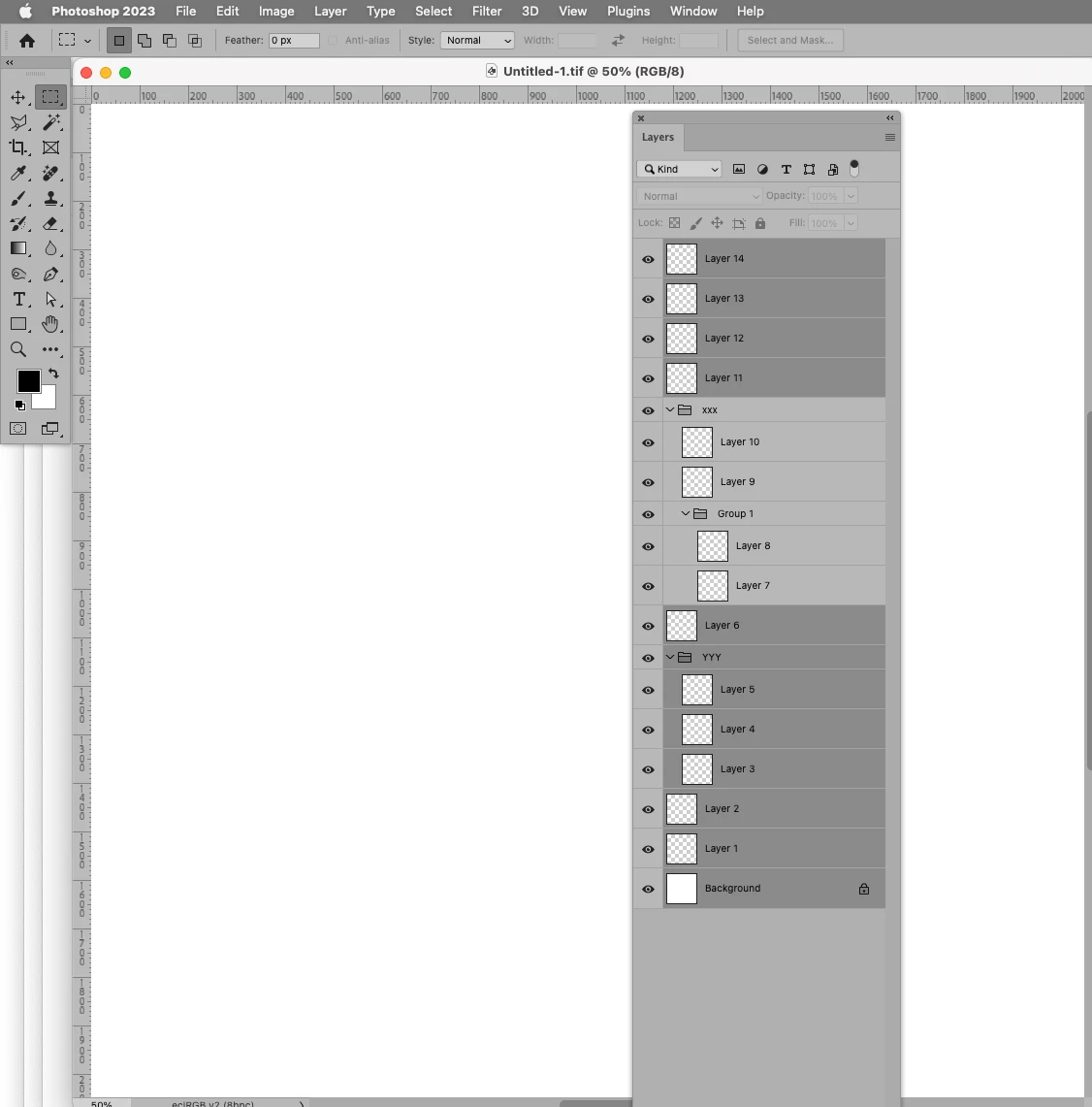
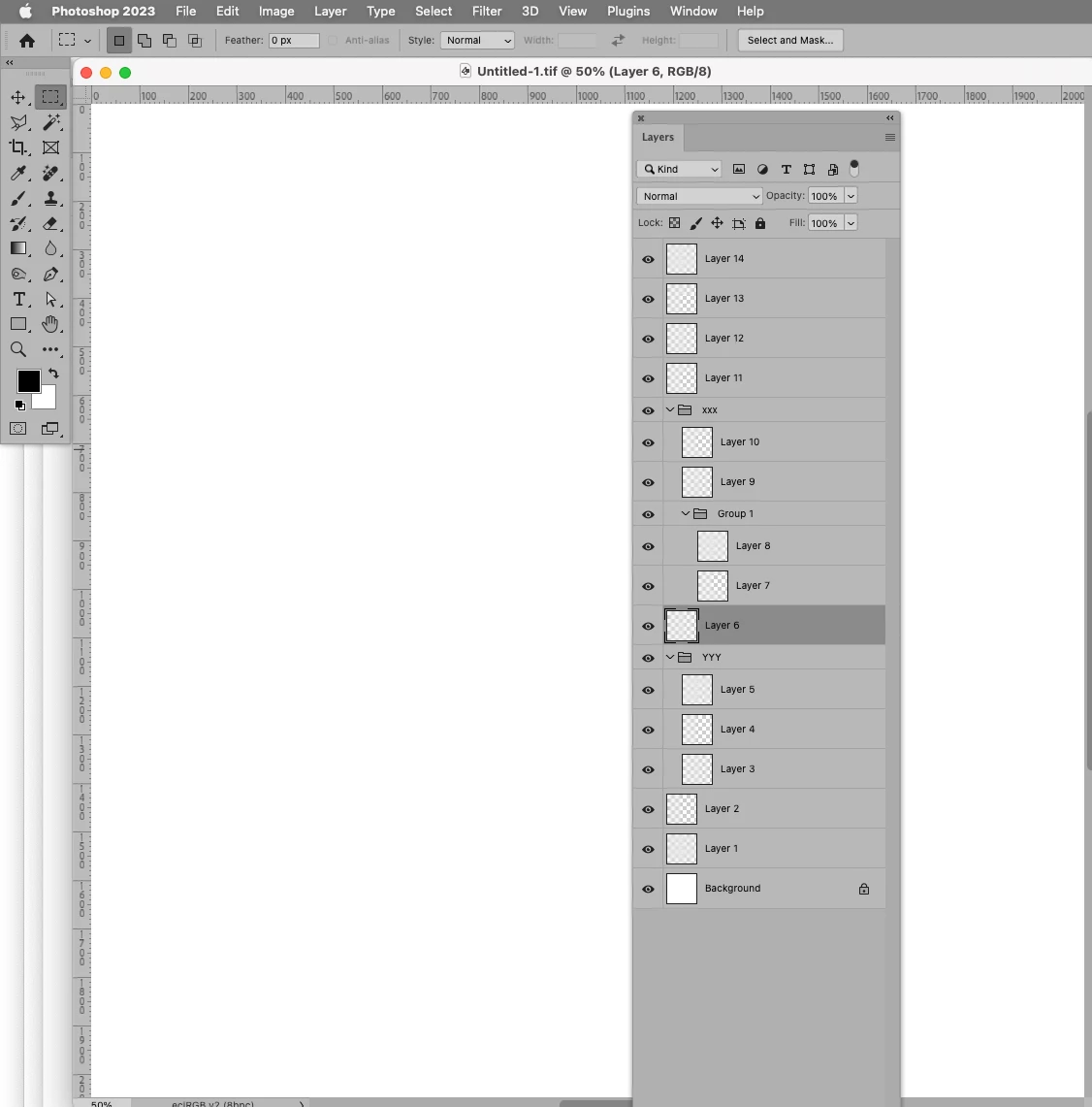
The following Script would select all Layers except the top level Group of a certain name and the Layers within that Group (see screenshots). 

I am not sure if this is what you want to achieve, though. 
// select all layers except the group of a certain name and the ones in that group;
// 2023, use it at your own risk;
if (app.documents.length > 0) {
var theName = "xxx";
var ref = new ActionReference();
ref.putProperty (stringIDToTypeID ("property"), stringIDToTypeID ("numberOfLayers"));
ref.putEnumerated( charIDToTypeID("Dcmn"), charIDToTypeID("Ordn"), charIDToTypeID("Trgt") ); 
var applicationDesc = executeActionGet(ref);
var theNumber = applicationDesc.getInteger(stringIDToTypeID("numberOfLayers"));
var theLayers = getLayersAndItsParentsIndexAndID(theName);
var numberOne = theLayers[theLayers.length-1][0][1] - 1;
var numberTwo = theLayers[0][theLayers[0].length-1][1] + 1;
var add = false;
for (var m = 0; m < numberOne; m++) {
    selectLayerByIndex(m, add);
    var add = true;
};
for (var n = numberTwo; n <= theNumber; n++) {
    selectLayerByIndex(n, true);
};
};
////////////////////////////////////
////// collect layers and their parents if the top level group has a specific name //////
function getLayersAndItsParentsIndexAndID (folderName) {
var ref = new ActionReference();
ref.putEnumerated( charIDToTypeID("Dcmn"), charIDToTypeID("Ordn"), charIDToTypeID("Trgt") ); 
var applicationDesc = executeActionGet(ref);
var theNumber = applicationDesc.getInteger(stringIDToTypeID("numberOfLayers"));
// anumber is intended to keep track of layerset depth;
var aNumber = 0;
var theArray = new Array;
//var theGroups = new Array;
// work through layers;
for (var m = theNumber; m >= 0; m--) {
try {
var ref = new ActionReference();
ref.putIndex( charIDToTypeID( "Lyr " ), m);
var layerDesc = executeActionGet(ref);
var layerSet = typeIDToStringID(layerDesc.getEnumerationValue(stringIDToTypeID("layerSection")));
var isBackground = layerDesc.getBoolean(stringIDToTypeID("background"));
var theName = layerDesc.getString(stringIDToTypeID('name'));
var theID = layerDesc.getInteger(stringIDToTypeID('layerID'));
//var hasLayerMask = layerDesc.hasKey(charIDToTypeID("Usrs"));
var thisArray = [[theName, m, theID]];
////////////////////////////////////
// if group start:
if (layerSet == "layerSectionStart" && isBackground != true/* && theName == folderName*/) {
if (aNumber == 0) {var setArray = [[theName, m, theID]]}
else {
// include groups in array;
    for (var o = setArray.length - 1; o >= 0; o--) {thisArray.push(setArray[o])};
// set array;
    setArray.push([theName, m, theID])
    };
//theGroups.push([theName, m, theID]);
// add to mark group;
aNumber++
};
// if group end;
if (layerSet == "layerSectionEnd" && isBackground != true) {
// subtract to mark end of group;
aNumber--;
if (aNumber == 0) {var setArray = []}
else {setArray.pop()}
};
// if neither group start or end;
if (layerSet != "layerSectionEnd" && layerSet != "layerSectionStart" && isBackground != true) {
// if anumber is 0 layer is top level;
if (aNumber != 0) {
    for (var o = setArray.length - 1; o >= 0; o--) {thisArray.push(setArray[o])};
// check the to plevel folder name;
    if (thisArray[thisArray.length-1][0] == folderName) {
    theArray.push(thisArray)
    }
    };
};
////////////////////////////////////
} catch (e) {};
};
// the results;
return theArray
};
////// by mike hale, via paul riggott //////
function selectLayerByIndex(index,add){ 
add = undefined ? add = false:add 
var ref = new ActionReference();
    ref.putIndex(charIDToTypeID("Lyr "), index);
    var desc = new ActionDescriptor();
    desc.putReference(charIDToTypeID("null"), ref );
        if(add) desc.putEnumerated( stringIDToTypeID( "selectionModifier" ), stringIDToTypeID( "selectionModifierType" ), stringIDToTypeID( "addToSelection" ) ); 
        desc.putBoolean( charIDToTypeID( "MkVs" ), false ); 
    try{
    executeAction(charIDToTypeID("slct"), desc, DialogModes.NO );
}catch(e){
alert(e.message); 
}
};
////// based on code by mike hale, via paul riggott //////
function selectLayerByID(id,add){
try {
add = undefined ? add = false:add 
var ref = new ActionReference();
ref.putIdentifier(charIDToTypeID("Lyr "), id);
var desc = new ActionDescriptor();
desc.putReference(charIDToTypeID("null"), ref );
if(add) desc.putEnumerated( stringIDToTypeID( "selectionModifier" ), stringIDToTypeID( "selectionModifierType" ), stringIDToTypeID( "addToSelection" ) ); 
desc.putBoolean( charIDToTypeID( "MkVs" ), false ); 
try{
executeAction(charIDToTypeID("slct"), desc, DialogModes.NO );
}catch(e){
alert(e.message); 
}
} catch (e) {}
};

 

2 replies

Stephen Marsh
Community Expert
August 14, 2023

So, something like this:


reselect_active_layer();
var aDoc = app.activeDocument;
var set = aDoc.layerSets.getByName("Hameed");
aDoc.activeLayer = set;

function reselect_active_layer()
    {
    var r = new ActionReference();   
    r.putProperty(stringIDToTypeID("property"), stringIDToTypeID("layerID"));       
    r.putEnumerated(stringIDToTypeID("layer"), stringIDToTypeID("ordinal"), stringIDToTypeID("targetEnum"));   
    var id = executeActionGet(r).getInteger(stringIDToTypeID("layerID"));
    var r = new ActionReference();
    r.putEnumerated(stringIDToTypeID("layer"), stringIDToTypeID("ordinal"), stringIDToTypeID("targetEnum"));   
    var d = new ActionDescriptor();
    d.putReference(stringIDToTypeID("null"), r);
    try { executeAction(stringIDToTypeID("selectNoLayers"), d, DialogModes.NO); } catch(e) {}
    var r = new ActionReference();
    r.putIdentifier(stringIDToTypeID("layer"), id);
    var d = new ActionDescriptor();
    d.putReference(stringIDToTypeID("null"), r);
    d.putBoolean(stringIDToTypeID( "makeVisible"), activeDocument.activeLayer.visible);
    try { executeAction(stringIDToTypeID("select"), d, DialogModes.NO); } catch(e) {}
}


Or this:


app.activeDocument.artLayers.add();
app.activeDocument.activeLayer.remove();
var aDoc = app.activeDocument;
var set = aDoc.layerSets.getByName("Hameed");
aDoc.activeLayer = set;


Mohamed Hameed21513110
Inspiring
August 14, 2023

@c.pfaffenbichler @Stephen Marsh 

Thank you all for your beautifully appreciated help

I have a simple request is it possible here
Or do I put it in a new topic

I just want help with defining all layers except for a layer specified by name or a group and layers specified by names
Are there threads related to this problem?

Please just share it
Or help me solve it if possible

Thanks and sorry for the inconvenience

Mohamed Hameed21513110
Inspiring
August 15, 2023

The following isn't pretty, it was just the first method that I explored. There may be a more refined method.


/*
Merge Selected Layers.jsx
https://community.adobe.com/t5/photoshop-ecosystem-discussions/activate-the-group-layer-by-name/m-p/14006739
Stephen Marsh, 15th August 2023 - v1.0
*/

#target photoshop

var theDoc = app.activeDocument;
theDoc.suspendHistory("Merge Selected Layers", "main()");

function main() {
    if (app.documents.length > 0) {
        var sourceDoc = app.activeDocument;
        dupeSelectedLayers("tempDoc");
        app.activeDocument.flatten();
        var tempDoc = app.activeDocument;
        app.activeDocument = sourceDoc;
        deleteSelectedLayers();
        app.activeDocument = tempDoc;
        dupeDoc("Merged Selected Layers");
        app.activeDocument.close(SaveOptions.DONOTSAVECHANGES);
    } else {
        alert('You must have a document open!');
    }

    ///// FUNCTIONS /////

    function dupeSelectedLayers(theName) {
        function s2t(s) {
            return app.stringIDToTypeID(s);
        }
        var descriptor = new ActionDescriptor();
        var reference = new ActionReference();
        var reference2 = new ActionReference();
        reference.putClass(s2t("document"));
        descriptor.putReference(s2t("null"), reference);
        descriptor.putString(s2t("name"), theName);
        reference2.putEnumerated(s2t("layer"), s2t("ordinal"), s2t("targetEnum"));
        descriptor.putReference(s2t("using"), reference2);
        executeAction(s2t("make"), descriptor, DialogModes.NO);
    }

    function deleteSelectedLayers() {
        function s2t(s) {
            return app.stringIDToTypeID(s);
        }
        var descriptor = new ActionDescriptor();
        var list = new ActionList();
        var reference = new ActionReference();
        reference.putEnumerated(s2t("layer"), s2t("ordinal"), s2t("targetEnum"));
        descriptor.putReference(s2t("null"), reference);
        descriptor.putList(s2t("layerID"), list);
        executeAction(s2t("delete"), descriptor, DialogModes.NO);
    }

    function dupeDoc(docName) {
        function s2t(s) {
            return app.stringIDToTypeID(s);
        }
        var descriptor = new ActionDescriptor();
        var reference = new ActionReference();
        var reference2 = new ActionReference();
        reference.putEnumerated(s2t("layer"), s2t("ordinal"), s2t("targetEnum"));
        descriptor.putReference(s2t("null"), reference);
        reference2.putName(s2t("document"), sourceDoc.name);
        descriptor.putReference(s2t("to"), reference2);
        descriptor.putString(s2t("name"), docName);
        executeAction(s2t("duplicate"), descriptor, DialogModes.NO);
    }
}


@Stephen Marsh 

Very great sir, thank you for your concern and assistance

But I am facing a slight problem

Those selected layers are within the group and I want to exclude them from the merge, and the other layer is also excluded

I used the (

// Select All Layers

) code

It works fine but only selects the group layer without its dependent layers

How can I exclude the layers of the specified group


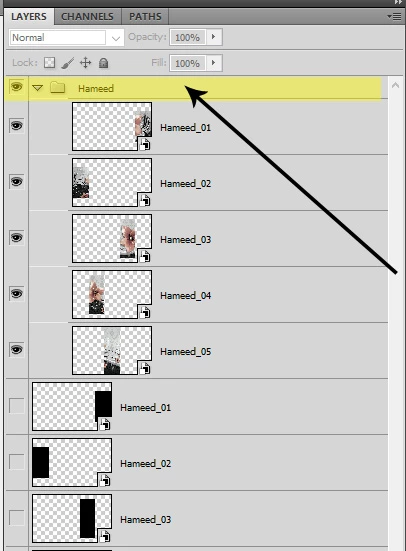
This image shows the problem
I used the code to select all layers and exclude the group and the selected layer, but I discovered that the layers inside the group were not excluded from the selection

This is the code that I am using

// Select All Layers
app.runMenuItem(stringIDToTypeID('selectAllLayers'));
// Layer Names to Exclude from Selection
deselectLayer("Hameed");
deselectLayer("Final");

function deselectLayer(layerName) {
	var s2t = function (s) {
		return app.stringIDToTypeID(s);
	};
	var descriptor = new ActionDescriptor();
	var list = new ActionList();
	var reference = new ActionReference();
	reference.putName( s2t( "layer" ), layerName );
	descriptor.putReference( s2t( "null" ), reference );
	descriptor.putEnumerated( s2t( "selectionModifier" ), s2t( "selectionModifierType" ), s2t( "removeFromSelection" ));
	descriptor.putBoolean( s2t( "makeVisible" ), false );
	descriptor.putList( s2t( "layerID" ), list );
	executeAction( s2t( "select" ), descriptor, DialogModes.NO );
}
Stephen Marsh
Community Expert
August 13, 2023
quote

welcome everybody
I want to select and activate the group layer by name

I tried this code but it didn't work
It only works on layers, but not on groups

What is the code responsible for identifying the group by name and activating it?


I have tried these lines

 var aDoc = app.activeDocument;
aDoc.activeLayer = aDoc.layers.getByName("Hameed")
var set=aDoc.activeLayer


By @Mohamed Hameed21513110


Try replacing layers with layerSets:


aDoc.activeLayer = aDoc.layerSets.getByName("Hameed")


Mohamed Hameed21513110
Inspiring
August 13, 2023

@Stephen Marsh 

I tried the code and it didn't work for me

c.pfaffenbichler
Community Expert
August 13, 2023
var aDoc = app.activeDocument;
var set = aDoc.layerSets.getByName("Hameed");
aDoc.activeLayer = set;