


Add inverse color stroke script size problems
Hey, It's me again, thanks for helping me out last time, now i got a new question.
I got this script from a friend of mine, it originally simply would invert the text layer stroke color, but i added a function that adds the stroke itself based on the text layer size (In pixels), however it works about right on new text layers, but when I try to run it in the already existing layers, it will mess up the size, at first I thought it was something about the way it measures size, but now I honestly don't know what might be the problem.
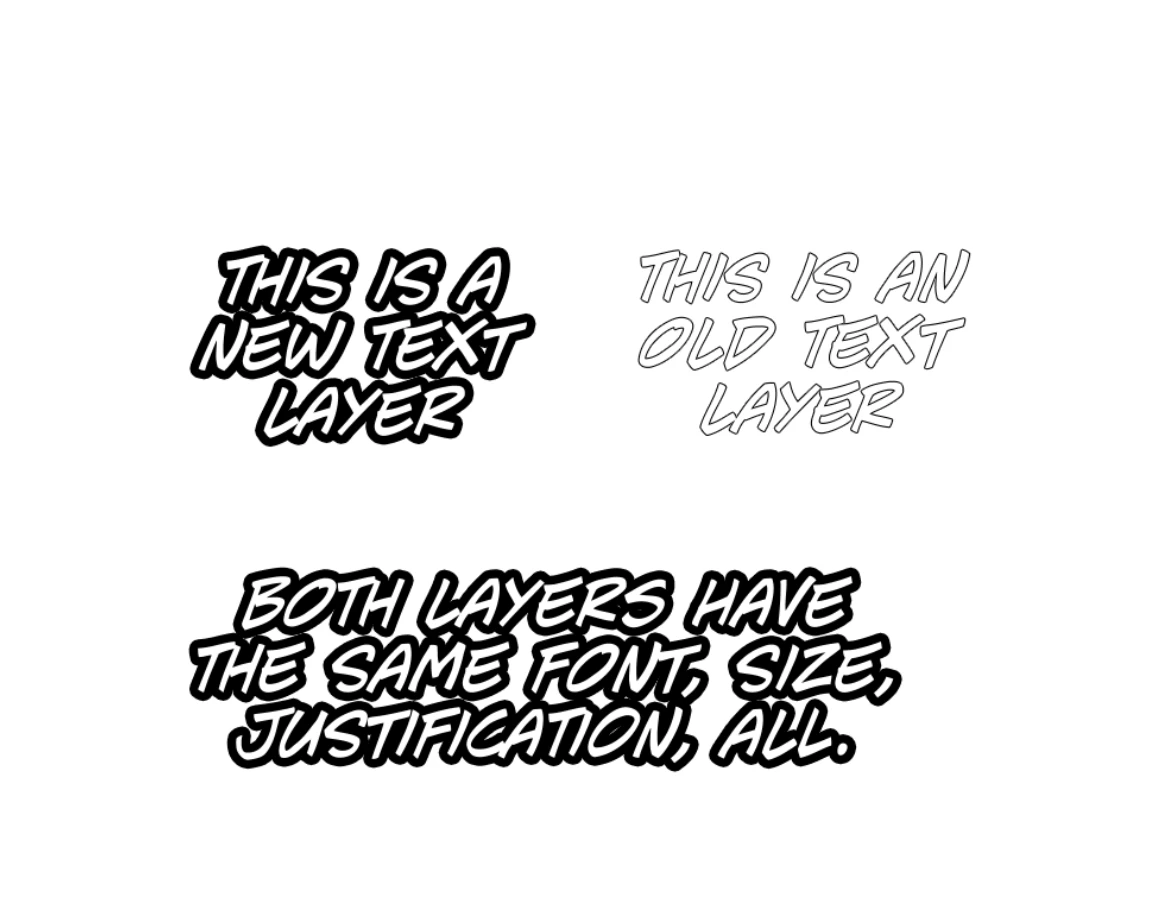
I had also in mind adding a function that makes it work only with one specific font, but I think the main problem is the stroke size, I really hope someone can help me out, thanks beforehand.
Here's the code in question:
// Add a stroke on a text layer
// Stroke will be the inverse of the text layer's color

function getStrokeSize(){
    try{
        var ref = new ActionReference();
        ref.putEnumerated( charIDToTypeID("Lyr "), charIDToTypeID("Ordn"), charIDToTypeID("Trgt") );
        var desc = executeActionGet(ref).getObjectValue(stringIDToTypeID('layerEffects')).getObjectValue(stringIDToTypeID('frameFX'));
        return desc.getUnitDoubleValue(stringIDToTypeID('size'));
    }catch(e){}
};


var textRed = app.activeDocument.activeLayer.textItem.color.rgb.red
var textBlue = app.activeDocument.activeLayer.textItem.color.rgb.blue
var textGreen = app.activeDocument.activeLayer.textItem.color.rgb.green
var textRed = Math.abs(textRed - 255)
var textBlue = Math.abs(textBlue - 255)
var textGreen = Math.abs(textGreen - 255)


function newStroke(size){
function newStrokeEffect(strokeSize, strokeColor, strokePosition) {
    var effectDescriptor = new ActionDescriptor();
    var effectColor = new ActionDescriptor();
    var strokeOpacity = 100.0;      // 0 - 100 %
    var strokeBlend = "Nrml";       // Normal[Nrml], ColorBurn[CBrn], SoftLight[SftL}, Color[Clr ]

    effectDescriptor.putBoolean(charIDToTypeID("enab"), true);
    effectDescriptor.putEnumerated(charIDToTypeID("Styl"), charIDToTypeID("FStl"), charIDToTypeID(strokePosition));
    effectDescriptor.putEnumerated(charIDToTypeID("PntT"), charIDToTypeID("FrFl"), charIDToTypeID("SClr"));
    effectDescriptor.putEnumerated(charIDToTypeID("Md  "), charIDToTypeID("BlnM"), charIDToTypeID(strokeBlend));
    effectDescriptor.putUnitDouble(charIDToTypeID("Opct"), charIDToTypeID("#Prc"), strokeOpacity);
    effectDescriptor.putUnitDouble(charIDToTypeID("Sz  "), charIDToTypeID("#Pxl"), strokeSize);
    effectColor.putDouble(charIDToTypeID("Rd  "), strokeColor.rgb.red);
    effectColor.putDouble(charIDToTypeID("Grn "), strokeColor.rgb.green);
    effectColor.putDouble(charIDToTypeID("Bl  "), strokeColor.rgb.blue);
    effectDescriptor.putObject(charIDToTypeID("Clr "), charIDToTypeID("RGBC"), effectColor);
    return(effectDescriptor);
}

var tmpC = new SolidColor();
tmpC.rgb.red = textRed
tmpC.rgb.blue = textBlue
tmpC.rgb.green = textGreen

var layerOptions = new ActionDescriptor();
var refr01 = new ActionReference();
var layerProperties = new ActionDescriptor();

layerOptions.putUnitDouble(charIDToTypeID("Scl "), charIDToTypeID("#Prc"), 100.0);

var layerEffects = newStrokeEffect(size, tmpC, "OutF");

layerOptions.putObject(charIDToTypeID("FrFX"), charIDToTypeID("FrFX"), layerEffects);

refr01.putProperty(charIDToTypeID("Prpr"), charIDToTypeID("Lefx"));
refr01.putEnumerated(charIDToTypeID("Lyr "), charIDToTypeID("Ordn"), charIDToTypeID("Trgt"));
layerProperties.putReference(charIDToTypeID("null"), refr01);
layerProperties.putObject(charIDToTypeID("T   "), charIDToTypeID("Lefx"), layerOptions);

try {
    executeAction(charIDToTypeID("setd"), layerProperties, DialogModes.NO);
} catch(ex) {
    if (ex != "Error: User cancelled the operation")
        alert(scriptName + " newLayerEffect() exception caught? line[" + ex.line + "] "  + ex);
}

}

var textLayer = app.activeDocument.activeLayer; // Get the active text layer
var textSize = textLayer.textItem.size;  // Get the height of the text layer

var strokeSize = textSize * 0.15; //Calculates a 15% of the original font size to be used as stroke, you can change it to whatever % you want.

strokeStatus = getStrokeSize()

if (typeof strokeStatus !== "number") {
    newStroke(strokeSize); //Uses the previously calculted 15% for the new stroke
} else {
newStroke(getStrokeSize()) //If the layer already has a stroke it will do the color inverse function, but if the stroke color is already the opposite of the text color, it wont do anything
}
 AdChoices