


Add only the folder paths of the files to be selected in the browser. Folder paths and not the names
Each of the selected files should open.
Opening files is very important.
Only the path of the folder should be displayed in the browser,
the path of each selected file should not be displayed in the browser.
var selectFolder = Folder.selectDialog();Folder Select Dialog Shouldn't be
There should be a Selected Files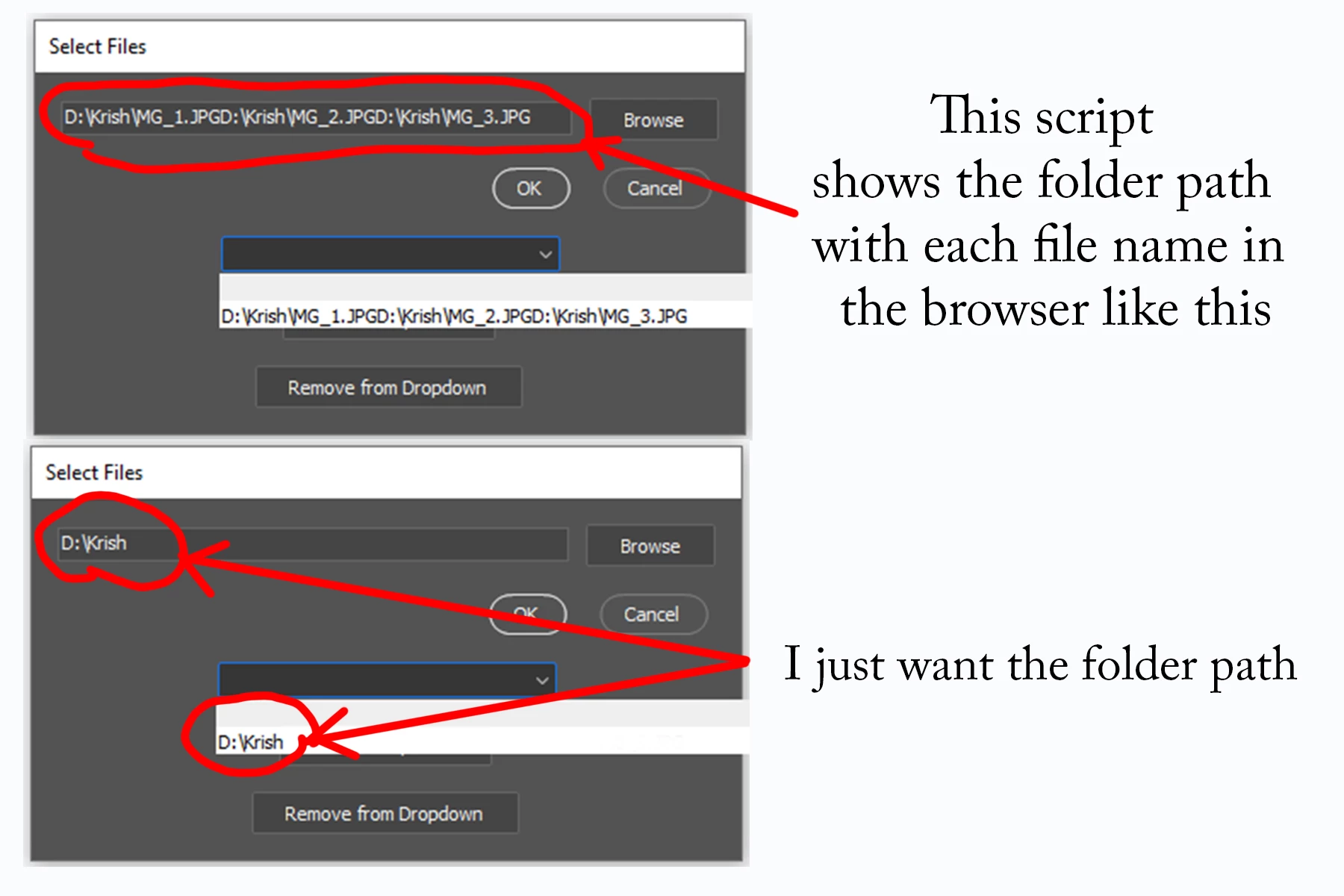
var dialog = new Window('dialog', 'Select Files');
dialog.orientation = 'column';
var fileGroup = dialog.add('group');
fileGroup.orientation = 'row';
fileGroup.alignment = 'left';
var filePath = fileGroup.add('edittext', undefined, '');
filePath.preferredSize.width = 300;
var browseButton = fileGroup.add('button', undefined, 'Browse');
browseButton.onClick = function () {
var folderToOpen = Folder(filePath.text);
var selectedFiles = folderToOpen.openDlg('Select JPG files', '*.jpg', true);
if (selectedFiles) {
var selectedFolders = [];
var selectedFilesPaths = [];
for (var i = 0; i < selectedFiles.length; i++) {
var folderPath = decodeURI(selectedFiles[i].parent.fsName);
selectedFilesPaths.push(decodeURI(selectedFiles[i].fsName));
var found = false;
for (var j = 0; j < selectedFolders.length; j++) {
if (selectedFolders[j] === folderPath) {
found = true;
break;
}
}
if (!found) {
selectedFolders.push(folderPath);
}
}
filePath.text = selectedFolders.join('\n');
filePath.text = selectedFilesPaths.join('\n');
} else {
//alert('No file selected or invalid file.');
return;
}
};
var buttonGroup = dialog.add('group');
buttonGroup.alignment = 'right';
var okButton = buttonGroup.add('button', undefined, 'OK');
okButton.onClick = function () {
dialog.close();
var selectedFiles = filePath.text.split('\n');
for (var i = 0; i < selectedFiles.length; i++) {
openFile(selectedFiles[i]);
}
};
var cancelButton = buttonGroup.add('button', undefined, 'Cancel');
cancelButton.onClick = function () {
dialog.close();
};
var dropdownList = dialog.add('dropdownlist');
dropdownList.preferredSize.width = 200;
var addPathButton = dialog.add('button', undefined, 'Add to Dropdown');
addPathButton.onClick = function () {
var newPath = filePath.text;
saveFolderPath(newPath);
storedPaths.push(newPath);
dropdownList.add('item', newPath);
};
var removePathButton = dialog.add('button', undefined, 'Remove from Dropdown');
removePathButton.onClick = function () {
if (dropdownList.selection !== null) {
var selectedIndex = dropdownList.selection.index;
var selectedPath = storedPaths[selectedIndex];
storedPaths.splice(selectedIndex, 1);
dropdownList.remove(selectedIndex);
var filePath = "C:/Code/input.txt";
var file = new File(filePath);
file.open("r");
var lines = file.read().split("\n");
file.close();
file.open("w");
for (var i = 0; i < lines.length; i++) {
if (lines[i] !== selectedPath) {
file.writeln(lines[i]);
}
}
file.close();
}
};
function openFile(file) {
app.open(new File(file));
}
function saveFolderPath(path) {
var file = new File('C:/code/input.txt');
file.open("a");
file.writeln(path);
file.close();
}
var storedPaths = [];
var filePathValue = "C:/Code/input.txt";
var file = new File(filePathValue);
if (file.exists) {
file.open("r");
while (!file.eof) {
var line = file.readln();
storedPaths.push(line);
dropdownList.add('item', line);
}
file.close();
}
dropdownList.onChange = function () {
filePath.text = storedPaths[dropdownList.selection.index];
};
dialog.show();
 AdChoices