


Adding a stop with an instruction to complete a task then resume the action
Hello, I'm an older guy with DX equipment. Often I want to add some field blur and bokeh in the background and I know how to create it, but I want to have an action to do it on numerous photos at will, with some automation.
I start with the background layer
Duplicate that
Select subject (Now right here, Photoshop is doing a really bad job of selecting the subject so I need to finish the selection before continuing to the next step, so I want the process to PAUSE and a message to come up "Complete Selection and leave it selected")
Then after completing the selection, I want the action to continue wherupon it will save that selection as "S1", then mask it, and after that the BG will be duplicated, that S1 selection loaded in, expanded 10 px, then that selection will be Content aware filled, Then that filled layer will be made into a smart object, to which a field blur will be applied with 9 blur points equally distributed, with preliminary blurs applied to each of the 3 rows of them.
I have an action that I run after doing the preliminary selection but I'd simply like to get it to start at the BG layer so I can load a dozen or more images and run the action in batch on them. Then I could just check and adjust each selection and let it continue to finish that one and go to the next. That would be a real time saver. Not sure what's happened to PS lately, but not long ago it was making incrediblely good selections with Select Subject ...but in the past few weeks it has become horrible. Lightroom makes better selections now. Might be something I messed up but don't know what or where to look to fix it.
If I can learn the above I will be able to make many other useful actions ...all of which need stops like that in order to make selections, choose colors, extend backgrounds etc.
I looked for this online and found an old Peachpit post that described doing it thusly:
From the Actions palette menu, choose Insert Menu Item to open the Insert Menu Item dialog box. From the Photoshop menu, choose File > Open; the entry file: open will appear in the Insert Menu Item dialog box. Click OK to close this dialog box.
I don't understand that and cannot find the Insert Menu Item or much at all for inserting in the action pallet menu that comes up for me in the program:
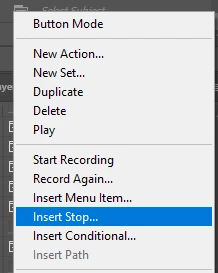
I see that Insert Stop and tried it, but next thing I knew I seemed to be out of the Action recording process altogether.
If someone could throw me a rope on this I'd sure appreciate it. Just basically how to make an action pause, display an instruction, and provide a way to continue the action afterward,
Thanks and stay well.
 AdChoices