Exit
  • Global community
    • Language:
      • Deutsch
      • English
      • Español
      • Français
      • Português
  • 日本語コミュニティ
  • 한국 커뮤니티
0

Adding metadata to muliple folders in photoshop

Participant ,
Nov 03, 2022 Nov 03, 2022

Is there a way of adding metadata (copyright info etc) to images in multiple folders without having to do that for each folder separately? I've already updated images in multiple folders treating each folder separately using a template, but it took a while. The reason for this is that originally I did not have copyright etc on any of my images.Thank you.

Paul

TOPICS
Windows
621
Translate
Report
Community guidelines
Be kind and respectful, give credit to the original source of content, and search for duplicates before posting. Learn more
community guidelines
Adobe
Community Expert ,
Nov 03, 2022 Nov 03, 2022

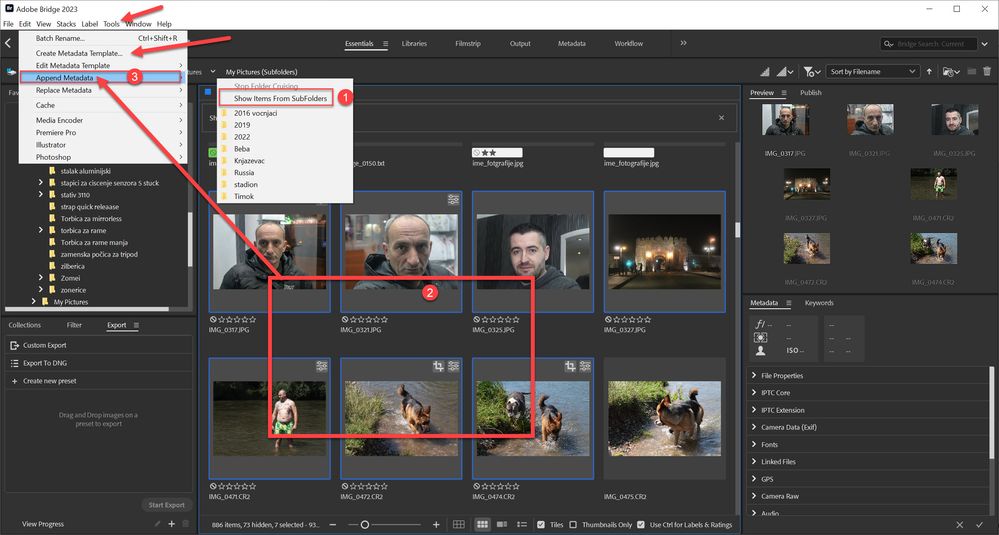
It can be done in Adobe Bridge, if you choose a Parent Folder and set VIEW> Show items from sub-folders.


Regards. My System: Windows-11, Lightroom-Classic 15.1, Photoshop 27.2, ACR 18.1.1, Lightroom 9.1, Lr-iOS 10.4.0, Bridge 16.0.1 .
Translate
Report
Community guidelines
Be kind and respectful, give credit to the original source of content, and search for duplicates before posting. Learn more
community guidelines
Community Expert ,
Nov 03, 2022 Nov 03, 2022

As already mentioned it can be done from Bridge. First you should create Metadata template from Tools > Create Metadata Template in Bridge. Next is to Show Items From SubFolders (1). Select all images that you want to add metadata(2) then go to Tools > Append Metadata (3) -- Replace Metadata will also work.

append metadata from bridge.jpg

Translate
Report
Community guidelines
Be kind and respectful, give credit to the original source of content, and search for duplicates before posting. Learn more
community guidelines
Participant ,
Nov 05, 2022 Nov 05, 2022

Thanks so much for the replies and procedure. Much appreciated!

Translate
Report
Community guidelines
Be kind and respectful, give credit to the original source of content, and search for duplicates before posting. Learn more
community guidelines
Community Expert ,
Nov 05, 2022 Nov 05, 2022

Thanks to @Bojan Živković for the informative reply.

Or you can simply select multiple photos and type Metadata in the Metadata panel fields-
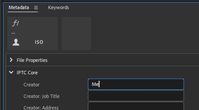
2022-11-06 09_51_41-Adobe Bridge 2023.jpg


The new changes in Bridge v13 "Multiple Content Panels" also looks

promising-

2022-11-06 09_50_45-What's new.jpg


Regards. My System: Windows-11, Lightroom-Classic 15.1, Photoshop 27.2, ACR 18.1.1, Lightroom 9.1, Lr-iOS 10.4.0, Bridge 16.0.1 .

Translate
Report
Community guidelines
Be kind and respectful, give credit to the original source of content, and search for duplicates before posting. Learn more
community guidelines
Participant ,
Nov 10, 2022 Nov 10, 2022

Cheers!

Translate
Report
Community guidelines
Be kind and respectful, give credit to the original source of content, and search for duplicates before posting. Learn more
community guidelines
Community Expert ,
Nov 10, 2022 Nov 10, 2022
LATEST

@paul190453 - please mark replies that helped as a correct answer, thanks.

Translate
Report
Community guidelines
Be kind and respectful, give credit to the original source of content, and search for duplicates before posting. Learn more
community guidelines