


Known Participant
September 1, 2022
Answered

Adding to selection with photoshop scripts

  • September 1, 2022
  • 3 replies
  • 783 views

Hey! I have a super quick question that I have spend way to much time struggling with.
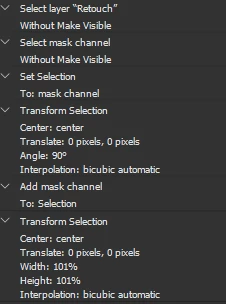
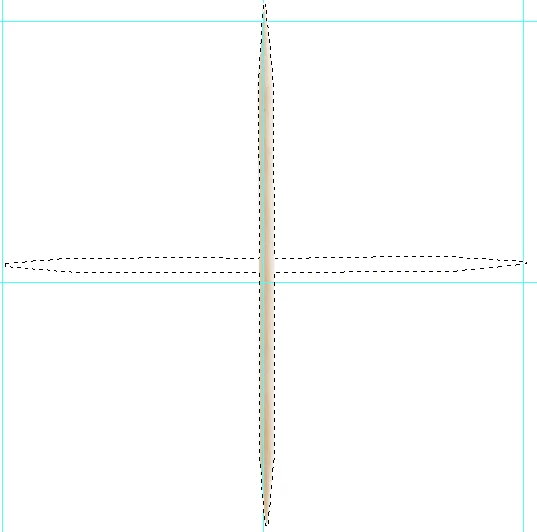
I am rewriting an action into a script file and I am looking for the correct way to add to a selection within a script, same as ctrl+shift clicking in photoshop. As of now I have the script selecting the layer mask, rotating the selection, and expanding the selection by 1%. The one step I am missing is adding the original layer mask selection back to the rotated selection. 
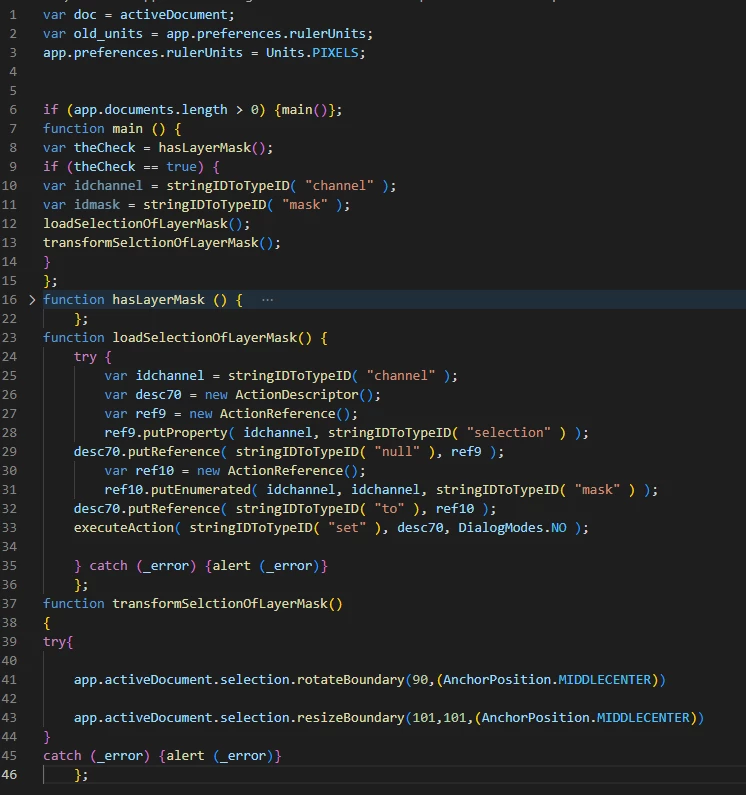
The current code  I have is 


Here is a screenshot of the action
Here is a screenshot of the desired seleciton effect. 

Here is the text of the code...

var doc = activeDocument;
var old_units = app.preferences.rulerUnits;
app.preferences.rulerUnits = Units.PIXELS;


if (app.documents.length > 0) {main()};
function main () {
var theCheck = hasLayerMask();
if (theCheck == true) {
var idchannel = stringIDToTypeID( "channel" );
var idmask = stringIDToTypeID( "mask" );
loadSelectionOfLayerMask();
transformSelctionOfLayerMask();
}
};
function hasLayerMask () {  
    var m_Dsc01, m_Ref01;
    m_Ref01 = new ActionReference();
    m_Ref01.putEnumerated(stringIDToTypeID("layer"), charIDToTypeID("Ordn"), charIDToTypeID("Trgt"));
    m_Dsc01 = executeActionGet(m_Ref01);
    return m_Dsc01.hasKey(charIDToTypeID("Usrs"));
    };
function loadSelectionOfLayerMask() {  
    try {
        var idchannel = stringIDToTypeID( "channel" );
        var desc70 = new ActionDescriptor();
        var ref9 = new ActionReference();
        ref9.putProperty( idchannel, stringIDToTypeID( "selection" ) );
    desc70.putReference( stringIDToTypeID( "null" ), ref9 );
        var ref10 = new ActionReference();
        ref10.putEnumerated( idchannel, idchannel, stringIDToTypeID( "mask" ) );
    desc70.putReference( stringIDToTypeID( "to" ), ref10 );
    executeAction( stringIDToTypeID( "set" ), desc70, DialogModes.NO );

    } catch (_error) {alert (_error)}
    };
function transformSelctionOfLayerMask()
{
try{
   
    app.activeDocument.selection.rotateBoundary(90,(AnchorPosition.MIDDLECENTER))
 
    app.activeDocument.selection.resizeBoundary(101,101,(AnchorPosition.MIDDLECENTER))
}
catch (_error) {alert (_error)}
    };
 
 
Thanks!


This topic has been closed for replies.
Correct answer Stephen Marsh

I don't believe that there is a native DOM method. Try this AM function, the layer with the mask has to be active/targeted:


addMaskSelToSel();

function addMaskSelToSel() {
	function s2t(s) {
        return app.stringIDToTypeID(s);
    }
	var descriptor = new ActionDescriptor();
	var reference = new ActionReference();
	var reference2 = new ActionReference();
	reference.putEnumerated( s2t( "channel" ), s2t( "channel" ), s2t( "mask" ));
	descriptor.putReference( s2t( "null" ), reference );
	reference2.putProperty( s2t( "channel" ), s2t( "selection" ));
	descriptor.putReference( s2t( "to" ), reference2 );
	executeAction( s2t( "add" ), descriptor, DialogModes.NO );
}


3 replies

Stephen Marsh
Adobe Expert
September 3, 2022

@J.C.C.1 - So how did you go?

J.C.C.1Author
Known Participant
September 5, 2022

The first answer worked perfectly. As always thanks for your help @Stephen Marsh!

Stephen Marsh
Stephen MarshCorrect answer
Adobe Expert
September 1, 2022

I don't believe that there is a native DOM method. Try this AM function, the layer with the mask has to be active/targeted:


addMaskSelToSel();

function addMaskSelToSel() {
	function s2t(s) {
        return app.stringIDToTypeID(s);
    }
	var descriptor = new ActionDescriptor();
	var reference = new ActionReference();
	var reference2 = new ActionReference();
	reference.putEnumerated( s2t( "channel" ), s2t( "channel" ), s2t( "mask" ));
	descriptor.putReference( s2t( "null" ), reference );
	reference2.putProperty( s2t( "channel" ), s2t( "selection" ));
	descriptor.putReference( s2t( "to" ), reference2 );
	executeAction( s2t( "add" ), descriptor, DialogModes.NO );
}


Stephen Marsh
Adobe Expert
September 2, 2022

An alternative approach, rather than adding to the current selection, use Quick Mask mode for a hybrid channel/selection approach... Again, presuming that the correct layer is targeted:


// Enter QM mode
activeDocument.quickMaskMode = true;
// Load selection from layer mask
maskToSelection();
// Clear/delete
activeDocument.selection.clear();
// Exit QM mode
activeDocument.quickMaskMode = false;


///// Functions /////

function maskToSelection() {
    var s2t = function (s) {
        return app.stringIDToTypeID(s);
    };
	var descriptor = new ActionDescriptor();
	var reference = new ActionReference();
	var reference2 = new ActionReference();
	reference.putProperty( s2t( "channel" ), s2t( "selection" ));
	descriptor.putReference( s2t( "null" ), reference );
	reference2.putEnumerated( s2t( "channel" ), s2t( "channel" ), s2t( "mask" ));
	descriptor.putReference( s2t( "to" ), reference2 );
	executeAction(s2t( "set" ), descriptor, DialogModes.NO);
}


J.C.C.1Author
Known Participant
September 1, 2022

If it helps this is the XML of the ATN

{
expanded: true,
enabled: true,
showDialogs: false,
dialogMode: 0,
commandName: 'Add',
descriptor: {
_obj: 'add',
_target: [
{
_ref: 'channel',
_enum: 'channel',
_value: 'mask'
}
],
to: [
{
_ref: 'channel',
_property: 'selection'
}
]
}
},