


Participating Frequently
April 15, 2022
해결됨

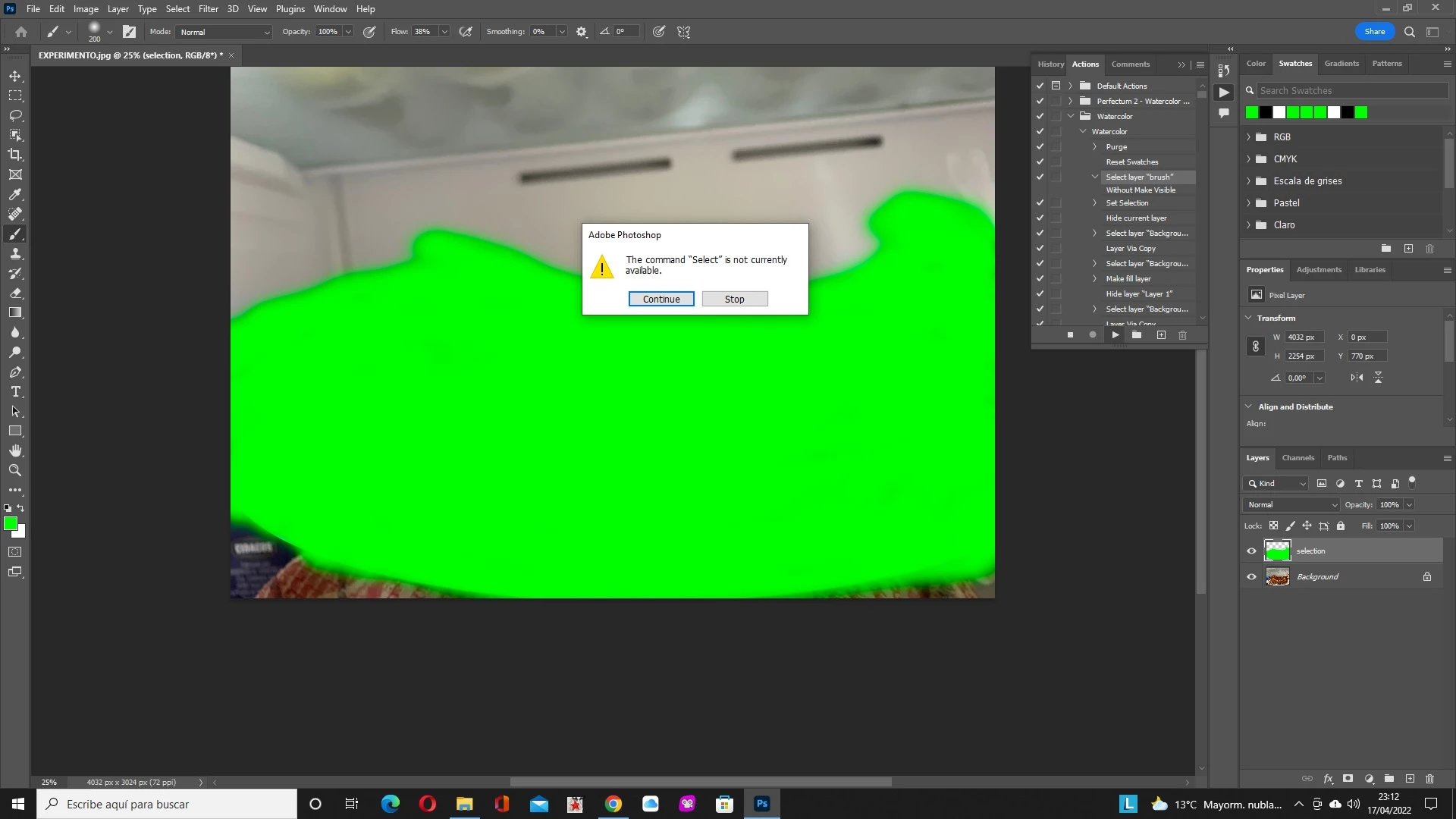
Al ejecutar una acción el comando "selección" no está disponible

  • April 15, 2022
  • 3 답변들
  • 5394 조회

Me he creado algunas acciones en Photosohop y cuando voy a ejecutarlas me dice que el comando selección no está disponible.

He probado a cambiar el idioma a inglés y no consigo mejorar nada.

Tengo la última versión de photoshop y mi sistema operativo es Windows 10.

Gracias por la atención recibida
 

이 주제는 답변이 닫혔습니다.
최고의 답변: Bojan Živković11378569

Hi Bob, thanks for replying.


Do you understand where is the problem? In step you have instruction to select layer named "brush" which is not present in the Layers panel. Try to rename layer "Selection" to layer "brush".

3 답변

Kukurykus
Legend
April 17, 2022
Gonzalo Flores Rojas
Participant
March 9, 2023

Tengo un problema similar con las acciones.

La primera acción es un condicional (La orientación del documento actual es horizontal).

La acción funciona con imagenes independintes, pero no puedo usarla en Automatizar -> Lote

Tengo la Versión 23.5.4 en macOS CATALINA

Bojan Živković11378569
Community Expert
Community Expert
September 25, 2023

It is challenging to provide a precise answer without observing the specific action steps. Could you please clarify which action cannot be used in batch? Additionally, it would be helpful to know at which step the problem is occurring.

Bojan Živković11378569
Community Expert
Community Expert
April 16, 2022

Can you expand problematic action step and post screenshot with Layers panel visible? When error occurs just stop playing action and take screenshot.

Participating Frequently
April 17, 2022

Kukurykus
Legend
April 18, 2022

hello Kukurykus,

This has been Bojan's response:


Do you understand where is the problem? In step you have instruction to select layer named "brush" which is not present in the Layers panel. Try to rename layer "Selection" to layer "brush".


Yes, I know. I'll mark that reply in your name as I think you don't know how to do it.

Michael Bullo
Community Expert
Community Expert
April 16, 2022

Could you please post some screen shots that include...
- the steps within your action and
- the error message.

Participating Frequently
April 17, 2022