


Participating Frequently
January 20, 2020
Question

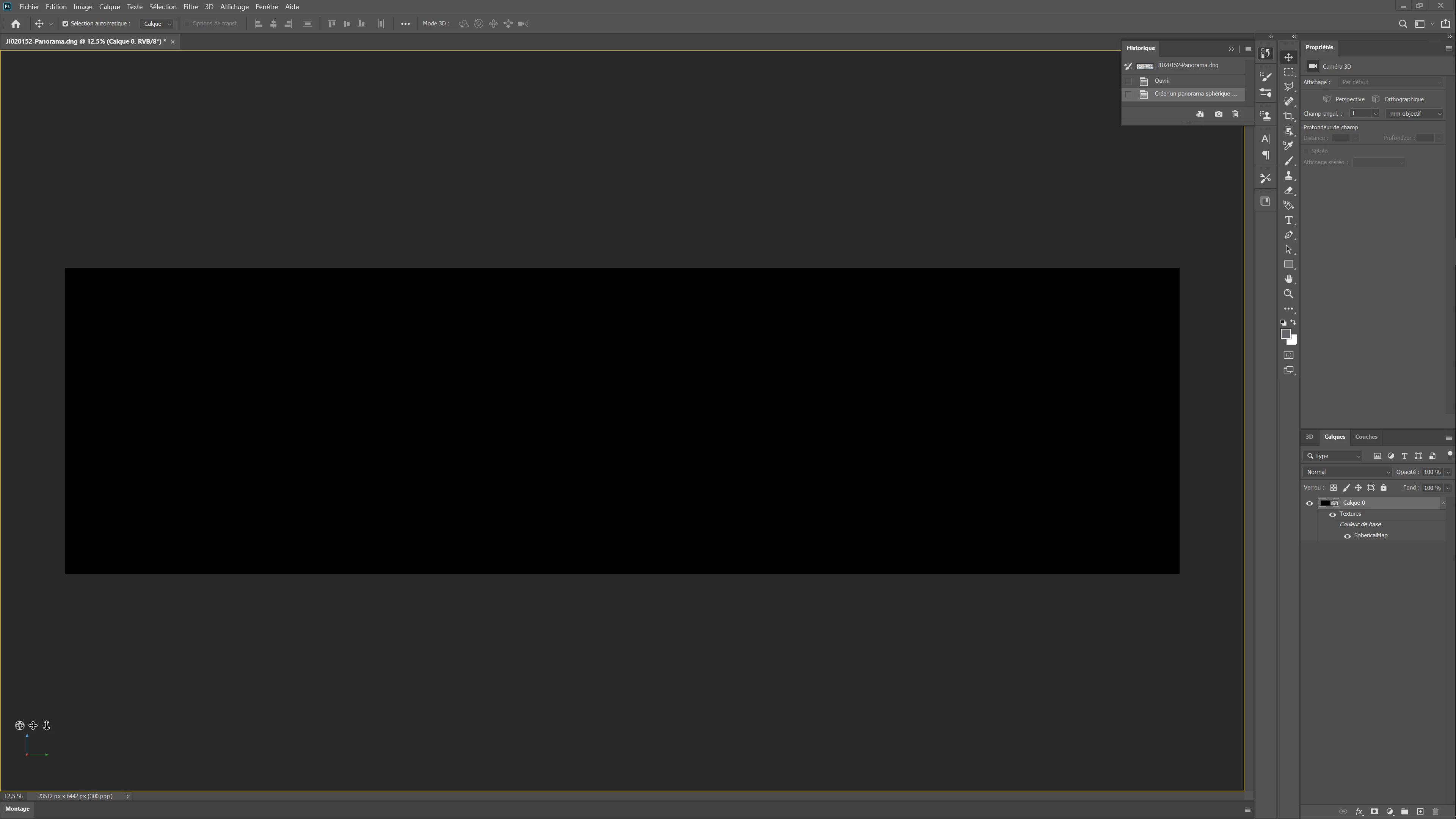
All black 3D workspace

  • January 20, 2020
  • 10 replies
  • 4599 views

Hello


I have been trying for several days to make a 360 ° panorama in Photoshop.
I first tested by making the panorama in lightroom and importing it into photoshop, then by creating the sherry panorama in photoshop.
I also tried making a photomerge directly in Photoshop.
However, I still come to the same problem: my 3D workspace is all black.

Do you have an idea of the problem and how to solve it?
This topic has been closed for replies.

10 replies

Kat Gilbert
Brainiac
April 20, 2020

Much time has passed but I wish to know if spherical pano has been corrected for you. If not I would like to know as I did bug this once again and will do so again if necessary. Thank you.

Participating Frequently
April 20, 2020

Hi,


I tried for the last time a month ago, and it still didn't work ...

Kat Gilbert
Brainiac
April 21, 2020

I just check the bug report and it is still open which means nothing has been done! Sorry...

Ussnorway7605025
Brainiac
January 28, 2020

sorry Kat, who said it was fixed in non-En builds?


Kat Gilbert
Brainiac
January 28, 2020

Unfortunately the 3D aspect of Photoshop has been on a seemingly silent hold for some time. We continue to request info into when or if these bugs will be corrected.


If you are working with at least 2019 Ps you should see the spherical panorama correctly. This is one bug that has been corrected. Please reply here if you are still getting the black screen.

Participating Frequently
January 28, 2020

Hello Kat Gilbert,


I am using the latest photoshop update (21.0.3 20200115.r.91 2020/01/15: 21f283574f6 x64) and it does not work properly.


I also tried to install an old version (cc 2019) but the same problem occurs ...

Kat Gilbert
Brainiac
January 29, 2020

Sorry... it is fixed in the English version. One would "think" it would also be in other languages! I will bug it once again and hope that it will be corrected.

Ussnorway7605025
Brainiac
January 23, 2020

thanks Ged

January 22, 2020

Hi

The has been reported here and acknowledged by Adobe, more info

https://feedback.photoshop.com/photoshop_family/topics/black-image-from-3d-spherical-panorama

Participating Frequently
January 22, 2020

Thank you very much, I will go and see if I find a solution on this side.

Ussnorway7605025
Brainiac
January 22, 2020

NahimicService is driver network software that laptop makers tend to use in the US and is a known cause of this sort of issue so it was worth having a look... imo the problem is your computer | photoshop more than the way you are making the pano file but I'm out of ideas and will ask my fellow ACP for you

Participating Frequently
January 22, 2020

I can hardly believe this is my computer. I have indeed tried on a workstation (Intel I7-8700K CPU + GTX 1080 GPU + 32 GB of Ram), on a laptop (Intel I7-10510U CPU + MX250 GPU + 16 GB) and even a macbook pro .
It didn't work on any computer ...

Ussnorway7605025
Brainiac
January 21, 2020

yes i can read it mate, the Gpu is a bit of an oddball so it could be a general driver issue;

  1. are you running NahimicService
  2. is the system using more than 1 monitor
  3. do other 3D panels also show black
Participating Frequently
January 21, 2020

The GPU was the top of the range three years ago, and the most recommended at the time without having to pay for a "pro" (Quadro) GPU.


The driver is up to date.


NahimicService is not running. In any case I do not see it in the task manager.


The system uses only one monitor.


I opened an .OBJ file in 3D space and it works fine.

Ussnorway7605025
Brainiac
January 20, 2020

ok please open the panel settings and show us these two

Participating Frequently
January 20, 2020

In French, but I think everything is understandable


Ussnorway7605025
Brainiac
January 20, 2020

well thats not a great example but ok

  • first point = equirectangular spherical panoramas need a 2:1 format to work so if the long end is 800 pixels then the short end MUST be 400 pixels (not 399 or 401)... thats the biggest cause of errors
  1. now to have a file to test please goto this page https://images.nasa.gov/details-PIA15482
  2. download and open the image in Photoshop [unlock it] then ask Photoshop to make it into a 360 panno

the guys at Nasa allow you to use these images free but it also nicely cut up into sizes i.e, try a small first and if your system can handle that then move up to med1um or large

Participating Frequently
January 20, 2020

Thank you.

I just tried, here is the result ...
Something isn't working, but I can't figure out what...


https://www.dropbox.com/s/cigz6e8y4n5kpd6/2020-01-21%2000-14-33.mp4?dl=0 (See the vid here...)

Ussnorway7605025
Brainiac
January 20, 2020

sorry but why are you in 3D mode for making pano files?


I don't know "the sherry panorama in photoshop" but I can point you to this tutorial


and you can download some test images to play with here

Participating Frequently
January 20, 2020

Hi,


Sorry for the "sherry panorama". It's a mistake. 

I meant spherical panorama.

I am in a 3D workspace because I want to have a 360 ° panorama, as in this tutorial.


https://www.youtube.com/watch?v=rzL3vTYU-bQ&