


studioiso
Known Participant
March 12, 2019
Answered

Applying adjustment layer to multiple layers

  • March 12, 2019
  • 4 replies
  • 20443 views

Hi there,

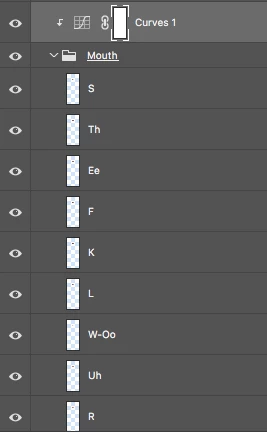
I've read many posts with this same question and earlier in the year I found the perfect solution in a script. I have since updated Photoshop and the script disappeared. Now I can't find it again. What I need to do is apply the adjustment layer to all the layers in the group. I need to do this to every mouth layer of every character I have going into Character animator. There are several of these so the manual way of applying the adjustment is very tedious. Especially as Photoshop names the merged layer according the top layer so I have to go through and rename everything on top of all the manual layer merging management. The script was very neat, you would put the adjustment layer or layers inside a group with all the layers in need of adjusting then run the script and it would adjust all layers in the group. Massive time saver. Has anyone out there come across this script???? I love script writers, you are my heroes.
This topic has been closed for replies.
Correct answer r-bin

Thank you for helping but I can't understand why it doesn't work for me.


Try it. One of the adjustment layers located above the group should be active.

app.activeDocument.suspendHistory("Script", "f()");

function f()
	{
	var doc = activeDocument;

	var adj_layer = doc.activeLayer;
	var parent = adj_layer.parent;
	for (var n = 0; n < parent.layers.length; n++)
		{
		if (parent.layers[n] == adj_layer)
			{
			for (++n; n < parent.layers.length; n++)
				{
				if (parent.layers[n].typename == "LayerSet")
					{
					var set = parent.layers[n];
					for (var i = set.artLayers.length-1; i >= 0; i--)
						{
						var layer = adj_layer.duplicate(set.artLayers[i], ElementPlacement.PLACEBEFORE)

						doc.activeLayer = layer;

						executeAction(stringIDToTypeID("mergeLayersNew"), undefined, DialogModes.NO);
						}
					adj_layer.remove();
					return;
					}
				}
			}
		}
	}

4 replies

New Participant
July 17, 2021

Here's a workaround without scripts. Depending on the project, it might not suit everyone's needs, but it helped me when scripting went awry.

Make a frame animation using the Timeline Panel. Each frame should include the adjustment layer and one of the layers you want treated. Export as a video (File > Export > Render as video...). Then import the video (File > Import > Video Frames to Layers...). Each frame becomes a new layer with the adjustment applied.

Stephen Marsh
Adobe Expert
May 1, 2021
New Participant
July 20, 2022

I signed up just to thank you r-bin! What a hero - thank you

Brainiac
March 12, 2019

Select adjustment layer.

Run the script.

app.activeDocument.suspendHistory("Script", "f()");
function f()
	{
	var doc = activeDocument;
	var adj_layer = doc.activeLayer;
	var set = doc.layerSets.getByName("Mouth");
	for (var i = set.artLayers.length-1; i >= 0; i--)
		{
		var layer = adj_layer.duplicate(set.artLayers[i], ElementPlacement.PLACEBEFORE)
		doc.activeLayer = layer;
		executeAction(stringIDToTypeID("mergeLayersNew"), undefined, DialogModes.NO);
		}
	adj_layer.remove();
	}
studioiso
studioisoAuthor
Known Participant
March 13, 2019

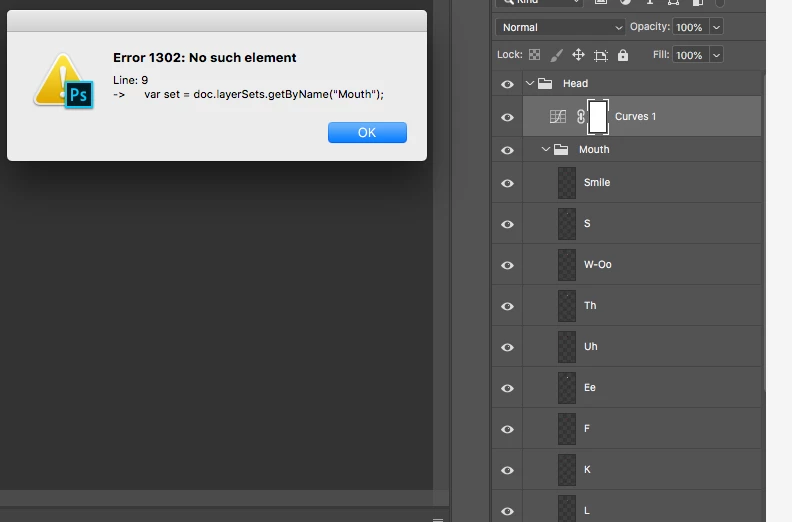
Thanks so much r-bin. I can't get it to work though. It says there's no such element as "Mouth". I tried it inside and outside of the group. Any suggestions?

New Participant
May 7, 2019

Try it. One of the adjustment layers located above the group should be active.

app.activeDocument.suspendHistory("Script", "f()");

function f()
	{
	var doc = activeDocument;

	var adj_layer = doc.activeLayer;
	var parent = adj_layer.parent;
	for (var n = 0; n < parent.layers.length; n++)
		{
		if (parent.layers[n] == adj_layer)
			{
			for (++n; n < parent.layers.length; n++)
				{
				if (parent.layers[n].typename == "LayerSet")
					{
					var set = parent.layers[n];
					for (var i = set.artLayers.length-1; i >= 0; i--)
						{
						var layer = adj_layer.duplicate(set.artLayers[i], ElementPlacement.PLACEBEFORE)

						doc.activeLayer = layer;

						executeAction(stringIDToTypeID("mergeLayersNew"), undefined, DialogModes.NO);
						}
					adj_layer.remove();
					return;
					}
				}
			}
		}
	}

This works like a charm @r-bin ! Thanks alot 🙂


There is any way to tweak the code to make it work when you have layers using clipping mask like Layer 06 in the example?

JJMack
Adobe Expert
March 12, 2019

If you install a new version of Photoshop did you copy the script into the new Photoshop version folder \Presets\scripts\ so it is installed into the new version pf Photoshop?

JJMack
studioiso
studioisoAuthor
Known Participant
March 13, 2019

No I had forgotten about copying the scripts over when I updated. I will keep them somewhere separate in future like I do with all my other scripts so that if I forget again, I can retrieve them.