Known Participant
October 16, 2022
Answered

Arrange objects in a diagonal line

  • October 16, 2022
  • 6 replies
  • 1960 views

Hi guys,


I wonder if there is a way to arrange some jpgs in a diagonal line with a specific degree overlaping each other, instead of doing it one by one. Any suggestions are welcome 🙂

Many thanks,

Alex

This topic has been closed for replies.
Correct answer c.pfaffenbichler

// arrange selected layers diagonally on canvas, they need to be same size;
// 2022, use it at your own risk;
if (app.documents.length > 0) {
// set to pixels;
    var originalRulerUnits = app.preferences.rulerUnits;
    app.preferences.rulerUnits = Units.PIXELS;
    var myDocument = app.activeDocument;
    var theLayers = collectSelectedLayersBounds ();
    var docWidth = myDocument.width;
    var docHeight = myDocument.height;
    var theWidth = theLayers[0][2][2]-theLayers[0][2][0];
    var theHeight = theLayers[0][2][3]-theLayers[0][2][1];
    var theX = theWidth/2;
    var theY = docHeight - theHeight/2;
    var xOffset = (docWidth - theWidth) / (theLayers.length-1);
    var yOffset = (docHeight - theHeight) / (theLayers.length-1);
// process layers;
    var theCount = 0;
//for (var m = 0; m < theLayers.length; m++) {
    for (var m = theLayers.length-1; m >= 0; m--) {
        var thisOne = theLayers[m];
        var thisCenterX = thisOne[2][0] + (thisOne[2][2] - thisOne[2][0])/2;
        var thisCenterY = thisOne[2][1] + (thisOne[2][3] - thisOne[2][1])/2;
        duplicateMoveRotateScale (thisOne[1], theX-thisCenterX+xOffset*theCount, theY-thisCenterY-yOffset*theCount, 100, 100, 0, false);
        theCount++
//        duplicateMoveRotateScale (thisOne[1], theX-thisCenterX+xOffset*m, theY-thisCenterY-yOffset*m, 100, 100, 0, false)
    };
// reset;
    app.preferences.rulerUnits = originalRulerUnits;
};
////////////////////////////////////
////// collect bounds of selected layers //////
function collectSelectedLayersBounds () {
// set to pixels;
    var originalRulerUnits = app.preferences.rulerUnits;
    app.preferences.rulerUnits = Units.PIXELS;
// get selected layers;
    var selectedLayers = new Array;
    var ref = new ActionReference();
    ref.putEnumerated( charIDToTypeID("Dcmn"), charIDToTypeID("Ordn"), charIDToTypeID("Trgt") );
    var desc = executeActionGet(ref);
    if (desc.getBoolean(stringIDToTypeID("hasBackgroundLayer")) == true) {var theAdd =0}
    else {var theAdd = 1};
    if( desc.hasKey( stringIDToTypeID( 'targetLayers' ) ) ){
    desc = desc.getList( stringIDToTypeID( 'targetLayers' ));
    var c = desc.count;
    var selectedLayers = new Array();
    // run through selected layers;
    for(var i=0;i<c;i++){
    var theIndex = desc.getReference( i ).getIndex()+theAdd;
    // get id for solid color layers;
    try {
    var ref = new ActionReference();
    ref.putIndex( charIDToTypeID("Lyr "), theIndex ); 
    var layerDesc = executeActionGet(ref);
    var theName = layerDesc.getString(stringIDToTypeID('name'));
    var theIdentifier = layerDesc.getInteger(stringIDToTypeID ("layerID"));
    var theBounds = layerDesc.getObjectValue(stringIDToTypeID("bounds"));
    var theseBounds = [theBounds.getUnitDoubleValue(stringIDToTypeID("left")), theBounds.getUnitDoubleValue(stringIDToTypeID("top")), theBounds.getUnitDoubleValue(stringIDToTypeID("right")), theBounds.getUnitDoubleValue(stringIDToTypeID("bottom"))];
    selectedLayers.push([theName, theIdentifier, theseBounds]);
    } catch (e) {};
    };
    // if only one:
    }else{
    var ref = new ActionReference();
    ref.putEnumerated( charIDToTypeID("Lyr "), charIDToTypeID("Ordn"), charIDToTypeID("Trgt") );
    var layerDesc = executeActionGet(ref);
    try {
    var theName = layerDesc.getString(stringIDToTypeID('name'));
    var theIdentifier = layerDesc.getInteger(stringIDToTypeID ("layerID"));
    var theBounds = layerDesc.getObjectValue(stringIDToTypeID("bounds"));
    var theseBounds = [theBounds.getUnitDoubleValue(stringIDToTypeID("left")), theBounds.getUnitDoubleValue(stringIDToTypeID("top")), theBounds.getUnitDoubleValue(stringIDToTypeID("right")), theBounds.getUnitDoubleValue(stringIDToTypeID("bottom"))];
    selectedLayers = [[theName, theIdentifier, theseBounds]]
    } catch (e) {};
    };
// reset;
    app.preferences.rulerUnits = originalRulerUnits;
    return selectedLayers;
};
////// duplicate layer and move, rotate and scale it //////
function duplicateMoveRotateScale (theID, theX, theY, theScaleX, theScaleY, theRotation, theCopy) {
selectLayerByID(theID,false);
try{
var idTrnf = charIDToTypeID( "Trnf" );
    var desc10 = new ActionDescriptor();
    var idnull = charIDToTypeID( "null" );
        var ref6 = new ActionReference();
        ref6.putIdentifier( charIDToTypeID( "Lyr " ), theID );
    desc10.putReference( idnull, ref6 );
    var idFTcs = charIDToTypeID( "FTcs" );
    var idQCSt = charIDToTypeID( "QCSt" );
    var idQcsa = charIDToTypeID( "Qcsa" );
    desc10.putEnumerated( idFTcs, idQCSt, idQcsa );
    var idOfst = charIDToTypeID( "Ofst" );
        var desc11 = new ActionDescriptor();
        var idHrzn = charIDToTypeID( "Hrzn" );
        var idPxl = charIDToTypeID( "#Pxl" );
        desc11.putUnitDouble( idHrzn, idPxl, theX );
        var idVrtc = charIDToTypeID( "Vrtc" );
        var idPxl = charIDToTypeID( "#Pxl" );
        desc11.putUnitDouble( idVrtc, idPxl, theY );
    var idOfst = charIDToTypeID( "Ofst" );
    desc10.putObject( idOfst, idOfst, desc11 );
    var idWdth = charIDToTypeID( "Wdth" );
    var idPrc = charIDToTypeID( "#Prc" );
    desc10.putUnitDouble( idWdth, idPrc, theScaleX );
    var idHght = charIDToTypeID( "Hght" );
    var idPrc = charIDToTypeID( "#Prc" );
    desc10.putUnitDouble( idHght, idPrc, theScaleY );
    var idAngl = charIDToTypeID( "Angl" );
    var idAng = charIDToTypeID( "#Ang" );
    desc10.putUnitDouble( idAngl, idAng, theRotation );
    var idIntr = charIDToTypeID( "Intr" );
    var idIntp = charIDToTypeID( "Intp" );
    var idbicubicAutomatic = stringIDToTypeID( "bicubicAutomatic" );
    desc10.putEnumerated( idIntr, idIntp, idbicubicAutomatic );
    var idCpy = charIDToTypeID( "Cpy " );
    desc10.putBoolean( idCpy, theCopy );
executeAction( idTrnf, desc10, DialogModes.NO );
var thisCopy = app.activeDocument.activeLayer;
return thisCopy
} catch (e) {}
};
// based on code by mike hale, via paul riggott;
function selectLayerByID(id,add){ 
add = undefined ? add = false:add 
var ref = new ActionReference();
    ref.putIdentifier(charIDToTypeID("Lyr "), id);
    var desc = new ActionDescriptor();
    desc.putReference(charIDToTypeID("null"), ref );
       if(add) desc.putEnumerated( stringIDToTypeID( "selectionModifier" ), stringIDToTypeID( "selectionModifierType" ), stringIDToTypeID( "addToSelection" ) ); 
      desc.putBoolean( charIDToTypeID( "MkVs" ), false ); 
   try{
    executeAction(charIDToTypeID("slct"), desc, DialogModes.NO );
}catch(e){
alert(e.message); 
}
};

6 replies

c.pfaffenbichler
c.pfaffenbichlerCorrect answer
Community Expert
October 16, 2022

// arrange selected layers diagonally on canvas, they need to be same size;
// 2022, use it at your own risk;
if (app.documents.length > 0) {
// set to pixels;
    var originalRulerUnits = app.preferences.rulerUnits;
    app.preferences.rulerUnits = Units.PIXELS;
    var myDocument = app.activeDocument;
    var theLayers = collectSelectedLayersBounds ();
    var docWidth = myDocument.width;
    var docHeight = myDocument.height;
    var theWidth = theLayers[0][2][2]-theLayers[0][2][0];
    var theHeight = theLayers[0][2][3]-theLayers[0][2][1];
    var theX = theWidth/2;
    var theY = docHeight - theHeight/2;
    var xOffset = (docWidth - theWidth) / (theLayers.length-1);
    var yOffset = (docHeight - theHeight) / (theLayers.length-1);
// process layers;
    var theCount = 0;
//for (var m = 0; m < theLayers.length; m++) {
    for (var m = theLayers.length-1; m >= 0; m--) {
        var thisOne = theLayers[m];
        var thisCenterX = thisOne[2][0] + (thisOne[2][2] - thisOne[2][0])/2;
        var thisCenterY = thisOne[2][1] + (thisOne[2][3] - thisOne[2][1])/2;
        duplicateMoveRotateScale (thisOne[1], theX-thisCenterX+xOffset*theCount, theY-thisCenterY-yOffset*theCount, 100, 100, 0, false);
        theCount++
//        duplicateMoveRotateScale (thisOne[1], theX-thisCenterX+xOffset*m, theY-thisCenterY-yOffset*m, 100, 100, 0, false)
    };
// reset;
    app.preferences.rulerUnits = originalRulerUnits;
};
////////////////////////////////////
////// collect bounds of selected layers //////
function collectSelectedLayersBounds () {
// set to pixels;
    var originalRulerUnits = app.preferences.rulerUnits;
    app.preferences.rulerUnits = Units.PIXELS;
// get selected layers;
    var selectedLayers = new Array;
    var ref = new ActionReference();
    ref.putEnumerated( charIDToTypeID("Dcmn"), charIDToTypeID("Ordn"), charIDToTypeID("Trgt") );
    var desc = executeActionGet(ref);
    if (desc.getBoolean(stringIDToTypeID("hasBackgroundLayer")) == true) {var theAdd =0}
    else {var theAdd = 1};
    if( desc.hasKey( stringIDToTypeID( 'targetLayers' ) ) ){
    desc = desc.getList( stringIDToTypeID( 'targetLayers' ));
    var c = desc.count;
    var selectedLayers = new Array();
    // run through selected layers;
    for(var i=0;i<c;i++){
    var theIndex = desc.getReference( i ).getIndex()+theAdd;
    // get id for solid color layers;
    try {
    var ref = new ActionReference();
    ref.putIndex( charIDToTypeID("Lyr "), theIndex ); 
    var layerDesc = executeActionGet(ref);
    var theName = layerDesc.getString(stringIDToTypeID('name'));
    var theIdentifier = layerDesc.getInteger(stringIDToTypeID ("layerID"));
    var theBounds = layerDesc.getObjectValue(stringIDToTypeID("bounds"));
    var theseBounds = [theBounds.getUnitDoubleValue(stringIDToTypeID("left")), theBounds.getUnitDoubleValue(stringIDToTypeID("top")), theBounds.getUnitDoubleValue(stringIDToTypeID("right")), theBounds.getUnitDoubleValue(stringIDToTypeID("bottom"))];
    selectedLayers.push([theName, theIdentifier, theseBounds]);
    } catch (e) {};
    };
    // if only one:
    }else{
    var ref = new ActionReference();
    ref.putEnumerated( charIDToTypeID("Lyr "), charIDToTypeID("Ordn"), charIDToTypeID("Trgt") );
    var layerDesc = executeActionGet(ref);
    try {
    var theName = layerDesc.getString(stringIDToTypeID('name'));
    var theIdentifier = layerDesc.getInteger(stringIDToTypeID ("layerID"));
    var theBounds = layerDesc.getObjectValue(stringIDToTypeID("bounds"));
    var theseBounds = [theBounds.getUnitDoubleValue(stringIDToTypeID("left")), theBounds.getUnitDoubleValue(stringIDToTypeID("top")), theBounds.getUnitDoubleValue(stringIDToTypeID("right")), theBounds.getUnitDoubleValue(stringIDToTypeID("bottom"))];
    selectedLayers = [[theName, theIdentifier, theseBounds]]
    } catch (e) {};
    };
// reset;
    app.preferences.rulerUnits = originalRulerUnits;
    return selectedLayers;
};
////// duplicate layer and move, rotate and scale it //////
function duplicateMoveRotateScale (theID, theX, theY, theScaleX, theScaleY, theRotation, theCopy) {
selectLayerByID(theID,false);
try{
var idTrnf = charIDToTypeID( "Trnf" );
    var desc10 = new ActionDescriptor();
    var idnull = charIDToTypeID( "null" );
        var ref6 = new ActionReference();
        ref6.putIdentifier( charIDToTypeID( "Lyr " ), theID );
    desc10.putReference( idnull, ref6 );
    var idFTcs = charIDToTypeID( "FTcs" );
    var idQCSt = charIDToTypeID( "QCSt" );
    var idQcsa = charIDToTypeID( "Qcsa" );
    desc10.putEnumerated( idFTcs, idQCSt, idQcsa );
    var idOfst = charIDToTypeID( "Ofst" );
        var desc11 = new ActionDescriptor();
        var idHrzn = charIDToTypeID( "Hrzn" );
        var idPxl = charIDToTypeID( "#Pxl" );
        desc11.putUnitDouble( idHrzn, idPxl, theX );
        var idVrtc = charIDToTypeID( "Vrtc" );
        var idPxl = charIDToTypeID( "#Pxl" );
        desc11.putUnitDouble( idVrtc, idPxl, theY );
    var idOfst = charIDToTypeID( "Ofst" );
    desc10.putObject( idOfst, idOfst, desc11 );
    var idWdth = charIDToTypeID( "Wdth" );
    var idPrc = charIDToTypeID( "#Prc" );
    desc10.putUnitDouble( idWdth, idPrc, theScaleX );
    var idHght = charIDToTypeID( "Hght" );
    var idPrc = charIDToTypeID( "#Prc" );
    desc10.putUnitDouble( idHght, idPrc, theScaleY );
    var idAngl = charIDToTypeID( "Angl" );
    var idAng = charIDToTypeID( "#Ang" );
    desc10.putUnitDouble( idAngl, idAng, theRotation );
    var idIntr = charIDToTypeID( "Intr" );
    var idIntp = charIDToTypeID( "Intp" );
    var idbicubicAutomatic = stringIDToTypeID( "bicubicAutomatic" );
    desc10.putEnumerated( idIntr, idIntp, idbicubicAutomatic );
    var idCpy = charIDToTypeID( "Cpy " );
    desc10.putBoolean( idCpy, theCopy );
executeAction( idTrnf, desc10, DialogModes.NO );
var thisCopy = app.activeDocument.activeLayer;
return thisCopy
} catch (e) {}
};
// based on code by mike hale, via paul riggott;
function selectLayerByID(id,add){ 
add = undefined ? add = false:add 
var ref = new ActionReference();
    ref.putIdentifier(charIDToTypeID("Lyr "), id);
    var desc = new ActionDescriptor();
    desc.putReference(charIDToTypeID("null"), ref );
       if(add) desc.putEnumerated( stringIDToTypeID( "selectionModifier" ), stringIDToTypeID( "selectionModifierType" ), stringIDToTypeID( "addToSelection" ) ); 
      desc.putBoolean( charIDToTypeID( "MkVs" ), false ); 
   try{
    executeAction(charIDToTypeID("slct"), desc, DialogModes.NO );
}catch(e){
alert(e.message); 
}
};
Known Participant
October 16, 2022

Any chance to control the distance between the arranged images and the angle? Apart from that it works. Thanks

c.pfaffenbichler
Community Expert
October 16, 2022

You can change the Canvas accordingly. 

Chuck Uebele
Community Expert
October 16, 2022

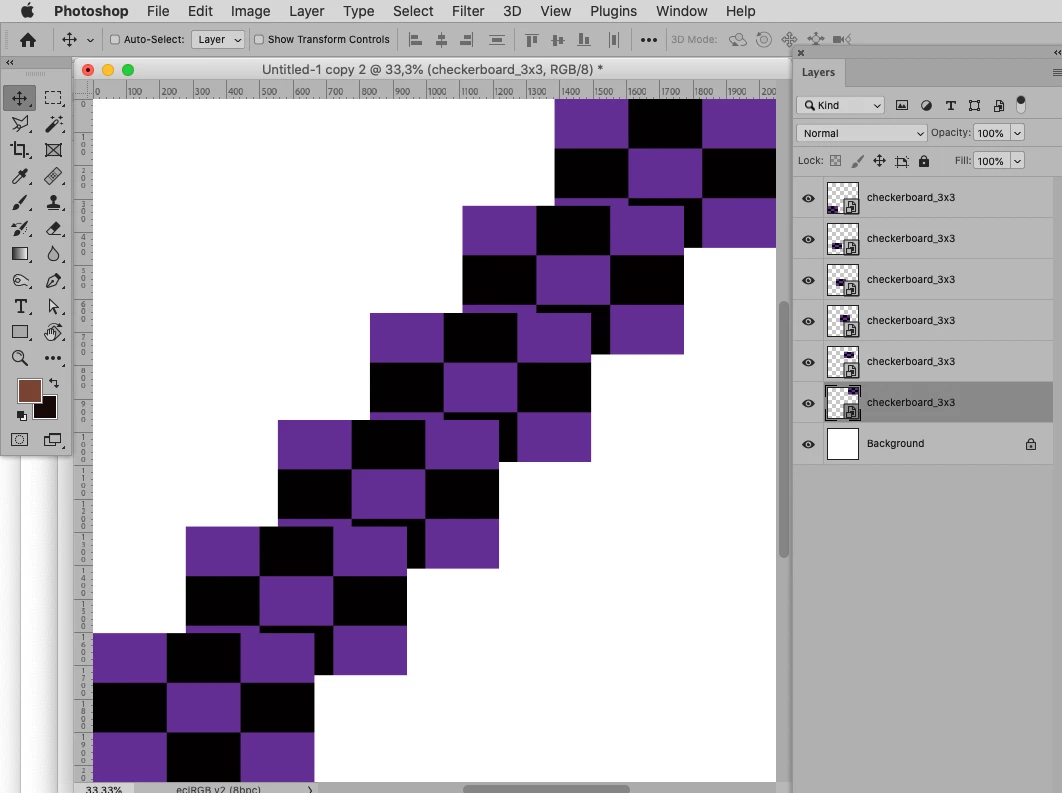
Here's a smple with the y value changed to -70.


Known Participant
October 16, 2022

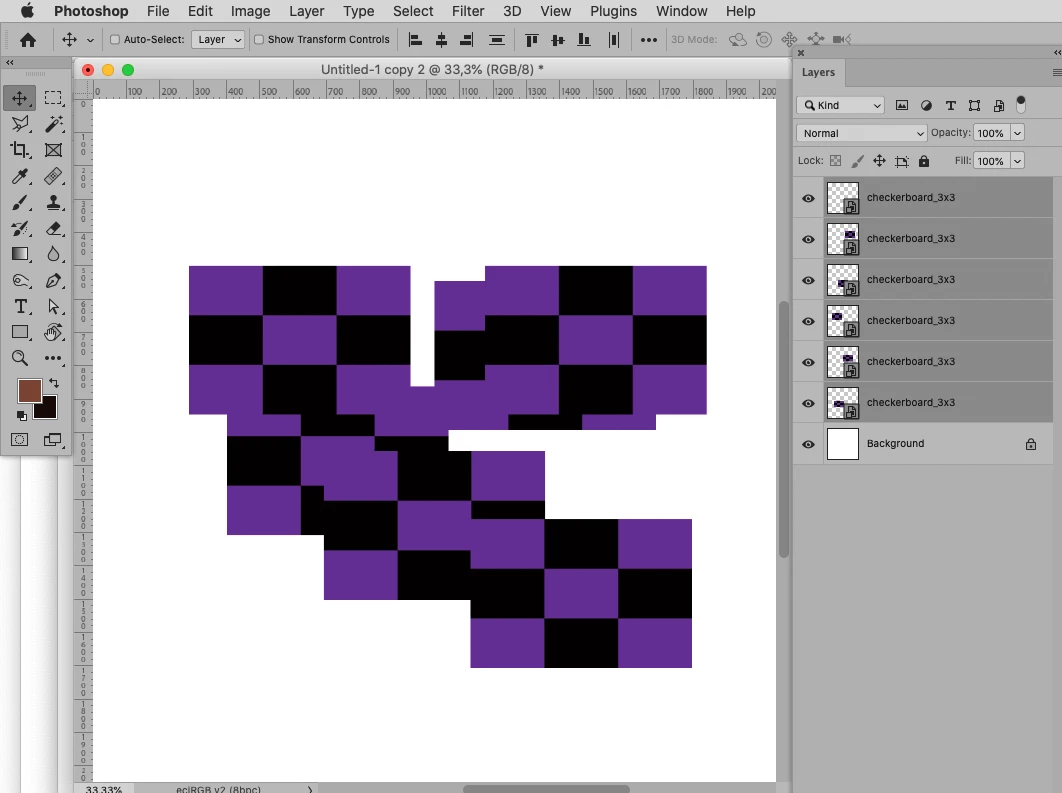
How exactly works? I created a new document 1500x1500px and I put 8 images resized to about 200px, but when I run the script all images dissapeared.

Chuck Uebele
Community Expert
October 16, 2022

I can't read the warning dialogs. What are they saying?

Chuck Uebele
Community Expert
October 16, 2022

Here's an example of running my script.


Chuck Uebele
Community Expert
October 16, 2022

Try this script. you will have to change the distance you want the offset of the layers. You can do this in a plain text editor. Just save the file with the extension .jsx and place it in the Photoshop subfolder presets/scripts. Position the top layer where you want it, and leave that layer selected to run the script.


#target photoshop 
var doc = activeDocument;
var startLayer = doc.activeLayer
var numLay = startLayer.parent.layers.length;
var horOffset = 50;
var vertOffset =70;

for(var i=0;i<numLay;i++){
    var curLayBounds = startLayer.bounds
    nextLayer ();
    if(doc.activeLayer.isBackgroundLayer){
        break;
        }
        var nextLay = doc.activeLayer;
        var nextBounds = nextLay.bounds
        var xDiff = curLayBounds[0] - nextBounds[0] + horOffset;
        var yDiff = curLayBounds[1] - nextBounds[1] + vertOffset;
        nextLay.translate(xDiff,yDiff)
        startLayer = doc.activeLayer;
    }

function nextLayer(){
    var idslct = charIDToTypeID( "slct" );
        var desc5 = new ActionDescriptor();
        var idnull = charIDToTypeID( "null" );
            var ref3 = new ActionReference();
            var idLyr = charIDToTypeID( "Lyr " );
            var idOrdn = charIDToTypeID( "Ordn" );
            var idBckw = charIDToTypeID( "Bckw" );
            ref3.putEnumerated( idLyr, idOrdn, idBckw );
        desc5.putReference( idnull, ref3 );
        var idMkVs = charIDToTypeID( "MkVs" );
        desc5.putBoolean( idMkVs, false );
        var idLyrI = charIDToTypeID( "LyrI" );
            var list3 = new ActionList();
            list3.putInteger( 10 );
        desc5.putList( idLyrI, list3 );
    executeAction( idslct, desc5, DialogModes.NO );    
    }


Chuck Uebele
Community Expert
October 16, 2022

What are the sizes if the jpgs, how much overlap, and what size is you main canvas? Can you post an example?

Known Participant
October 16, 2022

The final result shoul look something like this. The size of the images is 2000px and the main canvas is 1500px. However, I can resize the images to 200px for example or the final main canvas can be resized to the desired size afterward.

Chuck Uebele
Community Expert
October 16, 2022

Just saw this, after I posted my script. if you want the layers to go up, as in your example, use a negative number for the y value, in my script.

c.pfaffenbichler
Community Expert
October 16, 2022

So the images have the exact same dimensions? 

Known Participant
October 16, 2022

Yes, they are the same size. Currently I use the X and Y coordinates calculating the next postition
1 - X (200px) / Y (800px)
2 - X (250px) / Y (770px)

3 - X (300px) / Y (740px)

etc...
I used an action but it works only if the images are the same number and the degree remains the same. I want a more flexible way, allowing to choose more images and a different degree. I hope it makes sense.

Thanks

c.pfaffenbichler
Community Expert
October 16, 2022

Yes, they are the same size.

I was hoping the Align Panel’s Distribute might work out in that case, alas I got unfitting results. 


Yeah, a Script seems unavoidable in this case. 

Do you have some experience with JavaScript in/for Photoshop?