


ikari
Participant
November 19, 2016
Question

audio on photoshop not working

  • November 19, 2016
  • 6 replies
  • 38514 views

So I create a video timeline and when I put the audio, it plays, but with no sound. Help?
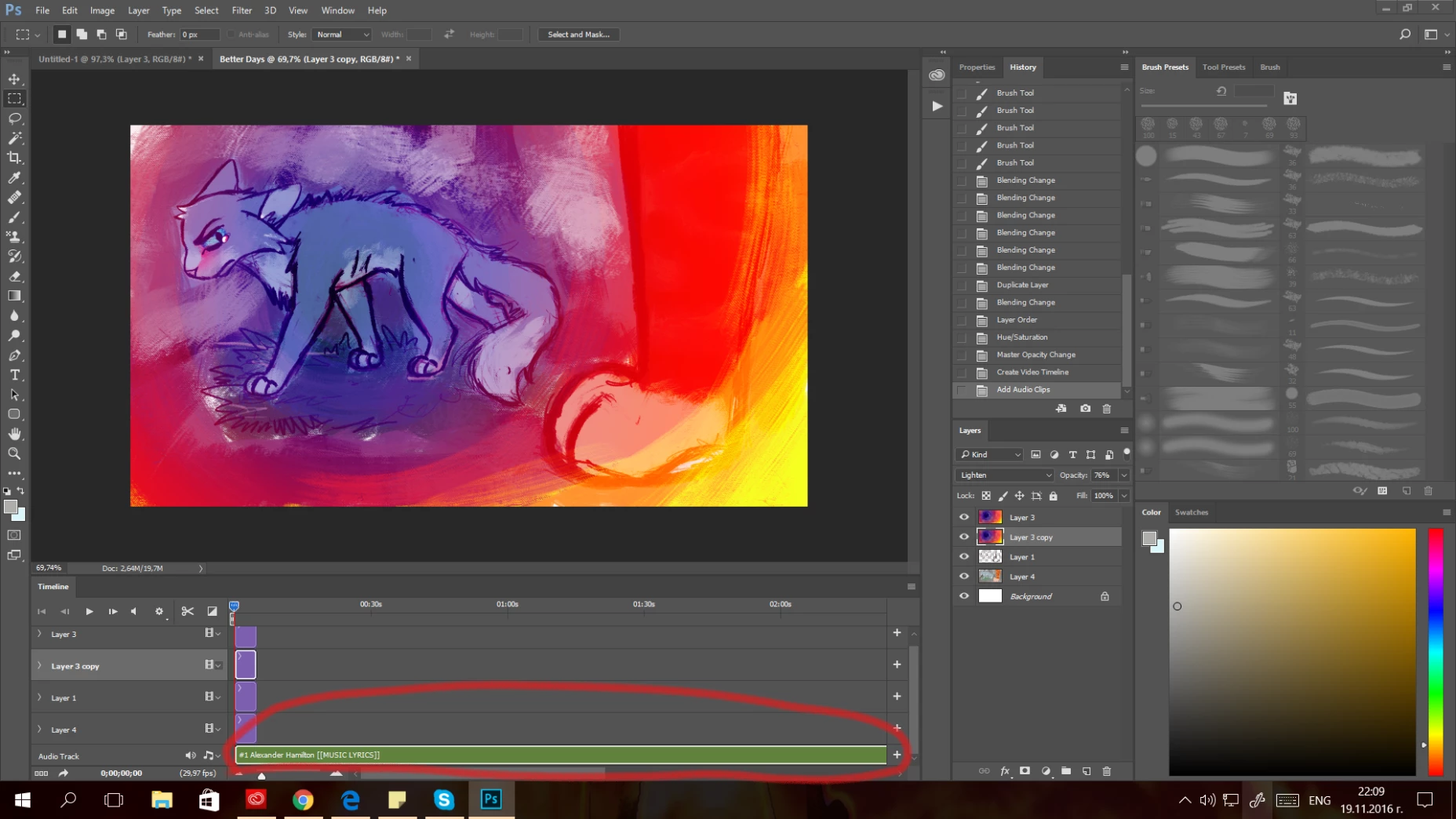
[Moved from non-technical Forum Lounge to specific Program forum... Mod]

[Here is the list of all Adobe forums... https://forums.adobe.com/welcome]

6 replies

Participant
November 2, 2021

Hi,

I'm facing this problem when i add audio, please help me out.. 

Mostafa Moradian
Participant
March 17, 2022

hello dear;

convert your audio format to aac and try opening in photoshop. i try it and photoshop opened that.

Participant
July 7, 2022

Hi,

even changing to aac not working. Is this bug or how to add audio. need urgent.

latest ps with latest mac os 

Participant
August 3, 2021

This is a very annoying bit of interface design. I had the same problem as ikari; no sound played on my video layer. I hadn't used video in a long time, and have no idea why it would change settings in the interim.   Davescm had the answer for me, because he circled the speaker button. I knew that I had repeatedly clicked that icon from mute to unmute and back again, with no effect.         It turns out there are two of the teeny little things! I've labeled them 1 and 2 on my screenshot. I had been toggling the lower one (2) beside the music notes to the left of the audio track. I never noticed that there's another one (1) up by the play controls! But that's what Dave had circled.


Here's where I think it could use improvement: BOTH have to be on (little sound waves coming out) for the sound on the video to play, and they don't affect each other. I think it makes more sense to have both go mute when you mute one of them, etc. Unless that messes up something I don't know about. In fact, why 2 of them?


I also tested Michael Riordan's answer. Guess what? If you mute only button 1, up by the play controls, have button 2 set to make sounds, and hold option/Alt, the sound plays with the video. But the reverse is mute: 1 off, 2 on, plus hold option/Alt, play and there is no sound. I don't know how he found that out, but it works--at least in one direction.  


So thanks to both of you! I could have wasted several days otherwise. Surely this is a mistake, maybe a control leftover when something else was changed?  PixelAnnie   [website removed] 


Participant
October 3, 2021

I have issue on photoshop, there is not way to read all my audio file. How i can solve this problem?

Participant
November 16, 2021

I'm having the same problem, might be a bug with the new 2022 update...

Participating Frequently
August 1, 2020

This didn't work for me.

The only thing that works is the Alt play option with speaker icon ON

marae46406227
Participant
May 26, 2021

My audio wasn't working in PhotoShop. I tried everything. 2 hours later I just logged in and out of PS

and it worked!


Participant
May 13, 2020

I have tried all above but did not work for me. so i downloaded the video again from my whatsapp page, did not change the name (as i did not know what i did that caused the problem) and finally it worked perfectly for me.

davescm
Community Expert
Community Expert
November 20, 2016

Your screenshot indicates you need to click on the speaker symbol, next to the play controls, to turn on the audio.

Dave

Critical_Tick
Participant
March 1, 2019

Hey, I'm kind of having the same issue. I made sure that the button was pressed, but it keeps turning itself back off. Not sure why it's happening, but I can't find any answers, and I've been scouring Google for about an hour now.

EDIT: Don't know what was happening, but a quick restart fixed it. I think it was the fact that I plugged in a pair of headphones and hadn't tried a restart yet.

Participant
May 29, 2020

Worked for me. I hit sound button on and off without resoult at the beggining. Then I restarted PSD and it works now.

Michael Riordan
Inspiring
November 19, 2016

I haven’t worked with Video in Photoshop in a while, but when I did, you had to use the option/Alt key when you hit the play button to get Photoshop to play audio. Try that, see if it helps.


Michael Riordan

[personal info removed]


Participant
June 12, 2022

Tried it and worked. Why did this suddenly happen?