SMTPhoto
Participant
November 9, 2019
Question

Auto Tone keyboard shortcut doesn't work as expected

  • November 9, 2019
  • 2 replies
  • 670 views
Hi folks.
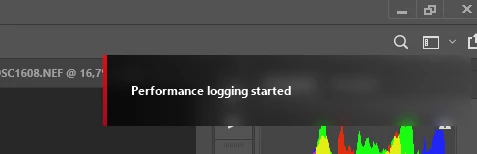
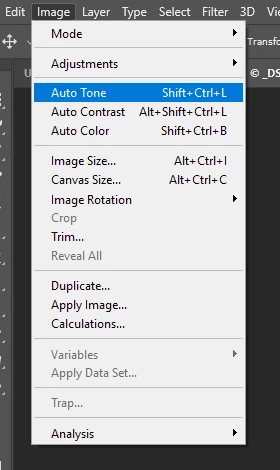
I don't use Photoshop on a daily basis, but I just recently learned that the Auto Tone keyboard shortcut (Shift+Ctrl+L) now starts and saves performance logging instead of doing what it's supposed to do.I don't see how this is useful? The attached screen shots shows that the shortcut SHOULD be assigned to the auto tone command, but I'm not able to find out how to change the behaviour I'm experiencing. I'm working on Windows 10, English, with a Norwegian keyboard, if that could have any thing to do with it. It's worked before (old keyboard at least).
 
 
Any help is greatkly appreciated.
 
Best regards
 
Stig M. Thu

2 replies

Conrad_C
Community Expert
Community Expert
January 10, 2025

Does your computer have AMD hardware?


The clue is the Performance Logging Started message that appears in your screen shot. That does not resemble how Photoshop or Adobe messages look, it isn’t designed like one, so it must be coming from somewhere else. I don’t have AMD hardware (I use a Mac), but running a web search on “Ctrl+Shift+L performance logging” turns up the web page below, where I made the screen shot below. In it, you can see that AMD software uses Ctrl+Shift+L to toggle performance logging. AMD’s use of that shortcut appears to be overriding all applications, probably because its integration with the hardware means it has control at the system level. So when you press Ctrl+Shift+L, AMD intercepts it before Photoshop does.


You can also see below that if you have an application where you want Ctrl+Shift+L to work, you should use the Hotkeys panel in the AMD software to change that shortcut, or disable the Use Hotkeys switch. After you “liberate” Ctrl+Shift+L from AMD, applications such as Photoshop should be able to intercept Ctrl+Shift+L and apply it as its own shortcut.


The screen shot below is from this web page:

Monitor Performance Metrics with AMD Software: Adrenalin Edition


Participant
January 10, 2025
Thanks! That solved the issue. You're a hero.
Participant
January 10, 2025

I'm having the same issue.  I added a tourbox and set all my normal keyboard shortcuts to it.  everything works except for  the autotone which only brings up performance logging.  has anyone figured this out.  I use this shortcut all the time.