


Known Participant
January 8, 2025
Question

Batch / auto straighten & crop scans?

  • January 8, 2025
  • 2 replies
  • 460 views

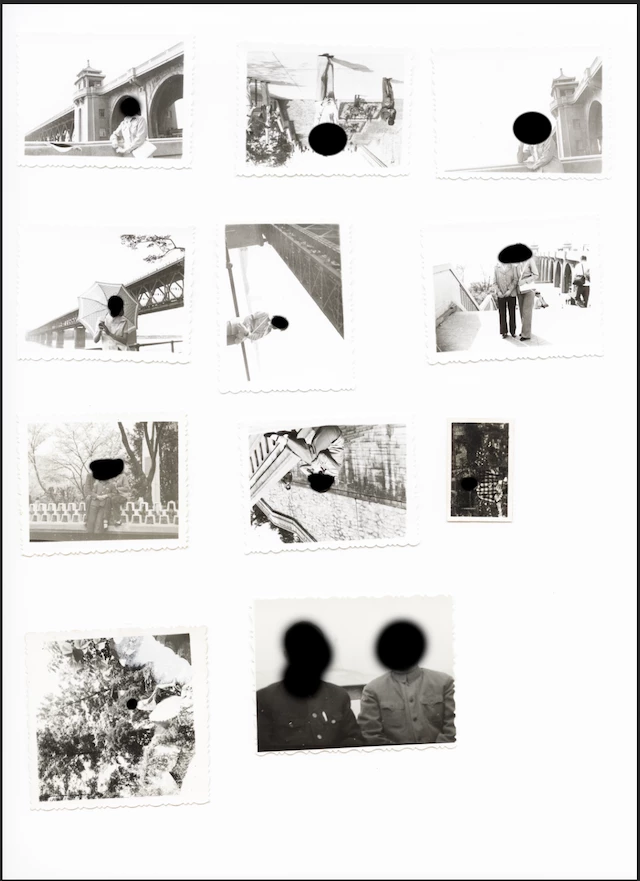
I know this question has been asked before. But I can't find a satisfactory solution to cropping individual photos from a scanned image (which usually consists of 2-4 prints).


I know the easiest way is to automate this with photoshop's crop & straighten function. But its accuracy leaves a lot to be desired (i.e. sometimes crops a bit too much, other times leaves a tiny white border. And it is almost uniformly bad at leveling slightly askew photos). I also tried a bunch of standalone software, such as scan tailor and paper scan, but they were worse than Photoshop in my opinion.


I saw some of the old scripts @Stephen Marsh created, but when I run them on my Applee Silicon Mac, they just crash. 


Here's an example of what my original scanned file looks like. It'd be best if I can automate this entire process, as I'm looking more than 1000 old family photos
 

2 replies

Conrad_C
Community Expert
Community Expert
January 8, 2025

Photoshop Crop & Straighten, written many years ago, is relatively simple and very picky about a clear difference between the background and the items on the scanner. It can easily be confused by a non-uniform (textured, dirty…) background, photos packed together too closely on the scanner, ambiguous edges (torn edges, irregular borders), etc. It seems to work best if the original scans were done in a way optimized for the quirks of Corp & Straighten.


I have been using VueScan software for many years. Mostly with a film scanner, but more recently with family photo prints. Its Multi Crop feature can detect multiple frames in a filmstrip scanned on a flatbed scanner, or detect multiple prints scanned on a flatbed. For that last one, I seem to have better luck with VueScan Auto Crop + Multi Crop than with Photoshop Crop & Straighten. One reason I prefer Multi Crop is that it proposes multiple detected crop borders in the scan preview, then you can adjust the proposed crop borders in that preview, so that when you click the Scan button, it turns this into multiple final scan files exactly the way you told it to crop. The demo below shows how this works.


VueScan is not free and people balk at that, but for me personally, I chose their One-Time Payment option many years ago, and it paid for itself many times over because I do a lot of scanning and its Professional Edition scanning features are very deep — usually much better than the software that comes with a scanner. 


LAMY2017 asked about double-sided scanning. I was surprised to find out that is now a thing. Keith Cooper at Northlight Images has been writing about digital photography, scanning, and printing for many years, and a few months ago he did a rather detailed review of the Epson FF-680W, which can scan both sides of a print. It’s designed for bulk scanning. His review is linked below, and on that page you can also watch his YouTube video review of that scanner.


Epson FF-680W print scanner
Quickly scan both sides up to A4/letter

hhost05Author
Known Participant
January 10, 2025

Curious if you have any personal experience with the FF-680W?


At first, I thought it was crazy to get yet another scanner when my Epson V700 is working perfectly. But I'm so incensed by this issue I'm thinking of just getting the 680W. But I heard it has bad IQ and much more concerningly, damages your photos.  

Legend
January 10, 2025

Yes, it is a bit pricey for a photo-only scanner. I have not used it but I have need to scan hundreds of photos (after I take them out of their "magnetic" photo albums, a literally sticky issue). I have $hundreds tied up in orphaned scanners that won't run on updated operating systems, so price is a consideration. It doesn't help with with the 10,000 slides in another project.


As far as damage, high-speed feeding of photos -- old, curved, bent, thick/Poloroids -- certainly increase the odds of damaging them. The best archive is a print; magnetic media aren't really as trustworthy as a print, imo.

Larry
Legend
January 8, 2025

hhost, as long as we're asking for a miracle solution, double-sided scanning would be great. One of the difficult parts of scanning larger numbers of prints is turning the prints over to find ID, then naming the file (people)_yymmdd.jpg.

4 prints/scan = 250 passes, ignoring the crop & straighten/save as separate files.


In my experience, I minimized that mess by aligning the prints on the scanner glass as carefully as I could (at the cost of taking even more time).I saved the "contact-sheet file to go back to manually rotate and crop the files with which I had trouble.


Maybe look into buying or renting a dedicated photo scanner? [old name brand] digital film scanners on Amazon, $405US and up are possibilities. Skewing can occur when using motorized feeders [automatic document feeder], but it could be helpful.


For our sakes, maybe someone else in the community has a better solution.

Larry