


Participating Frequently
August 3, 2021
Answered

Batch removal of background - getting errors

  • August 3, 2021
  • 2 replies
  • 6931 views

I am trying to remove the background from 300 images. The images are pretty much identical. 


First I tried setting up a batch procedure where I manually unlocked the background, used the quick selection tool to select the background and then finally deleted the background. But when I run the batch thing on the folder with the images it immediately returns the error "the command Delete is not currently available". I also tried running the same with the image processor. Same error.


Then I tried recording a batch operation with the "Remove background" tool built into Photoshop - that does work, but it removes way too much of the background.


I have attached a sample image.


Can anyone help with this?
Thanks!
This topic has been closed for replies.
Correct answer c.pfaffenbichler

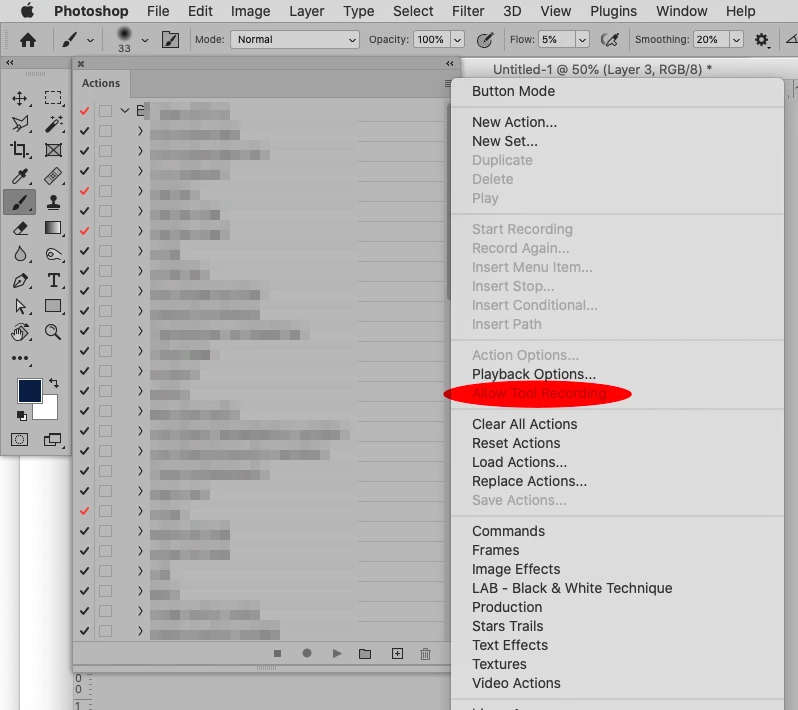
Is »Allow Tool Recording« enabled? 

Edit: 

2 replies

Inspiring
August 9, 2021

I am recording a set of tasks as an action, but for some reason the quick selection tool task is not recorded (before this task I have recorded a task setting the canvas size and adding a solid color background so the problem is not that the selection is happening outside of the canvas).

The issue results in the error message that the command "smooth" is not currently available (this is because no selection is recorded).

I attach a list of the tasks in the recorded action.

c.pfaffenbichler
Community Expert
c.pfaffenbichlerCommunity ExpertCorrect answer
Community Expert
August 9, 2021

Is »Allow Tool Recording« enabled? 

Edit: 

Inspiring
August 9, 2021

Thanks! That was the problem! I thought I had managed to record selection before, but wasn't sure - now I realised that that was done on my other computer 🙂
I am so grateful, you made my dag 🙂

c.pfaffenbichler
Community Expert
Community Expert
August 3, 2021

Could you please post a meaningful screenshot with the pertinent Panels (Toolbar, Layers, Options Bar, …) and the fully expanded Action in the Actions Panel visible at the time of the error being thrown? 


»I manually unlocked the background«

Why did you not make that part of the Action? 

MartinNPAuthor
Participating Frequently
August 3, 2021

Thank for your reply. 

I meant to say that I unlocked the background as part of the batch recording process - shouldn't have said manually. 

I made a GIF recording of the process, and took a screenshot at the time of the error. Hope that helps ? 🙂

Legend
August 4, 2021

Still getting the error, but didn't know about these settings so will have to look more into those. Thanks!


quote

Still getting the error, but didn't know about these settings so will have to look more into those. Thanks!


By @MartinNP


You have been hinted that you should recreate the Action with this option enabled. Did you do it?