Known Participant
July 18, 2024
Answered

Batch rename the layer base on the text layer above it?

  • July 18, 2024
  • 4 replies
  • 841 views

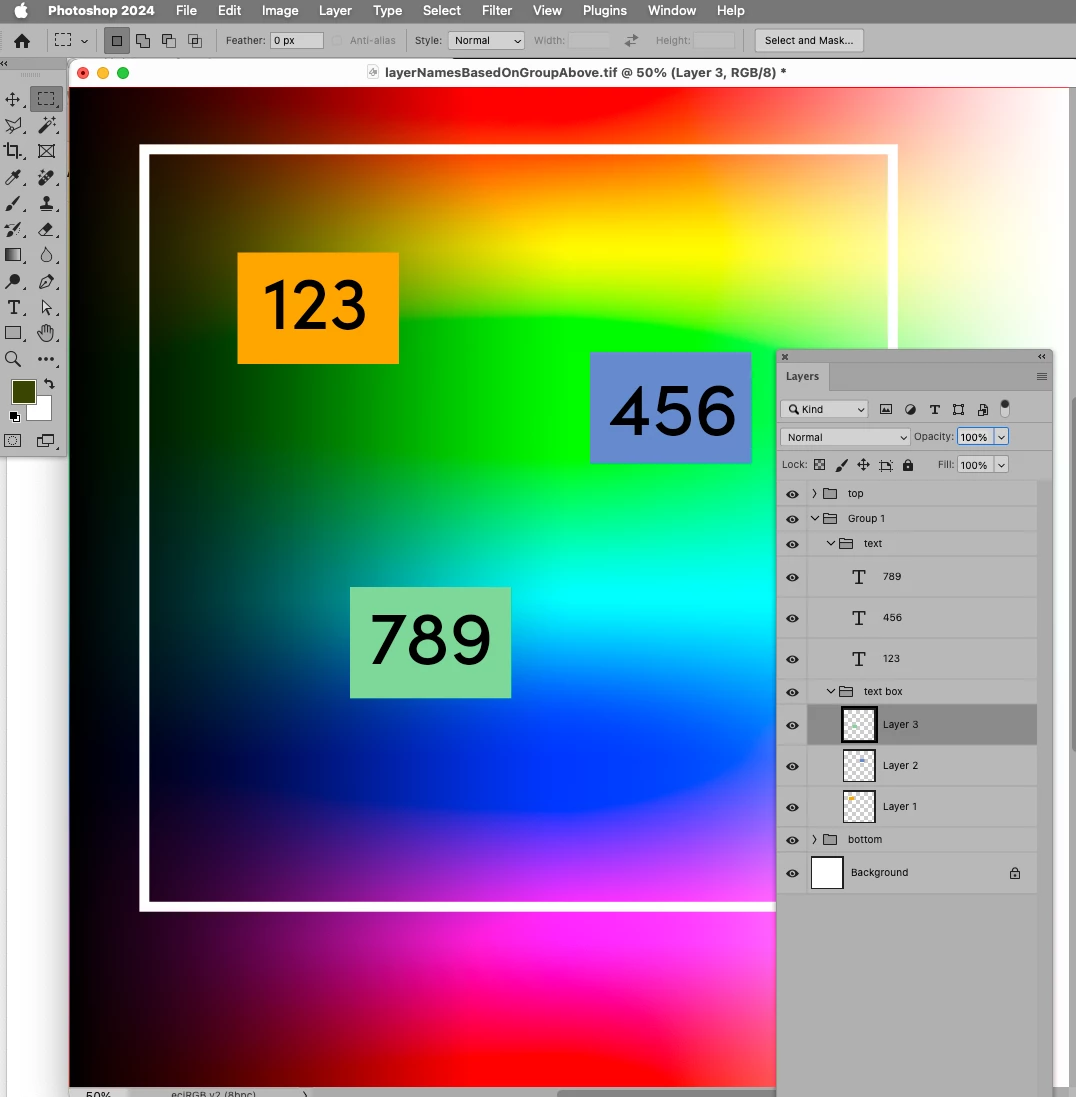
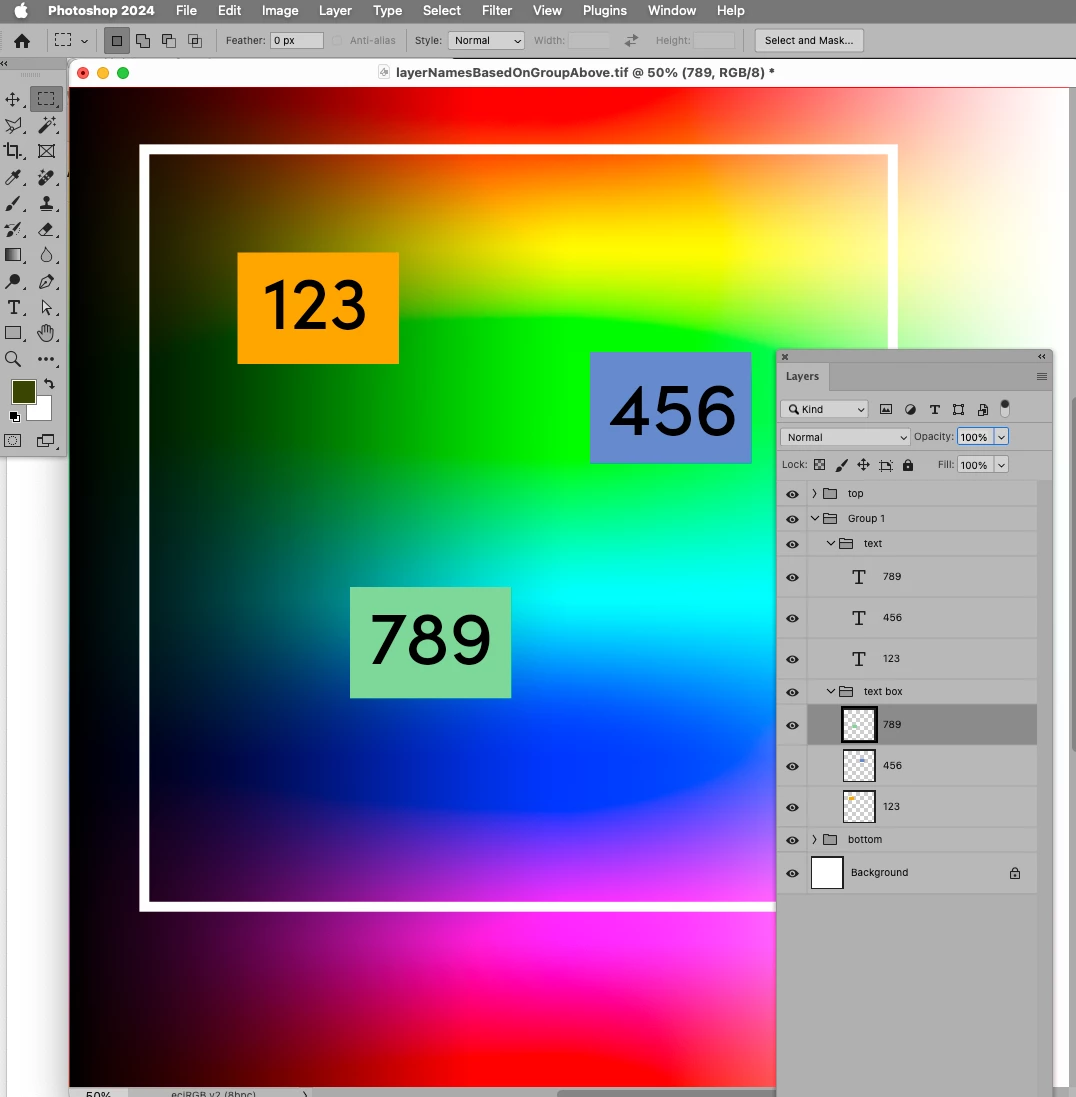
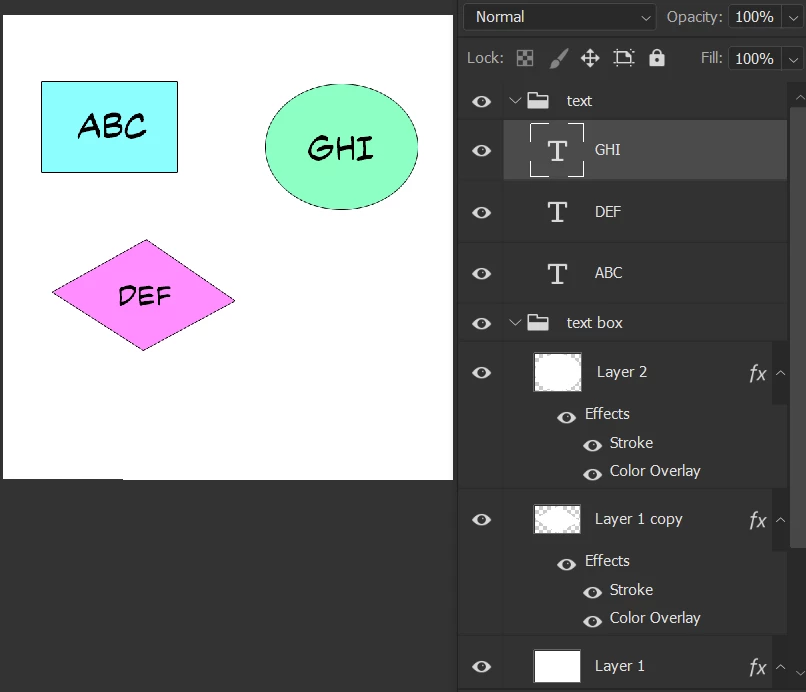
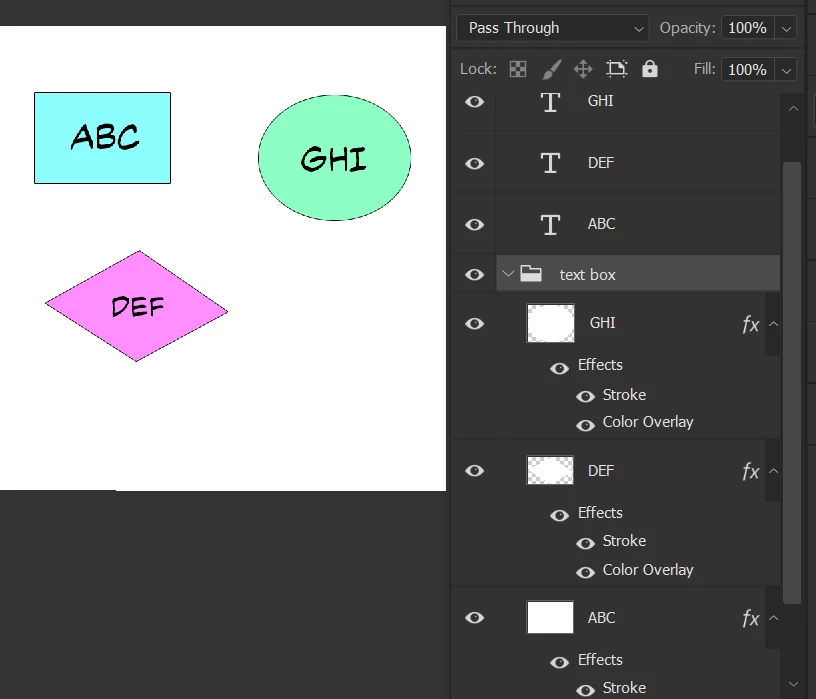
Hello everyone! I have a bundle of file that the layer in the "text box" group need to be rename as the text in the group "text" above it. This is an example and the final target:

Could you help me to build a script or action to run in multiple file? I am extremely grateful that you can help!


This topic has been closed for replies.
Correct answer c.pfaffenbichler


// name layers in group according to layers in next group up;
// 2024, use it at your own risk;
if (app.documents.length > 0) {
var ref = new ActionReference();
ref.putProperty (stringIDToTypeID ("property"), stringIDToTypeID ("parentLayerID"));
ref.putEnumerated( charIDToTypeID("Lyr "), charIDToTypeID("Ordn"), charIDToTypeID("Trgt") ); 
var layerDesc = executeActionGet(ref);
var parentId = layerDesc.getInteger(stringIDToTypeID ("parentLayerID"));
var theGroups = collectGroupsAboveCertainIndex (parentId);
var theLayers = collectLayersFromGroupsOfIndex(theGroups[0][1]);
var theOtherLayers = collectLayersFromGroupsOfIndex(theGroups[1][1]);
if (theLayers.length == theOtherLayers.length) {
for (var m = 0; m < theLayers.length; m++) {
    changeNameById(theLayers[m][2], theOtherLayers[m][0])
}
}
};
////////////////////////////////////
////// collect groups including and up from id //////
function collectGroupsAboveCertainIndex (theTargetId) {
var theCheck = false;
// get number of layers;
var ref = new ActionReference();
ref.putProperty(stringIDToTypeID('property'), stringIDToTypeID('numberOfLayers'));
ref.putEnumerated( charIDToTypeID("Dcmn"), charIDToTypeID("Ordn"), charIDToTypeID("Trgt") ); 
var applicationDesc = executeActionGet(ref);
var theNumber = applicationDesc.getInteger(stringIDToTypeID("numberOfLayers"));
// process the layers;
var theLayers = new Array;
//for (var m = 0; m >= theNumber; m--) {
for (var m = 0; m <= theNumber; m++) {
try {
var ref = new ActionReference();
ref.putIndex( charIDToTypeID( "Lyr " ), m);
var layerDesc = executeActionGet(ref);
var layerSet = typeIDToStringID(layerDesc.getEnumerationValue(stringIDToTypeID("layerSection")));
var isBackground = layerDesc.getBoolean(stringIDToTypeID("background"));
// if group collect values;
if (layerSet == "layerSectionStart") {
var theName = layerDesc.getString(stringIDToTypeID('name'));
// collect if condition is met;
var theID = layerDesc.getInteger(stringIDToTypeID('layerID'));
var theIndex = layerDesc.getInteger(stringIDToTypeID('itemIndex'));
if (theID == theTargetId) {theCheck = true}
if (theCheck == true) {theLayers.push([theName, theIndex, theID])}
};
}
catch (e) {};
};
return theLayers
};
////// collect layers and their parents if the top level group has a specific name //////
function collectLayersFromGroupsOfIndex (theTargetIndex) {
// a number is intended to keep track of layerset depth;
var aNumber = 0;
var theArray = new Array;
var theCheck = false;
try {
// work through layers;
while (theCheck == false) {
theTargetIndex--;
var ref = new ActionReference();
ref.putIndex( charIDToTypeID( "Lyr " ), theTargetIndex);
var layerDesc = executeActionGet(ref);
var layerSet = typeIDToStringID(layerDesc.getEnumerationValue(stringIDToTypeID("layerSection")));
var theName = layerDesc.getString(stringIDToTypeID('name'));
var theID = layerDesc.getInteger(stringIDToTypeID('layerID'));
var thisArray = [theName, theTargetIndex, theID];
////////////////////////////////////
// if group start add to mark group:
if (layerSet == "layerSectionStart") {
aNumber++
};
// if group end subtract to mark end of group;
if (layerSet == "layerSectionEnd") {
aNumber--;
};
// if corresponding group end;
if (layerSet == "layerSectionEnd" && aNumber == 0) {
theCheck = true;
} else {
// add to array;
theArray.push(thisArray);
};
////////////////////////////////////
};
} catch (e) {};
// the results;
theArray.shift();
return theArray
};
////// set name //////
function changeNameById (theID, theNewName) {
    var desc2 = new ActionDescriptor();
        var ref1 = new ActionReference();
        ref1.putIdentifier( charIDToTypeID( "Lyr " ), theID );
    desc2.putReference( charIDToTypeID( "null" ), ref1 );
        var desc3 = new ActionDescriptor();
//        desc3.putUnitDouble( charIDToTypeID( "Opct" ), charIDToTypeID( "#Prc" ), Math.round(theOpacity/2.55) );
        desc3.putString( stringIDToTypeID( "name" ), theNewName );
    desc2.putObject( charIDToTypeID( "T   " ), charIDToTypeID( "Lyr " ), desc3 );
executeAction( charIDToTypeID( "setd" ), desc2, DialogModes.NO );
};

 

4 replies

Legend
July 19, 2024

Just for reference, here is a script I wrote and use

/*
Utility Pack Scripts created by David M. Converse ©2018-24

This script renames text layers in an open Photoshop document

Last modifed 7/5/2024

Licensed under the Apache License, Version 2.0 (the "License");
you may not use this file except in compliance with the License.
You may obtain a copy of the License at

    http://www.apache.org/licenses/LICENSE-2.0

Unless required by applicable law or agreed to in writing, software
distributed under the License is distributed on an "AS IS" BASIS,
WITHOUT WARRANTIES OR CONDITIONS OF ANY KIND, either express or implied.
See the License for the specific language governing permissions and
limitations under the License.
*/
#target photoshop

renameTextLayers();

function renameTextLayers(){
    if(!app.documents.length > 0){
        return;
        }
    var docRef = null;
    var vis = true;
    var LayerRef = null;
    var TextRef = null;
    var layerText = '';
    try{
        docRef = app.activeDocument;
        docRef.activeLayer = docRef.artLayers[0];
        for(var i = 0; i < docRef.artLayers.length; i++){
            LayerRef = docRef.artLayers[i];
            vis = true;
            if(LayerRef.kind == LayerKind.TEXT){
                if(!LayerRef.visible){
                    vis = false;
                    }
                TextRef = LayerRef.textItem;
                layerText = TextRef.contents;
                layerText = layerText.replace(/\r$/, '');
                layerText = layerText.replace(/,\r/, ', ');
                if(layerText.search('\r') == -1){
                    layerText = layerText.split(' ');
                    layerText[0] = layerText[0].replace(',', '');
                    }
                else{
                    layerText = layerText.split('\r');
                    }
                LayerRef.name = layerText[0];
                if(vis == false){
                    LayerRef.visible = false;
                    }
                }
            }
        }
    catch(e){
        Window.alert(e + e.line);
        }
    }

, it has similar functionality but not the same.


c.pfaffenbichler
Community Expert
c.pfaffenbichlerCommunity ExpertCorrect answer
Community Expert
July 18, 2024


// name layers in group according to layers in next group up;
// 2024, use it at your own risk;
if (app.documents.length > 0) {
var ref = new ActionReference();
ref.putProperty (stringIDToTypeID ("property"), stringIDToTypeID ("parentLayerID"));
ref.putEnumerated( charIDToTypeID("Lyr "), charIDToTypeID("Ordn"), charIDToTypeID("Trgt") ); 
var layerDesc = executeActionGet(ref);
var parentId = layerDesc.getInteger(stringIDToTypeID ("parentLayerID"));
var theGroups = collectGroupsAboveCertainIndex (parentId);
var theLayers = collectLayersFromGroupsOfIndex(theGroups[0][1]);
var theOtherLayers = collectLayersFromGroupsOfIndex(theGroups[1][1]);
if (theLayers.length == theOtherLayers.length) {
for (var m = 0; m < theLayers.length; m++) {
    changeNameById(theLayers[m][2], theOtherLayers[m][0])
}
}
};
////////////////////////////////////
////// collect groups including and up from id //////
function collectGroupsAboveCertainIndex (theTargetId) {
var theCheck = false;
// get number of layers;
var ref = new ActionReference();
ref.putProperty(stringIDToTypeID('property'), stringIDToTypeID('numberOfLayers'));
ref.putEnumerated( charIDToTypeID("Dcmn"), charIDToTypeID("Ordn"), charIDToTypeID("Trgt") ); 
var applicationDesc = executeActionGet(ref);
var theNumber = applicationDesc.getInteger(stringIDToTypeID("numberOfLayers"));
// process the layers;
var theLayers = new Array;
//for (var m = 0; m >= theNumber; m--) {
for (var m = 0; m <= theNumber; m++) {
try {
var ref = new ActionReference();
ref.putIndex( charIDToTypeID( "Lyr " ), m);
var layerDesc = executeActionGet(ref);
var layerSet = typeIDToStringID(layerDesc.getEnumerationValue(stringIDToTypeID("layerSection")));
var isBackground = layerDesc.getBoolean(stringIDToTypeID("background"));
// if group collect values;
if (layerSet == "layerSectionStart") {
var theName = layerDesc.getString(stringIDToTypeID('name'));
// collect if condition is met;
var theID = layerDesc.getInteger(stringIDToTypeID('layerID'));
var theIndex = layerDesc.getInteger(stringIDToTypeID('itemIndex'));
if (theID == theTargetId) {theCheck = true}
if (theCheck == true) {theLayers.push([theName, theIndex, theID])}
};
}
catch (e) {};
};
return theLayers
};
////// collect layers and their parents if the top level group has a specific name //////
function collectLayersFromGroupsOfIndex (theTargetIndex) {
// a number is intended to keep track of layerset depth;
var aNumber = 0;
var theArray = new Array;
var theCheck = false;
try {
// work through layers;
while (theCheck == false) {
theTargetIndex--;
var ref = new ActionReference();
ref.putIndex( charIDToTypeID( "Lyr " ), theTargetIndex);
var layerDesc = executeActionGet(ref);
var layerSet = typeIDToStringID(layerDesc.getEnumerationValue(stringIDToTypeID("layerSection")));
var theName = layerDesc.getString(stringIDToTypeID('name'));
var theID = layerDesc.getInteger(stringIDToTypeID('layerID'));
var thisArray = [theName, theTargetIndex, theID];
////////////////////////////////////
// if group start add to mark group:
if (layerSet == "layerSectionStart") {
aNumber++
};
// if group end subtract to mark end of group;
if (layerSet == "layerSectionEnd") {
aNumber--;
};
// if corresponding group end;
if (layerSet == "layerSectionEnd" && aNumber == 0) {
theCheck = true;
} else {
// add to array;
theArray.push(thisArray);
};
////////////////////////////////////
};
} catch (e) {};
// the results;
theArray.shift();
return theArray
};
////// set name //////
function changeNameById (theID, theNewName) {
    var desc2 = new ActionDescriptor();
        var ref1 = new ActionReference();
        ref1.putIdentifier( charIDToTypeID( "Lyr " ), theID );
    desc2.putReference( charIDToTypeID( "null" ), ref1 );
        var desc3 = new ActionDescriptor();
//        desc3.putUnitDouble( charIDToTypeID( "Opct" ), charIDToTypeID( "#Prc" ), Math.round(theOpacity/2.55) );
        desc3.putString( stringIDToTypeID( "name" ), theNewName );
    desc2.putObject( charIDToTypeID( "T   " ), charIDToTypeID( "Lyr " ), desc3 );
executeAction( charIDToTypeID( "setd" ), desc2, DialogModes.NO );
};
 

Stephen Marsh
Community Expert
Community Expert
July 18, 2024

@Zipser31550168t845 


You can try the following script for a single open doc:


/*
Rename Layers in Target Group from Source Group.jsx
v1.0 - 18th July 2024, Stephen Marsh
https://community.adobe.com/t5/photoshop-ecosystem-discussions/batch-rename-the-layer-base-on-the-text-layer-above-it/td-p/14744881
*/

#target photoshop

app.activeDocument.suspendHistory("Rename Layers in Target Group from Source Group.jsx", "renameLayers()");

function renameLayers() {

    // Set the active document
    var doc = app.activeDocument;

    // Get the layer groups by name
    var sourceGroup = getLayerSetByName(doc, "text");
    var targetGroup = getLayerSetByName(doc, "text box");

    // Check if both groups are found
    if (targetGroup == null || sourceGroup == null) {
        alert("One or both groups not found!");
        return;
    }

    // Get the layers in the groups
    var sourceLayers = getLayersInGroup(sourceGroup);
    var targetLayers = getLayersInGroup(targetGroup);

    // Check if both groups have the same number of layers
    if (targetLayers.length != sourceLayers.length) {
        app.beep();
        alert("The 'text box' and 'text' groups do not have the same number of layers!");
        return;
    }

    // Rename the layers in the 'text box' group with the names from the 'text' group
    for (var i = 0; i < targetLayers.length; i++) {
        targetLayers[i].name = sourceLayers[i].name;
    }

    app.beep();
    alert("Layers renamed!");


    ///// Helper Functions /////

    // Get a layer group by name
    function getLayerSetByName(doc, name) {
        for (var i = 0; i < doc.layerSets.length; i++) {
            if (doc.layerSets[i].name == name) {
                return doc.layerSets[i];
            }
        }
        return null;
    }

    // Get all the layers in a layer group
    function getLayersInGroup(group) {
        var layers = [];
        for (var i = 0; i < group.artLayers.length; i++) {
            layers.push(group.artLayers[i]);
        }
        for (var j = 0; j < group.layerSets.length; j++) {
            layers = layers.concat(getLayersInGroup(group.layerSets[j]));
        }
        return layers;
    }

}


https://prepression.blogspot.com/2017/11/downloading-and-installing-adobe-scripts.html


For multiple files, you can record the execution of the script into an action, then run the action over multiple files using File > Automate > Batch


A batch script could be created, however, the batch action route is easier.

Known Participant
July 18, 2024

Thank you so very much! This is so awesome Sir, I am extremely grateful to you!

May I ask for another thing? I wonder if you could provide this script into not only the text layer but also any layer type inside "text" (like raster layer) that above the "text box"?

Stephen Marsh
Community Expert
Community Expert
July 19, 2024
quote

Thank you so very much! This is so awesome Sir, I am extremely grateful to you!

May I ask for another thing? I wonder if you could provide this script into not only the text layer but also any layer type inside "text" (like raster layer) that above the "text box"?


By @Zipser31550168t845


You're welcome.


The script was using artLayers in the getLayersInGroup function, you can swap out the original function for this one if you like (or just change the two occurrences of artLayers to layers).


    // Get all the layers in a layer group
    function getLayersInGroup(group) {
        var layers = [];
        for (var i = 0; i < group.layers.length; i++) {
            layers.push(group.layers[i]);
        }
        for (var j = 0; j < group.layerSets.length; j++) {
            layers = layers.concat(getLayersInGroup(group.layerSets[j]));
        }
        return layers;
    }


Stephen Marsh
Community Expert
Community Expert
July 18, 2024

@Zipser31550168t845 


So, just the text layer's names, not the actual text contents?

Known Participant
July 18, 2024

Hello sir, thank you for your attention. But my target is rename the layers inside "text box" above each text, not the text layers ^^

c.pfaffenbichler
Community Expert
Community Expert
July 18, 2024

What @Stephen Marsh explained is that the name of a Type Layer and the text-contents of a Type Layer need not be the same. 

So please answer the question.