Hi @Stephen Marsh ! I wonder if is there any way to addapt the script you post in this thread to my needs. I spent more than two hours without success (Sorry, i'm not good with coding).
Here is what i would need if possible:
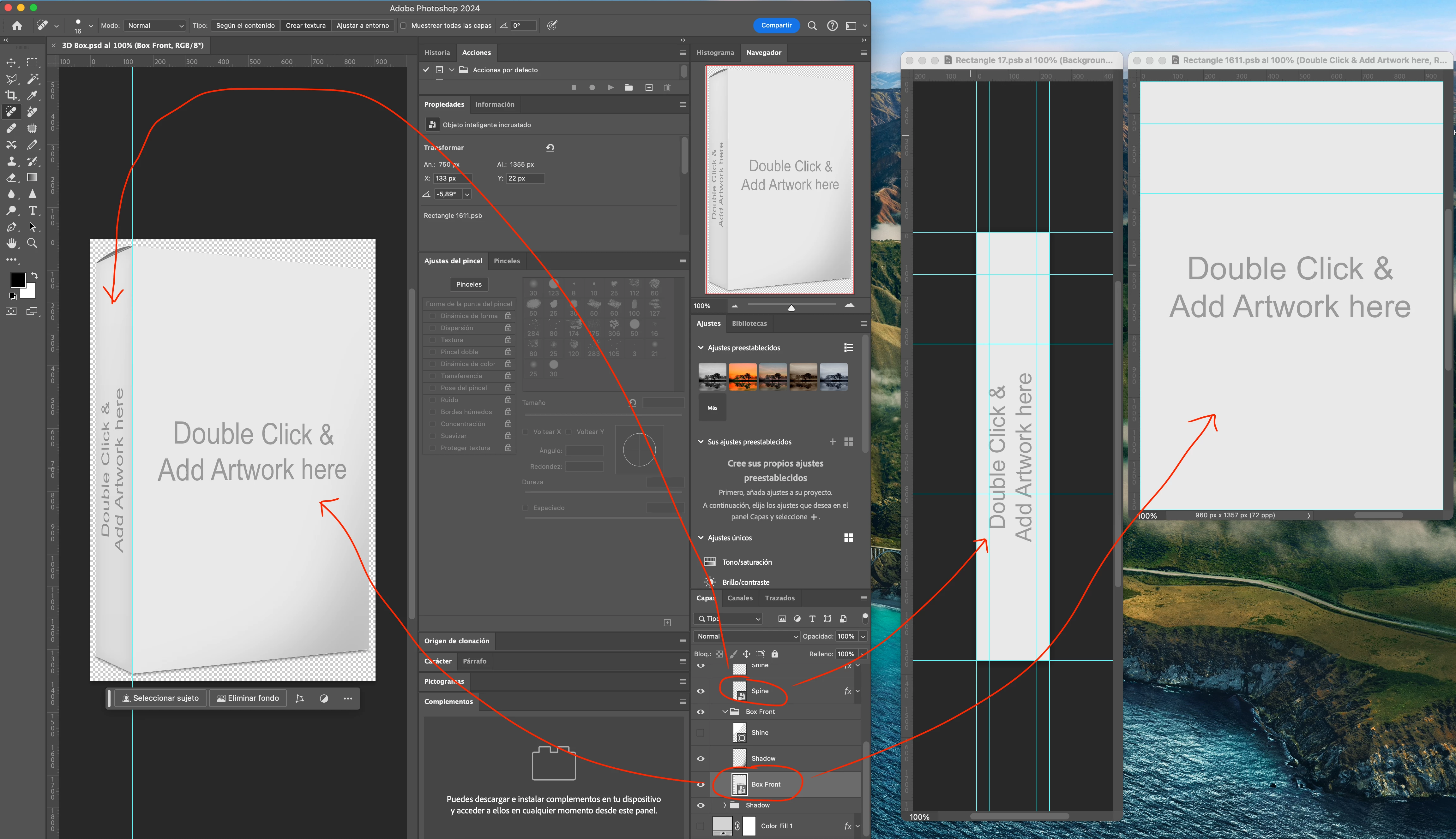
I have a psd template "3D Box.psd" which is a game box with two smart objects: One is the Box Front, and the other is the Box Spine.
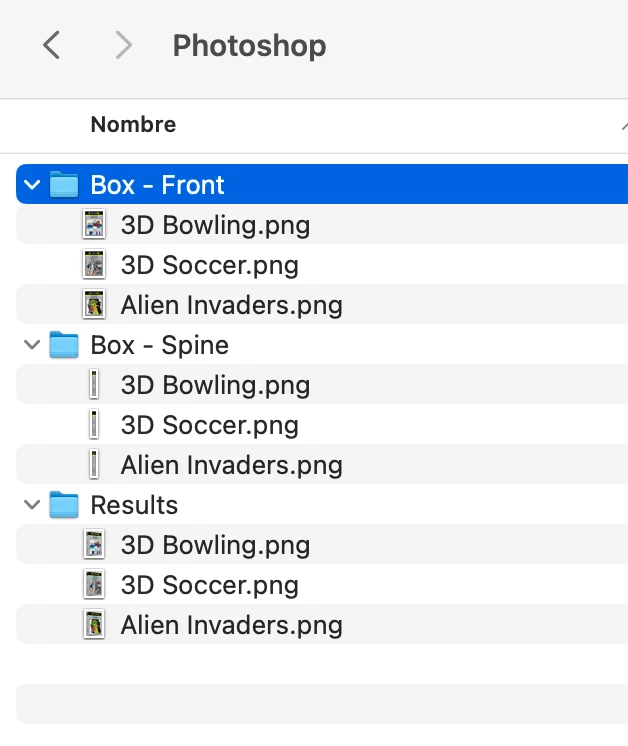
I also have three folders on my computer:
- Box - Front (With all images of the box front)
- Box - Spine (With all images of the box spine)
- Results (Output folder for all the images that i would like the script generates in .png format)
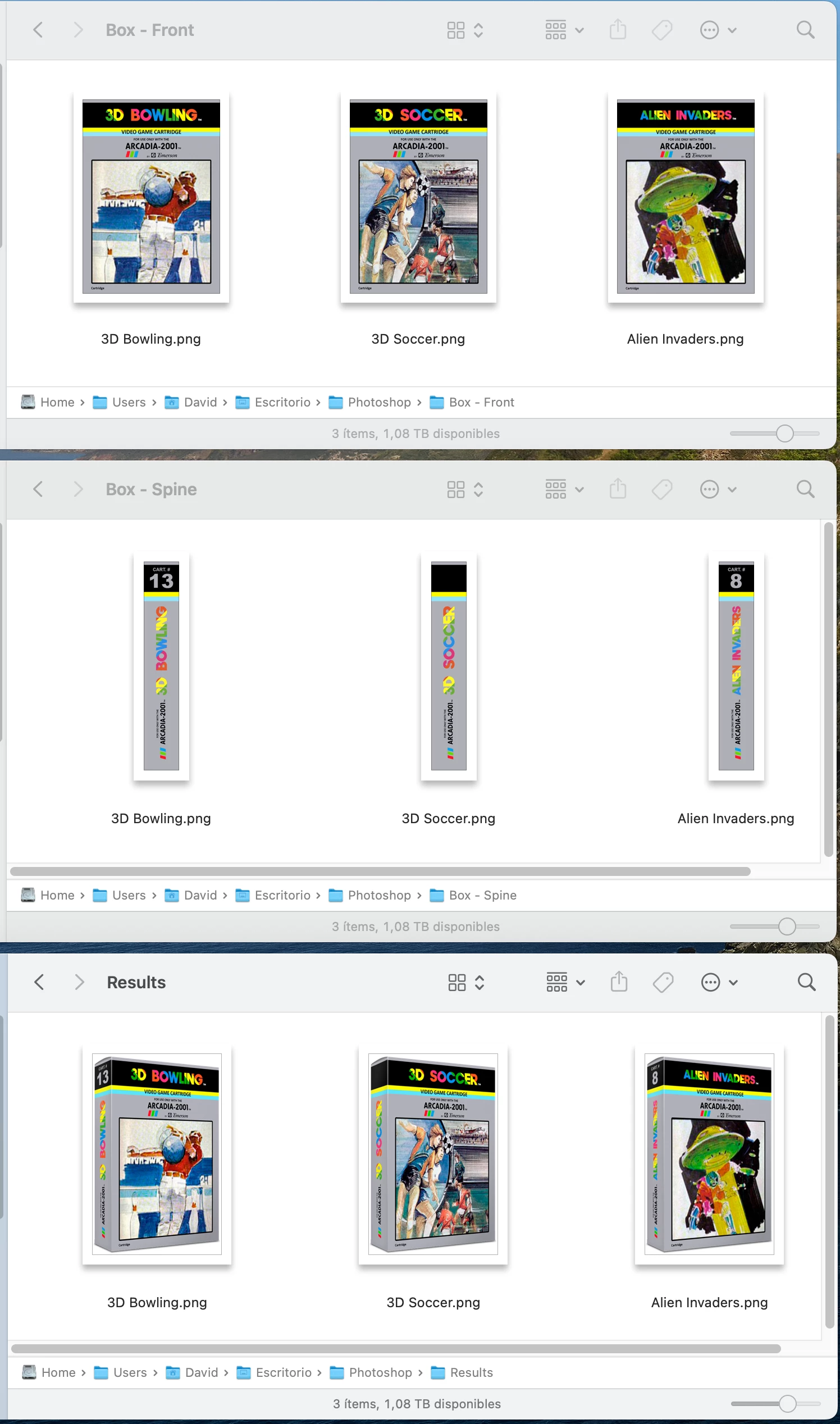
I wonder if is possible the script creates a 3D Box called the same way as the Front Box and Spines Image. And the same for all images in the folders.
Example of the job done manually by exporting one 3D Box by one.
Hope you can help me. Thank in advance!
@ci2own
Here is the revised script for your specific template and assets:
/*
Video Game Smart Object Layer Replacements to PNG.jsx
Version 1.0 - 22nd June 2024, Stephen Marsh
Based on:
https://community.adobe.com/t5/photoshop-ecosystem-discussions/batch-script-to-replace-2-smart-objects-and-save-the-final-image/m-p/13728400
*/

#target photoshop

    (function () {

        try {

            var selectFile = File.openDialog("Select the template file:");
            open(selectFile);

            // Image 1 input folder
            var theSpine = Folder.selectDialog("Select the Spine image folder:");
            if (theSpine === null) {
                //alert('Script cancelled!');
                return;
            }

            // Image 2 input folder
            var theFront = Folder.selectDialog("Select the Front image folder:");
            if (theFront === null) {
                //alert('Script cancelled!');
                return;
            }

            // Validate image folder selection
            var validateInputDir = (theSpine.fsName === theFront.fsName);
            if (validateInputDir === true) {
                alert("Script cancelled as both the input folders are the same!");
                return;
            }

            // Limit the file formats
            var list1 = theSpine.getFiles(/\.(jpe?g|tif?f|psd|psb|png|webp)$/i);
            var list2 = theFront.getFiles(/\.(jpe?g|tif?f|psd|psb|png|webp)$/i);

            // Alpha-numeric sort
            list1.sort();
            list2.sort();

            // Validate that folder 1 & 2 lists are not empty
            var validateEmptyList = (list1.length > 0 && list2.length > 0);
            if (validateEmptyList === false) {
                alert("Script cancelled as one of the input folders is empty!");
                return;
            }

            // Validate that the item count in folder 1 & 2 matches
            var validateListLength = (list1.length === list2.length);
            if (validateListLength === false) {
                alert("Script cancelled as the input folders don't have equal quantities of images!");
                return;
            }

            // Output folder
            var saveFolder = Folder.selectDialog("Select the folder to save the PNG files to...");
            if (saveFolder === null) {
                //alert('Script cancelled!');
                return;
            }

            // Save and set the dialog display settings
            var savedDisplayDialogs = app.displayDialogs;
            app.displayDialogs = DialogModes.NO;

            // PNG export options
            var pngOptions = new ExportOptionsSaveForWeb();
            pngOptions.PNG8 = false;
            pngOptions.transparency = true;
            pngOptions.interlaced = false;
            pngOptions.quality = 100;
            pngOptions.includeProfile = true;
            pngOptions.format = SaveDocumentType.PNG;

            // Set the file processing counter
            var fileCounter = 0;

            // Hide the Photoshop panels
            app.togglePalettes();

            // Script running notification window - courtesy of William Campbell
            // https://www.marspremedia.com/download?asset=adobe-script-tutorial-11.zip
            // https://youtu.be/JXPeLi6uPv4?si=Qx0OVNLAOzDrYPB4
            var working;
            working = new Window("palette");
            working.preferredSize = [300, -1];
            working.add("statictext");
            working.t = working.add("statictext");
            working.add("statictext");
            working.display = function (message) {
                this.t.text = message || "Script running, please wait...";
                this.show();
                app.refresh();
            };
            working.display();

            // Perform the SO replacements
            for (var i = 0; i < list1.length; i++) {

                // Box Spine
                app.activeDocument.activeLayer = app.activeDocument.layerSets.getByName('Product Box').layerSets.getByName('Spine').layers.getByName('Spine');
                app.runMenuItem(stringIDToTypeID('placedLayerEditContents'));
                app.activeDocument.activeLayer = app.activeDocument.layers[0];
                placeFile(list1[i], 100);
                removeAncestorsMD();
                var theName = app.activeDocument.activeLayer.name;
                activeDocument.close(SaveOptions.SAVECHANGES);

                // Box Front
                app.activeDocument.activeLayer = app.activeDocument.layerSets.getByName('Product Box').layerSets.getByName('Box Front').layers.getByName('Box Front');
                app.runMenuItem(stringIDToTypeID('placedLayerEditContents'));
                app.activeDocument.activeLayer = app.activeDocument.layers[0];
                placeFile(list2[i], 100);
                removeAncestorsMD();
                activeDocument.close(SaveOptions.SAVECHANGES);

                // Remove unwanted paste/place metadata
                removeAncestorsMD();

                // Save for Web to PNG
                activeDocument.exportDocument(File(saveFolder + "/" + theName + ".png"), ExportType.SAVEFORWEB, pngOptions);

                // Revert
                executeAction(stringIDToTypeID("revert"), undefined, DialogModes.NO);

                // Advance the counter
                fileCounter++;
            }

            // Ensure Photoshop has focus before closing the running script notification window
            app.bringToFront();
            working.close();

            // Close the template
            activeDocument.close(SaveOptions.DONOTSAVECHANGES);

            // Restore the Photoshop panels
            app.togglePalettes();

            // End of script
            app.displayDialogs = savedDisplayDialogs;
            app.beep();
            alert('Script completed!' + '\r' + fileCounter + ' SO replacement PNG files of ' + list1.length + ' input file sets saved to:' + '\r' + saveFolder.fsName);

        } catch (e) {
            alert("Error!" + "\r" + e + ' ' + e.line);
        }


        ///// Functions /////

        function placeFile(file, scale) {
            try {
                var idPlc = charIDToTypeID("Plc ");
                var desc2 = new ActionDescriptor();
                var idnull = charIDToTypeID("null");
                desc2.putPath(idnull, new File(file));
                var idFTcs = charIDToTypeID("FTcs");
                var idQCSt = charIDToTypeID("QCSt");
                var idQcsa = charIDToTypeID("Qcsa");
                desc2.putEnumerated(idFTcs, idQCSt, idQcsa);
                var idOfst = charIDToTypeID("Ofst");
                var desc3 = new ActionDescriptor();
                var idHrzn = charIDToTypeID("Hrzn");
                var idPxl = charIDToTypeID("#Pxl");
                desc3.putUnitDouble(idHrzn, idPxl, 0.000000);
                var idVrtc = charIDToTypeID("Vrtc");
                var idPxl = charIDToTypeID("#Pxl");
                desc3.putUnitDouble(idVrtc, idPxl, 0.000000);
                var idOfst = charIDToTypeID("Ofst");
                desc2.putObject(idOfst, idOfst, desc3);
                var idWdth = charIDToTypeID("Wdth");
                var idPrc = charIDToTypeID("#Prc");
                desc2.putUnitDouble(idWdth, idPrc, scale);
                var idHght = charIDToTypeID("Hght");
                var idPrc = charIDToTypeID("#Prc");
                desc2.putUnitDouble(idHght, idPrc, scale);
                var idAntA = charIDToTypeID("AntA");
                desc2.putBoolean(idAntA, true);
                executeAction(idPlc, desc2, DialogModes.NO);
            } catch (e) {}
        }

        function removeAncestorsMD() {
            // https://prepression.blogspot.com/2017/06/metadata-bloat-photoshopdocumentancestors.html
            if (ExternalObject.AdobeXMPScript === undefined) ExternalObject.AdobeXMPScript = new ExternalObject("lib:AdobeXMPScript");
            var xmp = new XMPMeta(activeDocument.xmpMetadata.rawData);
            xmp.deleteProperty(XMPConst.NS_PHOTOSHOP, "DocumentAncestors");
            app.activeDocument.xmpMetadata.rawData = xmp.serialize();
        }

    }());



 AdChoices