Participating Frequently
April 15, 2023
Answered

Batch Script To Replace 2 Smart Objects And Save The Final Image

  • April 15, 2023
  • 4 replies
  • 11397 views

Hi everyone,


My knowledge of coding is unfortunately very minimal, and I've been having a really hard time for the better part of the day trying to figure out how to do this following other answers I've seen on here.


I have a mock up PSD that has 2 smart objects within it and I have 2 folders each with an equal number of images in them.


I need a script that can replace the first smart object with an image from the first folder and the second smart object with an image from the second folder and then export the whole thing. There's about 700~ images in both of the folders so I need it to run through all of them if possible.

As an example it would export like this.


Fortunately the images have mirrored names across the folders (i.e image1-side-a and image1-side-b) so I don't need the script to look for filenames or anything like that.


Any help would be extremely appreciated.

This topic has been closed for replies.
Correct answer Stephen Marsh

Hi @Stephen Marsh ! I wonder if is there any way to addapt the script you post in this thread to my needs. I spent more than two hours without success (Sorry, i'm not good with coding).


Here is what i would need if possible:


I have a psd template "3D Box.psd" which is a game box with two smart objects: One is the Box Front, and the other is the Box Spine.
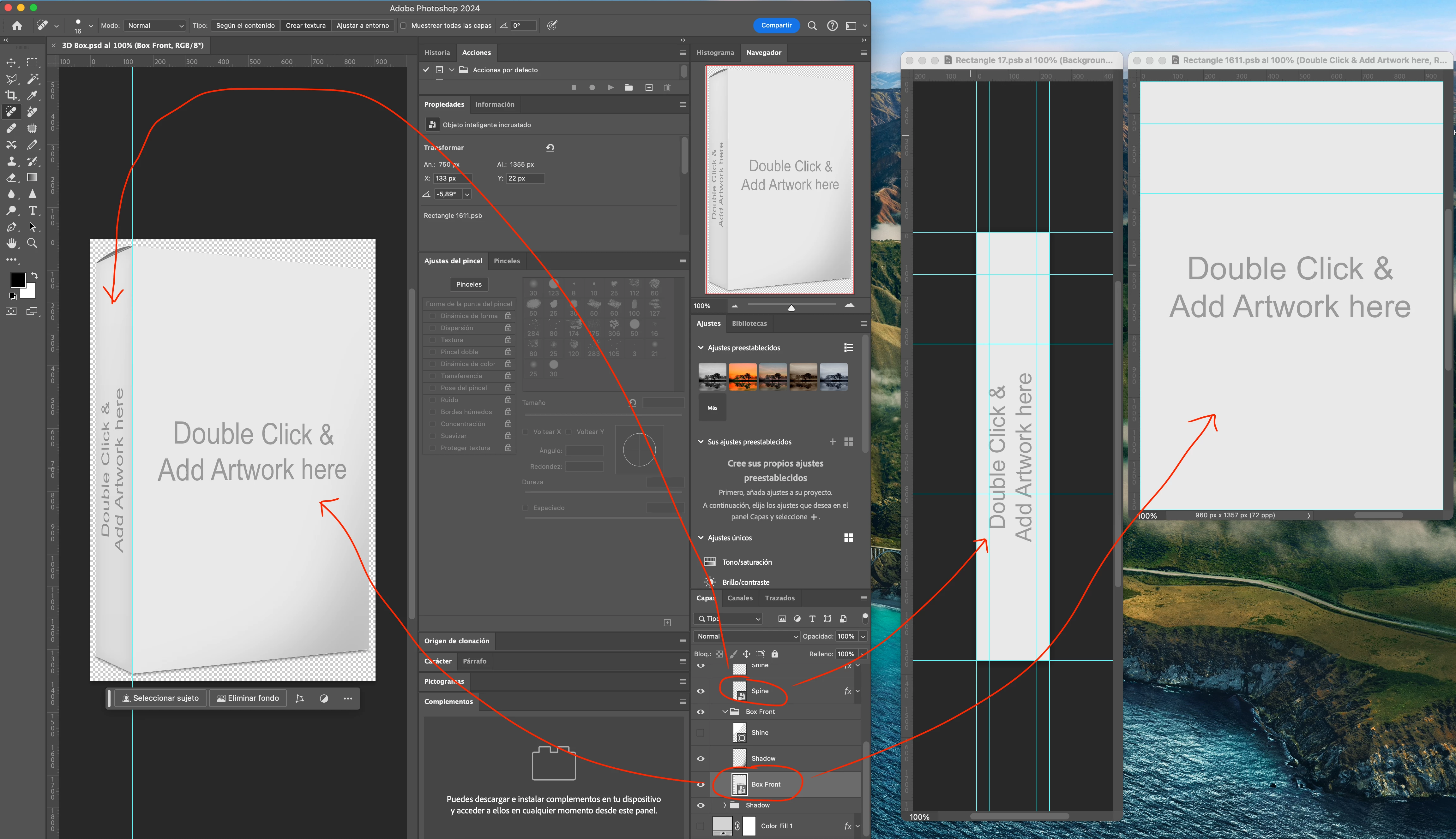


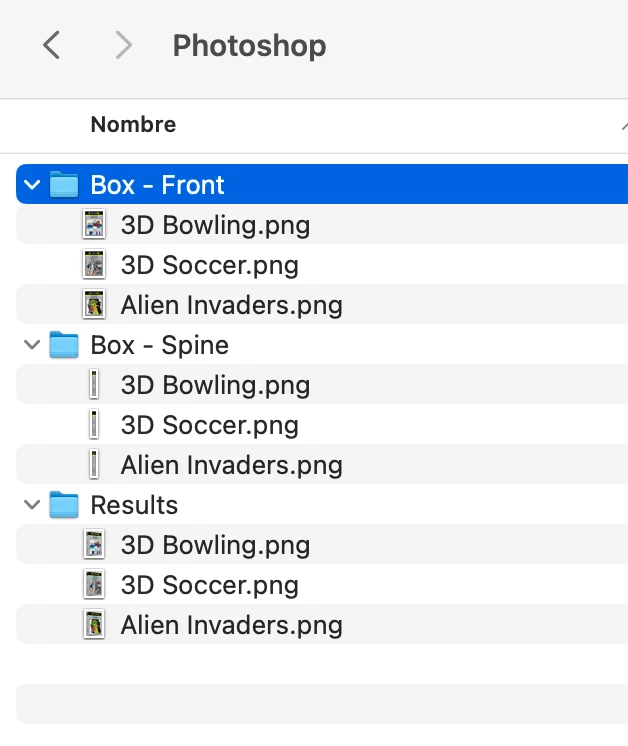
I also have three folders on my computer:

- Box - Front (With all images of the box front)

- Box - Spine (With all images of the box spine)

- Results (Output folder for all the images that i would like the script generates in .png format)


I wonder if is possible the script creates a 3D Box called the same way as the Front Box and Spines Image. And the same for all images in the folders.

Example of the job done manually by exporting one 3D Box by one.
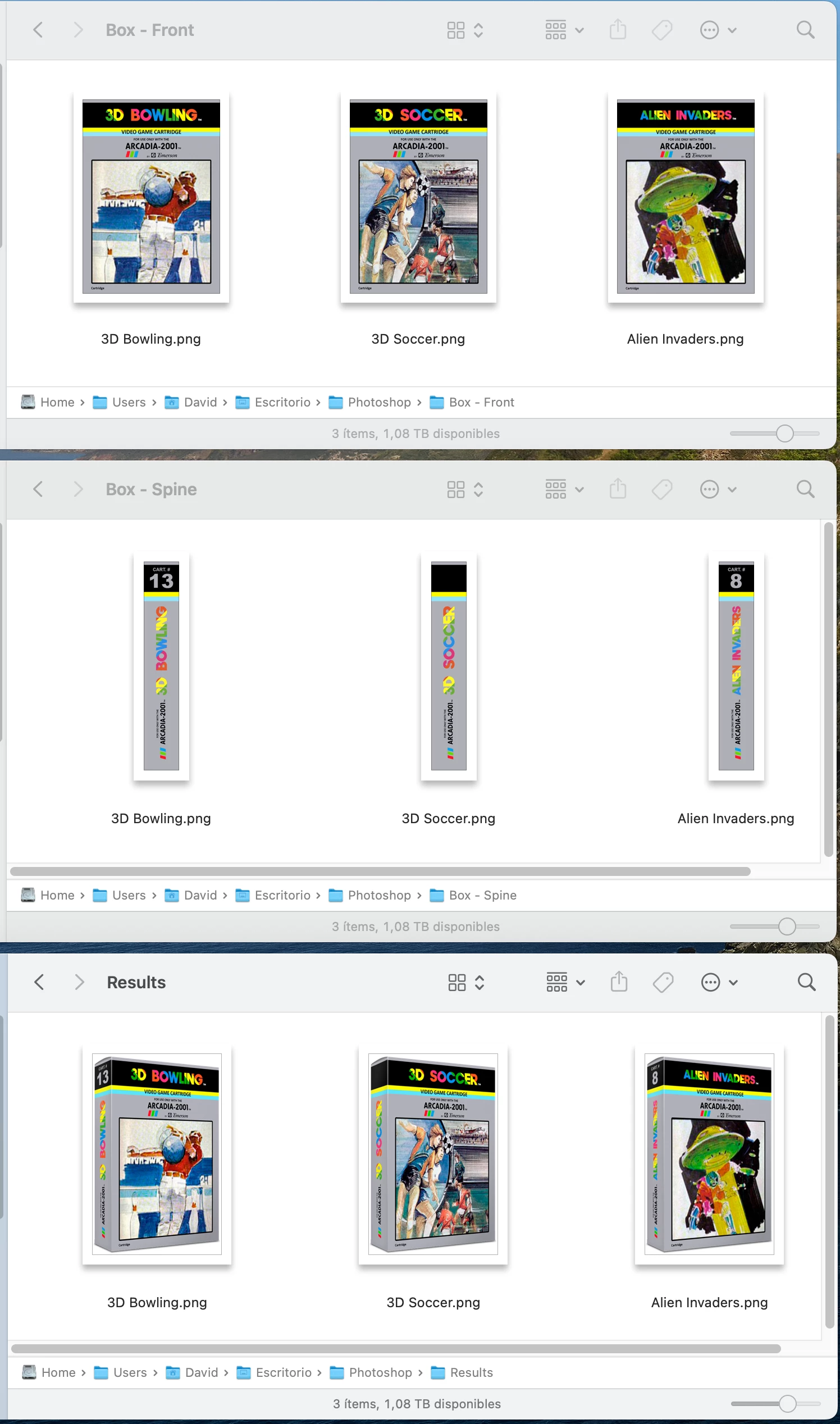
 

Hope you can help me. Thank in advance!


@ci2own 


Here is the revised script for your specific template and assets:


/*
Video Game Smart Object Layer Replacements to PNG.jsx
Version 1.0 - 22nd June 2024, Stephen Marsh
Based on:
https://community.adobe.com/t5/photoshop-ecosystem-discussions/batch-script-to-replace-2-smart-objects-and-save-the-final-image/m-p/13728400
*/

#target photoshop

    (function () {

        try {

            var selectFile = File.openDialog("Select the template file:");
            open(selectFile);

            // Image 1 input folder
            var theSpine = Folder.selectDialog("Select the Spine image folder:");
            if (theSpine === null) {
                //alert('Script cancelled!');
                return;
            }

            // Image 2 input folder
            var theFront = Folder.selectDialog("Select the Front image folder:");
            if (theFront === null) {
                //alert('Script cancelled!');
                return;
            }

            // Validate image folder selection
            var validateInputDir = (theSpine.fsName === theFront.fsName);
            if (validateInputDir === true) {
                alert("Script cancelled as both the input folders are the same!");
                return;
            }

            // Limit the file formats
            var list1 = theSpine.getFiles(/\.(jpe?g|tif?f|psd|psb|png|webp)$/i);
            var list2 = theFront.getFiles(/\.(jpe?g|tif?f|psd|psb|png|webp)$/i);

            // Alpha-numeric sort
            list1.sort();
            list2.sort();

            // Validate that folder 1 & 2 lists are not empty 
            var validateEmptyList = (list1.length > 0 && list2.length > 0);
            if (validateEmptyList === false) {
                alert("Script cancelled as one of the input folders is empty!");
                return;
            }

            // Validate that the item count in folder 1 & 2 matches
            var validateListLength = (list1.length === list2.length);
            if (validateListLength === false) {
                alert("Script cancelled as the input folders don't have equal quantities of images!");
                return;
            }

            // Output folder
            var saveFolder = Folder.selectDialog("Select the folder to save the PNG files to...");
            if (saveFolder === null) {
                //alert('Script cancelled!');
                return;
            }

            // Save and set the dialog display settings
            var savedDisplayDialogs = app.displayDialogs;
            app.displayDialogs = DialogModes.NO;

            // PNG export options
            var pngOptions = new ExportOptionsSaveForWeb();
            pngOptions.PNG8 = false;
            pngOptions.transparency = true;
            pngOptions.interlaced = false;
            pngOptions.quality = 100;
            pngOptions.includeProfile = true;
            pngOptions.format = SaveDocumentType.PNG;

            // Set the file processing counter
            var fileCounter = 0;

            // Hide the Photoshop panels
            app.togglePalettes();

            // Script running notification window - courtesy of William Campbell
            // https://www.marspremedia.com/download?asset=adobe-script-tutorial-11.zip
            // https://youtu.be/JXPeLi6uPv4?si=Qx0OVNLAOzDrYPB4
            var working;
            working = new Window("palette");
            working.preferredSize = [300, -1];
            working.add("statictext");
            working.t = working.add("statictext");
            working.add("statictext");
            working.display = function (message) {
                this.t.text = message || "Script running, please wait...";
                this.show();
                app.refresh();
            };
            working.display();

            // Perform the SO replacements
            for (var i = 0; i < list1.length; i++) {

                // Box Spine
                app.activeDocument.activeLayer = app.activeDocument.layerSets.getByName('Product Box').layerSets.getByName('Spine').layers.getByName('Spine');
                app.runMenuItem(stringIDToTypeID('placedLayerEditContents'));
                app.activeDocument.activeLayer = app.activeDocument.layers[0];
                placeFile(list1[i], 100);
                removeAncestorsMD();
                var theName = app.activeDocument.activeLayer.name;
                activeDocument.close(SaveOptions.SAVECHANGES);

                // Box Front
                app.activeDocument.activeLayer = app.activeDocument.layerSets.getByName('Product Box').layerSets.getByName('Box Front').layers.getByName('Box Front');
                app.runMenuItem(stringIDToTypeID('placedLayerEditContents'));
                app.activeDocument.activeLayer = app.activeDocument.layers[0];
                placeFile(list2[i], 100);
                removeAncestorsMD();
                activeDocument.close(SaveOptions.SAVECHANGES);

                // Remove unwanted paste/place metadata
                removeAncestorsMD();

                // Save for Web to PNG
                activeDocument.exportDocument(File(saveFolder + "/" + theName + ".png"), ExportType.SAVEFORWEB, pngOptions);

                // Revert
                executeAction(stringIDToTypeID("revert"), undefined, DialogModes.NO);

                // Advance the counter
                fileCounter++;
            }

            // Ensure Photoshop has focus before closing the running script notification window
            app.bringToFront();
            working.close();

            // Close the template
            activeDocument.close(SaveOptions.DONOTSAVECHANGES);

            // Restore the Photoshop panels
            app.togglePalettes();

            // End of script
            app.displayDialogs = savedDisplayDialogs;
            app.beep();
            alert('Script completed!' + '\r' + fileCounter + ' SO replacement PNG files of ' + list1.length + ' input file sets saved to:' + '\r' + saveFolder.fsName);

        } catch (e) {
            alert("Error!" + "\r" + e + ' ' + e.line);
        }


        ///// Functions /////

        function placeFile(file, scale) {
            try {
                var idPlc = charIDToTypeID("Plc ");
                var desc2 = new ActionDescriptor();
                var idnull = charIDToTypeID("null");
                desc2.putPath(idnull, new File(file));
                var idFTcs = charIDToTypeID("FTcs");
                var idQCSt = charIDToTypeID("QCSt");
                var idQcsa = charIDToTypeID("Qcsa");
                desc2.putEnumerated(idFTcs, idQCSt, idQcsa);
                var idOfst = charIDToTypeID("Ofst");
                var desc3 = new ActionDescriptor();
                var idHrzn = charIDToTypeID("Hrzn");
                var idPxl = charIDToTypeID("#Pxl");
                desc3.putUnitDouble(idHrzn, idPxl, 0.000000);
                var idVrtc = charIDToTypeID("Vrtc");
                var idPxl = charIDToTypeID("#Pxl");
                desc3.putUnitDouble(idVrtc, idPxl, 0.000000);
                var idOfst = charIDToTypeID("Ofst");
                desc2.putObject(idOfst, idOfst, desc3);
                var idWdth = charIDToTypeID("Wdth");
                var idPrc = charIDToTypeID("#Prc");
                desc2.putUnitDouble(idWdth, idPrc, scale);
                var idHght = charIDToTypeID("Hght");
                var idPrc = charIDToTypeID("#Prc");
                desc2.putUnitDouble(idHght, idPrc, scale);
                var idAntA = charIDToTypeID("AntA");
                desc2.putBoolean(idAntA, true);
                executeAction(idPlc, desc2, DialogModes.NO);
            } catch (e) {}
        }

        function removeAncestorsMD() {
            // https://prepression.blogspot.com/2017/06/metadata-bloat-photoshopdocumentancestors.html
            if (ExternalObject.AdobeXMPScript === undefined) ExternalObject.AdobeXMPScript = new ExternalObject("lib:AdobeXMPScript");
            var xmp = new XMPMeta(activeDocument.xmpMetadata.rawData);
            xmp.deleteProperty(XMPConst.NS_PHOTOSHOP, "DocumentAncestors");
            app.activeDocument.xmpMetadata.rawData = xmp.serialize();
        }

    }());


4 replies

Stephen Marsh
Community Expert
April 16, 2023

@NelNelD – Here is a version that uses Export > Save for Web to create PNG files.


/*
2 Input Folder Smart Object Layer Replacements to PNG.jsx
Version 1.3 - 19th April 2023, Stephen Marsh
https://community.adobe.com/t5/photoshop-ecosystem-discussions/batch-script-to-replace-2-smart-objects-and-save-the-final-image/m-p/13728400
*/

#target photoshop

    (function () {

        try {

            if (app.documents.length === 1) {

                // Image 1 input folder
                var folder1 = Folder.selectDialog("Select the Side-1 image folder:");
                if (folder1 === null) {
                    //alert('Script cancelled!');
                    return;
                }

                // Image 2 input folder
                var folder2 = Folder.selectDialog("Select the Side-2 image folder:");
                if (folder2 === null) {
                    //alert('Script cancelled!');
                    return;
                }

                // Validate input folder selection
                var validateInputDir = (folder1.fsName === folder2.fsName);
                if (validateInputDir === true) {
                    alert("Script cancelled as both the input folders are the same!");
                    return;
                }

                // Limit the file input as required
                var list1 = folder1.getFiles(/\.(jpe?g|tif?f|psd|psb|png)$/i);
                var list2 = folder2.getFiles(/\.(jpe?g|tif?f|psd|psb|png)$/i);

                // Alpha-numeric sort
                list1.sort();
                list2.sort();

                // Validate that folder 1 & 2 lists are not empty 
                var validateEmptyList = (list1.length > 0 && list2.length > 0);
                if (validateEmptyList === false) {
                    alert("Script cancelled as one of the input folders is empty!");
                    return;
                }

                // Validate that the item count in folder 1 & 2 matches
                var validateListLength = (list1.length === list2.length);
                if (validateListLength === false) {
                    alert("Script cancelled as the input folders don't have equal quantities of images!");
                    return;
                }

                // Output folder
                var saveFolder = Folder.selectDialog("Please select the folder to save to...");
                if (saveFolder === null) {
                    //alert('Script cancelled!');
                    return;
                }

                // Save and set the dialog display settings
                var savedDisplayDialogs = app.displayDialogs;
                app.displayDialogs = DialogModes.NO;

                // PNG export options
                var pngOptions = new ExportOptionsSaveForWeb();
                pngOptions.PNG8 = false;
                pngOptions.transparency = true;
                pngOptions.interlaced = false;
                pngOptions.quality = 100;
                pngOptions.includeProfile = true;
                pngOptions.format = SaveDocumentType.PNG;

                // Set the file processing counter
                var fileCounter = 0;

                // Perform the SO replacements
                for (var i = 0; i < list1.length; i++) {

                    selectBackLayer();
                    activeDocument.activeLayer = activeDocument.layers["Side-1"];
                    if (activeDocument.activeLayer.kind === LayerKind.SMARTOBJECT) {
                        app.runMenuItem(stringIDToTypeID('placedLayerEditContents'));
                        placeFile(list1[i], 100);
                        var side1Name = activeDocument.activeLayer.name;
                        removeAllLayersExceptFrontLayer();
                        removeAncestorsMD();
                        activeDocument.close(SaveOptions.SAVECHANGES);
                    } else {
                        alert("The layer isn't a Smart Object!");
                    }

                    activeDocument.activeLayer = activeDocument.layers["Side-2"];
                    if (activeDocument.activeLayer.kind === LayerKind.SMARTOBJECT) {
                        app.runMenuItem(stringIDToTypeID('placedLayerEditContents'));
                        placeFile(list2[i], 100);
                        var side2Name = activeDocument.activeLayer.name;
                        removeAllLayersExceptFrontLayer();
                        removeAncestorsMD();
                        activeDocument.close(SaveOptions.SAVECHANGES);
                    } else {
                        alert("The layer isn't a Smart Object!");
                    }

                    activeDocument.exportDocument(File(saveFolder + "/" + side1Name + "_" + side2Name + ".png"), ExportType.SAVEFORWEB, pngOptions);

                    // Advance the counter
                    fileCounter++;
                }

                removeAncestorsMD();
                activeDocument.close(SaveOptions.SAVECHANGES);

                // End of script
                app.displayDialogs = savedDisplayDialogs;
                app.beep();
                alert('Script completed!' + '\r' + fileCounter + ' SO replacement PNG files of ' + list1.length + ' input file sets saved to:' + '\r' + saveFolder.fsName);

            } else {
                alert("Only the template file should be open!");
            }

        } catch (e) {
            alert("Error!" + "\r" + e + ' ' + e.line);
        }


        ///// Functions /////

        function placeFile(file, scale) {
            try {
                var idPlc = charIDToTypeID("Plc ");
                var desc2 = new ActionDescriptor();
                var idnull = charIDToTypeID("null");
                desc2.putPath(idnull, new File(file));
                var idFTcs = charIDToTypeID("FTcs");
                var idQCSt = charIDToTypeID("QCSt");
                var idQcsa = charIDToTypeID("Qcsa");
                desc2.putEnumerated(idFTcs, idQCSt, idQcsa);
                var idOfst = charIDToTypeID("Ofst");
                var desc3 = new ActionDescriptor();
                var idHrzn = charIDToTypeID("Hrzn");
                var idPxl = charIDToTypeID("#Pxl");
                desc3.putUnitDouble(idHrzn, idPxl, 0.000000);
                var idVrtc = charIDToTypeID("Vrtc");
                var idPxl = charIDToTypeID("#Pxl");
                desc3.putUnitDouble(idVrtc, idPxl, 0.000000);
                var idOfst = charIDToTypeID("Ofst");
                desc2.putObject(idOfst, idOfst, desc3);
                var idWdth = charIDToTypeID("Wdth");
                var idPrc = charIDToTypeID("#Prc");
                desc2.putUnitDouble(idWdth, idPrc, scale);
                var idHght = charIDToTypeID("Hght");
                var idPrc = charIDToTypeID("#Prc");
                desc2.putUnitDouble(idHght, idPrc, scale);
                var idAntA = charIDToTypeID("AntA");
                desc2.putBoolean(idAntA, true);
                executeAction(idPlc, desc2, DialogModes.NO);
            } catch (e) {}
        }

        function selectBackLayer() {
            app.activeDocument.activeLayer = app.activeDocument.layers[app.activeDocument.layers.length - 1];
        }

        function removeAllLayersExceptFrontLayer() {
            // Remove all layers except the top/front layer
            for (var i = activeDocument.layers.length - 1; i >= 1; i--) {
                var theLayer = activeDocument.layers[i];
                theLayer.remove();
            }
        }

        function removeAllLayersExceptBackLayer() {
            // Remove all layers except the bottom/back layer
            for (var i = activeDocument.layers.length - 2; i >= 0; i--) {
                var theLayer = activeDocument.layers[i];
                theLayer.remove();
            }
        }

        function removeAncestorsMD() {
            // https://prepression.blogspot.com/2017/06/metadata-bloat-photoshopdocumentancestors.html
            if (ExternalObject.AdobeXMPScript === undefined) ExternalObject.AdobeXMPScript = new ExternalObject("lib:AdobeXMPScript");
            var xmp = new XMPMeta(activeDocument.xmpMetadata.rawData);
            xmp.deleteProperty(XMPConst.NS_PHOTOSHOP, "DocumentAncestors");
            app.activeDocument.xmpMetadata.rawData = xmp.serialize();
        }

    }());



NelNelDAuthor
Participating Frequently
April 17, 2023

This is amazing, thank you so much.

I've just run into another issue, because the files being used for the source images are transparent PNGs with a shadow, it seems they're overlapping in the smart object causing the shadow to get increasingly darker with every loop.


Is it possible to include a part of the script that removes the previous layer within the smart object before / after it adds the new file?


I've attached 5 images that show the shadow getting progressively darker, it's most noticeable on the left of the pillows.

ci2own
Known Participant
June 22, 2024

@ci2own 


Here is the revised script for your specific template and assets:


/*
Video Game Smart Object Layer Replacements to PNG.jsx
Version 1.0 - 22nd June 2024, Stephen Marsh
Based on:
https://community.adobe.com/t5/photoshop-ecosystem-discussions/batch-script-to-replace-2-smart-objects-and-save-the-final-image/m-p/13728400
*/

#target photoshop

    (function () {

        try {

            var selectFile = File.openDialog("Select the template file:");
            open(selectFile);

            // Image 1 input folder
            var theSpine = Folder.selectDialog("Select the Spine image folder:");
            if (theSpine === null) {
                //alert('Script cancelled!');
                return;
            }

            // Image 2 input folder
            var theFront = Folder.selectDialog("Select the Front image folder:");
            if (theFront === null) {
                //alert('Script cancelled!');
                return;
            }

            // Validate image folder selection
            var validateInputDir = (theSpine.fsName === theFront.fsName);
            if (validateInputDir === true) {
                alert("Script cancelled as both the input folders are the same!");
                return;
            }

            // Limit the file formats
            var list1 = theSpine.getFiles(/\.(jpe?g|tif?f|psd|psb|png|webp)$/i);
            var list2 = theFront.getFiles(/\.(jpe?g|tif?f|psd|psb|png|webp)$/i);

            // Alpha-numeric sort
            list1.sort();
            list2.sort();

            // Validate that folder 1 & 2 lists are not empty 
            var validateEmptyList = (list1.length > 0 && list2.length > 0);
            if (validateEmptyList === false) {
                alert("Script cancelled as one of the input folders is empty!");
                return;
            }

            // Validate that the item count in folder 1 & 2 matches
            var validateListLength = (list1.length === list2.length);
            if (validateListLength === false) {
                alert("Script cancelled as the input folders don't have equal quantities of images!");
                return;
            }

            // Output folder
            var saveFolder = Folder.selectDialog("Select the folder to save the PNG files to...");
            if (saveFolder === null) {
                //alert('Script cancelled!');
                return;
            }

            // Save and set the dialog display settings
            var savedDisplayDialogs = app.displayDialogs;
            app.displayDialogs = DialogModes.NO;

            // PNG export options
            var pngOptions = new ExportOptionsSaveForWeb();
            pngOptions.PNG8 = false;
            pngOptions.transparency = true;
            pngOptions.interlaced = false;
            pngOptions.quality = 100;
            pngOptions.includeProfile = true;
            pngOptions.format = SaveDocumentType.PNG;

            // Set the file processing counter
            var fileCounter = 0;

            // Hide the Photoshop panels
            app.togglePalettes();

            // Script running notification window - courtesy of William Campbell
            // https://www.marspremedia.com/download?asset=adobe-script-tutorial-11.zip
            // https://youtu.be/JXPeLi6uPv4?si=Qx0OVNLAOzDrYPB4
            var working;
            working = new Window("palette");
            working.preferredSize = [300, -1];
            working.add("statictext");
            working.t = working.add("statictext");
            working.add("statictext");
            working.display = function (message) {
                this.t.text = message || "Script running, please wait...";
                this.show();
                app.refresh();
            };
            working.display();

            // Perform the SO replacements
            for (var i = 0; i < list1.length; i++) {

                // Box Spine
                app.activeDocument.activeLayer = app.activeDocument.layerSets.getByName('Product Box').layerSets.getByName('Spine').layers.getByName('Spine');
                app.runMenuItem(stringIDToTypeID('placedLayerEditContents'));
                app.activeDocument.activeLayer = app.activeDocument.layers[0];
                placeFile(list1[i], 100);
                removeAncestorsMD();
                var theName = app.activeDocument.activeLayer.name;
                activeDocument.close(SaveOptions.SAVECHANGES);

                // Box Front
                app.activeDocument.activeLayer = app.activeDocument.layerSets.getByName('Product Box').layerSets.getByName('Box Front').layers.getByName('Box Front');
                app.runMenuItem(stringIDToTypeID('placedLayerEditContents'));
                app.activeDocument.activeLayer = app.activeDocument.layers[0];
                placeFile(list2[i], 100);
                removeAncestorsMD();
                activeDocument.close(SaveOptions.SAVECHANGES);

                // Remove unwanted paste/place metadata
                removeAncestorsMD();

                // Save for Web to PNG
                activeDocument.exportDocument(File(saveFolder + "/" + theName + ".png"), ExportType.SAVEFORWEB, pngOptions);

                // Revert
                executeAction(stringIDToTypeID("revert"), undefined, DialogModes.NO);

                // Advance the counter
                fileCounter++;
            }

            // Ensure Photoshop has focus before closing the running script notification window
            app.bringToFront();
            working.close();

            // Close the template
            activeDocument.close(SaveOptions.DONOTSAVECHANGES);

            // Restore the Photoshop panels
            app.togglePalettes();

            // End of script
            app.displayDialogs = savedDisplayDialogs;
            app.beep();
            alert('Script completed!' + '\r' + fileCounter + ' SO replacement PNG files of ' + list1.length + ' input file sets saved to:' + '\r' + saveFolder.fsName);

        } catch (e) {
            alert("Error!" + "\r" + e + ' ' + e.line);
        }


        ///// Functions /////

        function placeFile(file, scale) {
            try {
                var idPlc = charIDToTypeID("Plc ");
                var desc2 = new ActionDescriptor();
                var idnull = charIDToTypeID("null");
                desc2.putPath(idnull, new File(file));
                var idFTcs = charIDToTypeID("FTcs");
                var idQCSt = charIDToTypeID("QCSt");
                var idQcsa = charIDToTypeID("Qcsa");
                desc2.putEnumerated(idFTcs, idQCSt, idQcsa);
                var idOfst = charIDToTypeID("Ofst");
                var desc3 = new ActionDescriptor();
                var idHrzn = charIDToTypeID("Hrzn");
                var idPxl = charIDToTypeID("#Pxl");
                desc3.putUnitDouble(idHrzn, idPxl, 0.000000);
                var idVrtc = charIDToTypeID("Vrtc");
                var idPxl = charIDToTypeID("#Pxl");
                desc3.putUnitDouble(idVrtc, idPxl, 0.000000);
                var idOfst = charIDToTypeID("Ofst");
                desc2.putObject(idOfst, idOfst, desc3);
                var idWdth = charIDToTypeID("Wdth");
                var idPrc = charIDToTypeID("#Prc");
                desc2.putUnitDouble(idWdth, idPrc, scale);
                var idHght = charIDToTypeID("Hght");
                var idPrc = charIDToTypeID("#Prc");
                desc2.putUnitDouble(idHght, idPrc, scale);
                var idAntA = charIDToTypeID("AntA");
                desc2.putBoolean(idAntA, true);
                executeAction(idPlc, desc2, DialogModes.NO);
            } catch (e) {}
        }

        function removeAncestorsMD() {
            // https://prepression.blogspot.com/2017/06/metadata-bloat-photoshopdocumentancestors.html
            if (ExternalObject.AdobeXMPScript === undefined) ExternalObject.AdobeXMPScript = new ExternalObject("lib:AdobeXMPScript");
            var xmp = new XMPMeta(activeDocument.xmpMetadata.rawData);
            xmp.deleteProperty(XMPConst.NS_PHOTOSHOP, "DocumentAncestors");
            app.activeDocument.xmpMetadata.rawData = xmp.serialize();
        }

    }());

Wow! This script worked like a charm! 🙂


The only thing, in the result files, it adds a "-" between every word instead of a space.


 And also i realized doing some tests, the example images fits perfect on the result box, because i exported them from the same template, but when image size don't match the one in the smart object, it doesn't addapt it automatically:


Stephen Marsh
Community Expert
April 16, 2023

@NelNelD 


Try this script and the template that I simplified from your original:


/*
2 Input Folder Smart Object Layer Replacements to PSD.jsx
Version 1.3 - 19th April 2023, Stephen Marsh
https://community.adobe.com/t5/photoshop-ecosystem-discussions/batch-script-to-replace-2-smart-objects-and-save-the-final-image/m-p/13728400
*/

#target photoshop

    (function () {

        try {

            if (app.documents.length === 1) {

                // Image 1 input folder
                var folder1 = Folder.selectDialog("Select the Side-1 image folder:");
                if (folder1 === null) {
                    //alert('Script cancelled!');
                    return;
                }

                // Image 2 input folder
                var folder2 = Folder.selectDialog("Select the Side-2 image folder:");
                if (folder2 === null) {
                    //alert('Script cancelled!');
                    return;
                }

                // Validate input folder selection
                var validateInputDir = (folder1.fsName === folder2.fsName);
                if (validateInputDir === true) {
                    alert("Script cancelled as both the input folders are the same!");
                    return;
                }

                // Limit the file input as required
                var list1 = folder1.getFiles(/\.(jpe?g|tif?f|psd|psb|png)$/i);
                var list2 = folder2.getFiles(/\.(jpe?g|tif?f|psd|psb|png)$/i);

                // Alpha-numeric sort
                list1.sort();
                list2.sort();

                // Validate that folder 1 & 2 lists are not empty 
                var validateEmptyList = (list1.length > 0 && list2.length > 0);
                if (validateEmptyList === false) {
                    alert("Script cancelled as one of the input folders is empty!");
                    return;
                }

                // Validate that the item count in folder 1 & 2 matches
                var validateListLength = (list1.length === list2.length);
                if (validateListLength === false) {
                    alert("Script cancelled as the input folders don't have equal quantities of images!");
                    return;
                }

                // Output folder
                var saveFolder = Folder.selectDialog("Please select the folder to save to...");
                if (saveFolder === null) {
                    //alert('Script cancelled!');
                    return;
                }

                // Save and set the dialog display settings
                var savedDisplayDialogs = app.displayDialogs;
                app.displayDialogs = DialogModes.NO;

                // PSD save options
                var psdOptions = new PhotoshopSaveOptions();
                psdOptions.embedColorProfile = true;
                psdOptions.alphaChannels = true;
                psdOptions.layers = true;
                psdOptions.spotColors = true;

                // Set the file processing counter
                var fileCounter = 0;

                // Perform the SO replacements
                for (var i = 0; i < list1.length; i++) {

                    selectBackLayer();
                    activeDocument.activeLayer = activeDocument.layers["Side-1"];
                    if (activeDocument.activeLayer.kind === LayerKind.SMARTOBJECT) {
                        app.runMenuItem(stringIDToTypeID('placedLayerEditContents'));
                        placeFile(list1[i], 100);
                        var side1Name = activeDocument.activeLayer.name;
                        removeAllLayersExceptFrontLayer();
                        removeAncestorsMD();
                        activeDocument.close(SaveOptions.SAVECHANGES);
                    } else {
                        alert("The layer isn't a Smart Object!");
                    }

                    activeDocument.activeLayer = activeDocument.layers["Side-2"];
                    if (activeDocument.activeLayer.kind === LayerKind.SMARTOBJECT) {
                        app.runMenuItem(stringIDToTypeID('placedLayerEditContents'));
                        placeFile(list2[i], 100);
                        var side2Name = activeDocument.activeLayer.name;
                        removeAllLayersExceptFrontLayer();
                        removeAncestorsMD();
                        activeDocument.close(SaveOptions.SAVECHANGES);
                    } else {
                        alert("The layer isn't a Smart Object!");
                    }

                    activeDocument.saveAs(new File(saveFolder + '/' + side1Name + "_" + side2Name + '.psd'), psdOptions);

                    // Advance the counter
                    fileCounter++;
                }

                removeAncestorsMD();
                activeDocument.close(SaveOptions.SAVECHANGES);

                // End of script
                app.displayDialogs = savedDisplayDialogs;
                app.beep();
                alert('Script completed!' + '\r' + fileCounter + ' SO replacement PSD files of ' + list1.length + ' input file sets saved to:' + '\r' + saveFolder.fsName);

            } else {
                alert("Only the template file should be open!");
            }

        } catch (e) {
            alert("Error!" + "\r" + e + ' ' + e.line);
        }


        ///// Functions /////

        function placeFile(file, scale) {
            try {
                var idPlc = charIDToTypeID("Plc ");
                var desc2 = new ActionDescriptor();
                var idnull = charIDToTypeID("null");
                desc2.putPath(idnull, new File(file));
                var idFTcs = charIDToTypeID("FTcs");
                var idQCSt = charIDToTypeID("QCSt");
                var idQcsa = charIDToTypeID("Qcsa");
                desc2.putEnumerated(idFTcs, idQCSt, idQcsa);
                var idOfst = charIDToTypeID("Ofst");
                var desc3 = new ActionDescriptor();
                var idHrzn = charIDToTypeID("Hrzn");
                var idPxl = charIDToTypeID("#Pxl");
                desc3.putUnitDouble(idHrzn, idPxl, 0.000000);
                var idVrtc = charIDToTypeID("Vrtc");
                var idPxl = charIDToTypeID("#Pxl");
                desc3.putUnitDouble(idVrtc, idPxl, 0.000000);
                var idOfst = charIDToTypeID("Ofst");
                desc2.putObject(idOfst, idOfst, desc3);
                var idWdth = charIDToTypeID("Wdth");
                var idPrc = charIDToTypeID("#Prc");
                desc2.putUnitDouble(idWdth, idPrc, scale);
                var idHght = charIDToTypeID("Hght");
                var idPrc = charIDToTypeID("#Prc");
                desc2.putUnitDouble(idHght, idPrc, scale);
                var idAntA = charIDToTypeID("AntA");
                desc2.putBoolean(idAntA, true);
                executeAction(idPlc, desc2, DialogModes.NO);
            } catch (e) {}
        }

        function selectBackLayer() {
            app.activeDocument.activeLayer = app.activeDocument.layers[app.activeDocument.layers.length - 1];
        }

        function removeAllLayersExceptFrontLayer() {
            // Remove all layers except the top/front layer
            for (var i = activeDocument.layers.length - 1; i >= 1; i--) {
                var theLayer = activeDocument.layers[i];
                theLayer.remove();
            }
        }

        function removeAllLayersExceptBackLayer() {
            // Remove all layers except the bottom/back layer
            for (var i = activeDocument.layers.length - 2; i >= 0; i--) {
                var theLayer = activeDocument.layers[i];
                theLayer.remove();
            }
        }

        function removeAncestorsMD() {
            // https://prepression.blogspot.com/2017/06/metadata-bloat-photoshopdocumentancestors.html
            if (ExternalObject.AdobeXMPScript === undefined) ExternalObject.AdobeXMPScript = new ExternalObject("lib:AdobeXMPScript");
            var xmp = new XMPMeta(activeDocument.xmpMetadata.rawData);
            xmp.deleteProperty(XMPConst.NS_PHOTOSHOP, "DocumentAncestors");
            app.activeDocument.xmpMetadata.rawData = xmp.serialize();
        }

    }());


You didn't mention the final file format and I forgot to ask, so this v1.0 script uses PSD.


https://prepression.blogspot.com/2017/11/downloading-and-installing-adobe-scripts.html#Photoshop


c.pfaffenbichler
Community Expert
April 16, 2023

@NelNelD , in the Script @Stephen Marsh generously posted a selectDialog is used to identify the Folders with the replacement images – depending on whether there is a definite position (either on your computer in general or relative to the open psd) and on how frequent the task needs to be performed it might improve efficiency to hard-code that location into the Script. 

Stephen Marsh
Community Expert
April 16, 2023

@c.pfaffenbichler – Agreed 100%, much more efficient to not have to select the two input folders or the output folder!

c.pfaffenbichler
Community Expert
April 16, 2023

Could you provide a small number of the replacement files? 

What are the locations (relative to the psd) and names of the folders? 

Stephen Marsh
Community Expert
April 16, 2023

@NelNelD 


Can you post a screenshot of the layer panel, or better yet, provide the PSD and an image from each folder to help any volunteers that may try to assist?


You may not even need to do this with smart object replacement, the late JJMack's Photo Collage Toolkit may do the job:


https://github.com/MarshySwamp/JJMack-Archive

NelNelDAuthor
Participating Frequently
April 16, 2023

I had a look into JJMack's Photo Collage Toolkit but I'm not sure how to or if I can edit it to use my template.

I have attached my PSD file and a couple of the designs I'm trying to replace the smart objects with.

Stephen Marsh
Community Expert
April 16, 2023

@NelNelD 


Is there a particular reason why the mockup uses an embedded smart object PSB inside an embedded smart object PSB? Could the mockup file be simplified to only have one embedded smart object PSB file at the top level for each layer (no nesting/Matryoshka doll)?