


Participating Frequently
December 5, 2017
Answered

Brush Size/Hardness HUD Shortcut [Mac & MS Surface Device]

  • December 5, 2017
  • 4 replies
  • 5174 views

I was hoping there's some way to change the Brush Size/Hardness HUD Shortcut in Photoshop.

On Windows based devices the Shortcut is CTRL+ALT+Right Click, and on Mac devices it is CONTROL+OPTION+Left Click.

I would like to change it to CTRL+ALT+LEFT CLICK on my  Microsoft Surface Book 2.

It would make life so much easier if it were the Left Click because that function is the Pen tip on every stylus. Many designers have to switch between both operating systems and keeping shortcuts congruous between OS's makes everything much easier.

It is much more difficult to press the Right Click on the side of the Pen then simply dragging your curser on screen.

This would also remedy all Microsoft Surface Device issues with regards to Pen functionality in Photoshop. The Microsoft Surface Pen does not Hold the Right Click function which means the Brush HUD isn't even possible on any surface device (It just does a Quick Click, so you can't drag the pen to utilize the Brush HUD shortcut).

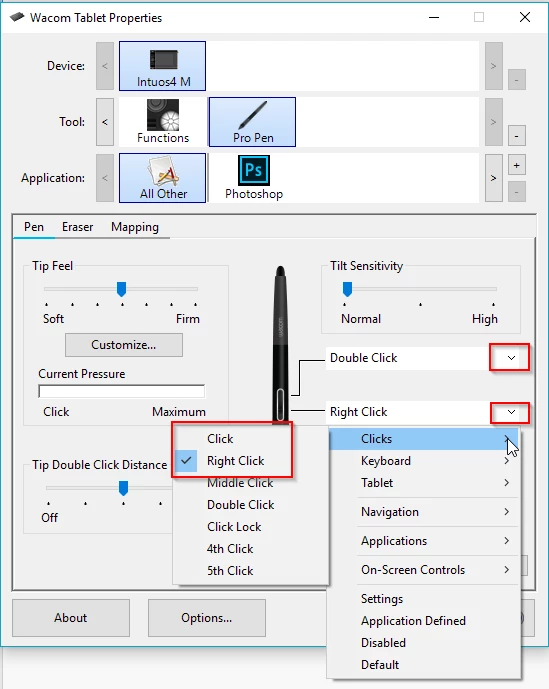
It would also be helpful for anyone using Wacom devices that just can't get used to hitting the Right Click button on the Pen like me.

I know that Adobe made the Microsoft Suface Dial compatible with Photoshop, however it is completely useless because it doesn't have supplementary buttons and therefore takes way too long to access brush settings, which should be accessable on-the-fly. It's like the first generation of BMW iDrive compared to the newest version of it which has supplementary buttons after many years of customer feedback (hopefully that analogy makes sense to ya).

If there is not a way to change it, ADOBE PLEASE MAKE THIS SHORTCUT CUSTOMIZABLE! You'll solve so many multi-platform issues.

This topic has been closed for replies.
Correct answer Trevor.Dennis

It looks like that is one of the hardwired shortcuts, but you should repeat your request on the Photoshop Feedback site which Adobe engineers follow.  You'll probably get a response from someone like Jeff Tranberry who will tell maybe one day, or it will never happen so you can think about an alternative.

Photoshop Family Customer Commuity

Do you own a Surface Pro as well as the Mac?  I have no experience with the Surface Pro, but I am wondering if you use the stylus buttons for other functions?  What I am angling at here, is that you might be able to swap the buttons in the device Preferences, but I don't know if that will stuff you up in other ways.

It's certainly doable with Wacom pens with Click being left click, and Right Click being...   hmmm  I'll have to think about that one

I'll mention a couple Surface Pro users, and maybe add Mac and Surface Pro to the subject line.  You'd better let us know if my edit is misleading so we can edit it again.

https://forums.adobe.com/people/Chuck%20Uebele

JJMack

Good luck

4 replies

Inspiring
October 3, 2019

yup, same problem here, still not fixed

October 3, 2019

I fail to see how the above is related to the issue you posted here

https://community.adobe.com/t5/Photoshop/Brush-size-fails-via-control-option-mouse-click-in-Photoshop/td-p/10647566

Considering Photoshop CC 2019 wasn't even released when this original thread was posted


JJMack
Community Expert
Community Expert
December 5, 2017

Ideally Wacom, Apple, Microsoft and other software and hardware developer should work as one.   I do not expect to live to see that day.  I live on the third rock from the sun not a bad place to live perfect it is not.

JJMack
andreamaestri
Participating Frequently
December 5, 2017

Hi @azywno,

If you go on Edit>Keyboard Shortcut, you can change any key biding, and there's the  Brush Size/Hardness one! I hope this is helps you

azywnoAuthor
Participating Frequently
December 5, 2017

Sorry, Is not helpful. That is not the HUD shortcut.

Trevor.Dennis
Community Expert
Trevor.DennisCommunity ExpertCorrect answer
Community Expert
December 5, 2017

It looks like that is one of the hardwired shortcuts, but you should repeat your request on the Photoshop Feedback site which Adobe engineers follow.  You'll probably get a response from someone like Jeff Tranberry who will tell maybe one day, or it will never happen so you can think about an alternative.

Photoshop Family Customer Commuity

Do you own a Surface Pro as well as the Mac?  I have no experience with the Surface Pro, but I am wondering if you use the stylus buttons for other functions?  What I am angling at here, is that you might be able to swap the buttons in the device Preferences, but I don't know if that will stuff you up in other ways.

It's certainly doable with Wacom pens with Click being left click, and Right Click being...   hmmm  I'll have to think about that one

I'll mention a couple Surface Pro users, and maybe add Mac and Surface Pro to the subject line.  You'd better let us know if my edit is misleading so we can edit it again.

https://forums.adobe.com/people/Chuck%20Uebele

JJMack

Good luck

azywnoAuthor
Participating Frequently
December 5, 2017

Yes, I use both devices. I just got the Surface Book and am really handicapped by this shortcut as it is the most used function for me in photoshop.

Unfortunately the Pen tip must be set as left click because it is the primary way to use tools in Photoshop regardless of it being a Wacom or Microsoft pen.

I posted on the Feedback site as recommended.

Thanks, hopefully this could be on an update.

@mj
Community Expert
Community Expert
December 5, 2017

You may find Radial Menu helpful. Not quite what you're needing but perhaps a more elegant workaround for now.

Top 7 Surface Book Hacks for Artists « Windows Tips :: Gadget Hacks

HTH