Participant
May 20, 2020
Answered

Bug in Photoshop newest Version 2020.

  • May 20, 2020
  • 1 reply
  • 1146 views

Exporting of Shapes had an error. It don't works. At least on the normal way.

With the Shape-Window Way it works. But not if you go with the shape Tool and the Shape Menü.


Please Update.


Image just from google images:

https://www.shapes4free.com/wp-content/tutorials/install-shapes-step-02.jpg 


The: Export Selected Shapes...


don't works.

This topic has been closed for replies.
Correct answer JJMack

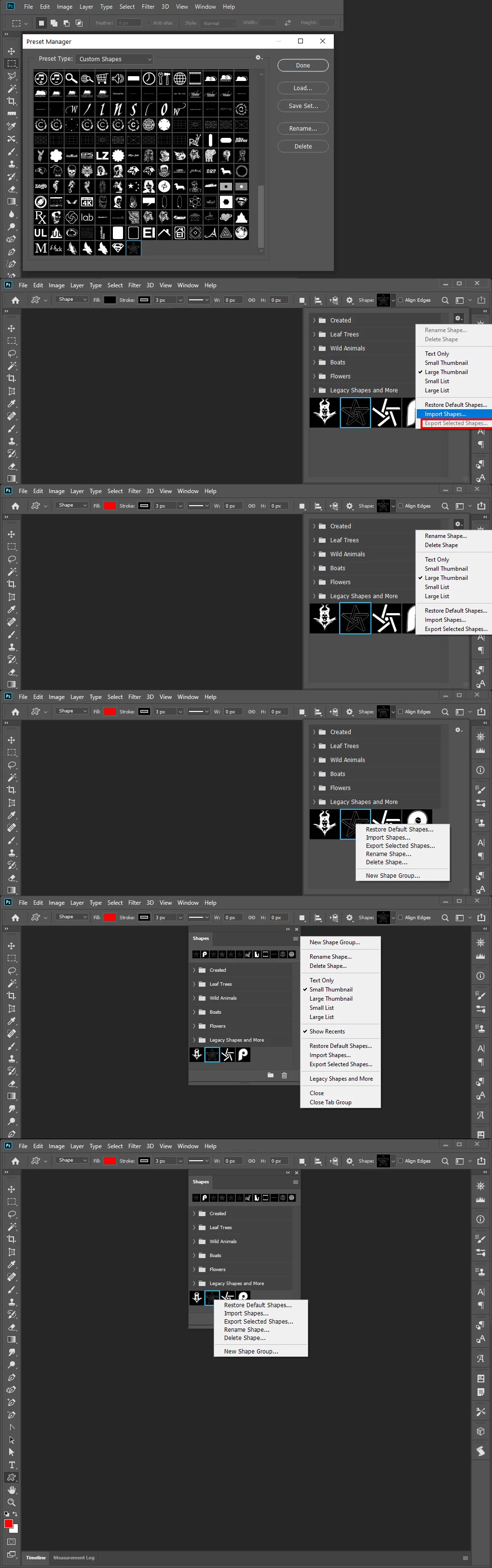
Maintaining Photoshop loaded shapes was changed from the Preset manager where sets were loaded ans saved to the Shapes Palette when Adobe added the Shapes palette where they are now exported and imported.  There seems to be a minor bug in Photoshop. Photoshop sometime grays out menu items that should not be grayed out. I have even seen the menu item that worked for you be grayed out. The menu item is also in other pop out  menus. I managed to capture here the one the worked for you grayed out and also captured it not grayed out.  I have seen it grayed out in other pop out lists. Here I captured it not grayed out in list that you may have seen it grayed out. I do not know what triggers the bug to bite. Notice the first two are the sames  pop out list. One has export grayed out the other is not.  It was consistently grayed out for some time in several list then is was not.  Perhaps switching between some tool cause Photoshop the stop graying it out because some internal bit was changed.
1 reply

JJMack
Community Expert
JJMackCommunity ExpertCorrect answer
Community Expert
May 20, 2020

Maintaining Photoshop loaded shapes was changed from the Preset manager where sets were loaded ans saved to the Shapes Palette when Adobe added the Shapes palette where they are now exported and imported.  There seems to be a minor bug in Photoshop. Photoshop sometime grays out menu items that should not be grayed out. I have even seen the menu item that worked for you be grayed out. The menu item is also in other pop out  menus. I managed to capture here the one the worked for you grayed out and also captured it not grayed out.  I have seen it grayed out in other pop out lists. Here I captured it not grayed out in list that you may have seen it grayed out. I do not know what triggers the bug to bite. Notice the first two are the sames  pop out list. One has export grayed out the other is not.  It was consistently grayed out for some time in several list then is was not.  Perhaps switching between some tool cause Photoshop the stop graying it out because some internal bit was changed.

JJMack
SEC0007Author
Participant
May 20, 2020

Thx for the answer.


Yeah, it's strange.

I know that in other pop out menus it works.

But in my present manager is another bug.

I can't choice/see the shapes in the present manager. Only the contours and tools.

All others, are not selectable and also not visible per se.


Just shapes and tools.


I am from Switzerland.


🙂But thx for the answer. At least export works in the own, pop out Window shape menu.

