


Participating Frequently
July 18, 2025
Answered

Camera Raw requires GPU acceleration to edit photo

  • July 18, 2025
  • 3 replies
  • 1339 views

Out of the blue I can't edit my Raw images in Camera Raw. I have a 2023 imac with an updated OS. Why is this happening. Last week I was good? see attached screenshots

Correct answer gener7

I have run into this error before on my Mac. Maybe a few screenshots will help:


Open a Finder window, and from the Go menu, select Go to Folder...
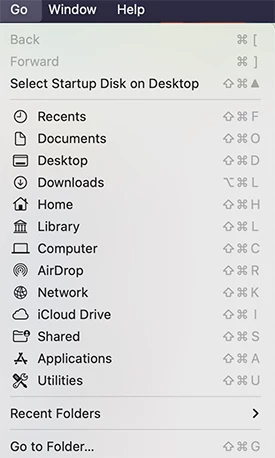
 

In the dialog that opens, type or select-copy-paste this path in:  ~/Library/Application Support/Adobe/CameraRaw/GPU/Adobe Photoshop Camera Raw/  (That curvy dash is called a tilde and is shorthand for your User directory.)  Press the Enter key.

 

This will open the correct directory where you should see the GPU2 or Gpu3 file. Delete it and re-open Adobe Camera Raw.  The GPU error dialog will be gone and ACR should be back to normal.



3 replies

gener7
Community Expert
gener7Community ExpertCorrect answer
Community Expert
July 23, 2025

I have run into this error before on my Mac. Maybe a few screenshots will help:


Open a Finder window, and from the Go menu, select Go to Folder...


In the dialog that opens, type or select-copy-paste this path in:  ~/Library/Application Support/Adobe/CameraRaw/GPU/Adobe Photoshop Camera Raw/  (That curvy dash is called a tilde and is shorthand for your User directory.)  Press the Enter key.


This will open the correct directory where you should see the GPU2 or Gpu3 file. Delete it and re-open Adobe Camera Raw.  The GPU error dialog will be gone and ACR should be back to normal.


neil_4506Author
Participating Frequently
July 24, 2025

THANK YOU, THANK YOU, THANK YOU!!!!!!!!!

Screenshots were so awesome! 

gener7
Community Expert
Community Expert
July 24, 2025

Thanks for reporting back. Since this answer got results for you, I'll consider it a correct answer and mark it so perhaps it will help others with the same problem.

Legend
July 18, 2025

Neil, Jeff's post is apt; the entire (GPU) FAQ and troubleshooting page is loaded with important tips.

How does this screen look?


Larry
neil_4506Author
Participating Frequently
July 19, 2025

that page is filled with alot of things I'm not familiar with... foreign language type stuff! 

Legend
July 19, 2025

That screenshot is pretty telling Neil!

Use Graphics Processor is grayed out, cannot be opened so as to turn on; 

"Camera Raw graphics acceleration is not supported by your system."


What happened in the time since you were able to edit in Camera Raw?


btw, I hate random or sporadic error messages -- I got an error message a few months ago, ignored it, never saw it again. Well, it's baaack. "Lightroom Classic does not have access to some Standard folders." How less-than-helpful.... "some"? why aren't they named? "Standard"? What is standard about the folders?


Not your issue, Neil, and I broke my promise to not complicate a fellow user's post. But my issue is sort of related -- what used to work quit, without explanation.


Larry
Jeff Arola
Community Expert
Community Expert
July 18, 2025

First thing to try is #6 from here:

6. Check and delete the TempDisableGPU3 or TempDisableGPU2 files

https://helpx.adobe.com/camera-raw/kb/acr-gpu-faq.html


neil_4506Author
Participating Frequently
July 19, 2025

Jeff thanks for chiming in and I'm not sure what or where TempDisableGPU3 or 2 is.