


Known Participant
August 21, 2022
Answered

Can a script count how many lines, words and characters there is in a Text Layer?

  • August 21, 2022
  • 1 reply
  • 2080 views

I've been browsing here and I found this script that counts the words and characters in a text layer, but it can't count how many lines there is in it. I've found other scripts that should count the lines but they didn't work.
So is it possible to add a line counter in the selected text layer?

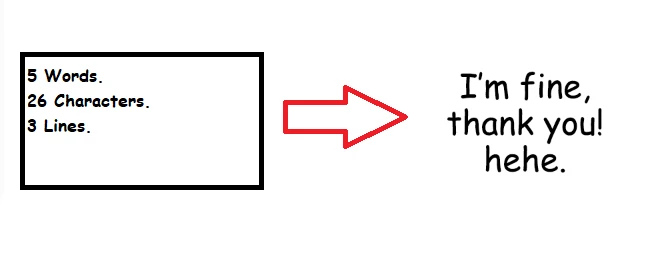
Also, how would I add a line in the code that breaks the line (add an enter) at a specific point, for example, breaks the line in the second word of the text layer, or the forth word, I'm asking because this would help me too.

Image example:
// 

/*

<javascriptresource>

<name>Count Words and Characters</name>

</javascriptresource>

*/

function run()

{

var layer = activeDocument.activeLayer;

    if (layer.kind == LayerKind.TEXT)

        {


    var words = layer.textItem.contents;

            words = words.replace(/(\r\n|\n|\r)/gm," ");

var countwords = words.split(" ").length;

var countletters = words.split(" ").join(" ").length;

alert("\n " + countwords + " Words\n " + countletters + " Characters","Count");

}

else

    {

    alert("Select a text layer.","Count");

    }

}

run();


This topic has been closed for replies.
Correct answer c.pfaffenbichler

The line-counting Script is on the Indesign Forum, so I assume it is for Indesign. 


// determine lines in point text;
// 2022, use it at your own risk;
if (app.documents.length > 0) {
    var myDocument = app.activeDocument;
    var myLayer = myDocument.activeLayer;
    if (myLayer.kind == LayerKind.TEXT) {
        var theText = myLayer.textItem.contents;
// carriage return;
        var theRegExp = /\r/g;
        alert (theText.match(theRegExp).length+1)
    }
};


For Point Text try this; it should give an alert of the count of carriage returns + 1. 

1 reply

c.pfaffenbichler
Community Expert
Community Expert
August 21, 2022

Also, how would I add a line in the code that breaks the line (add an enter) at a specific point, for example, breaks the line in the second word of the text layer, or the forth word, I'm asking because this would help me too.

Could you post meaningful screenshots to illustrate what you mean? 


I've found other scripts that should count the lines but they didn't work.

If you want to talk about Scripts you might want to actually show them/post links. 


Is the Type Layer Point Text or Paragraph Text? 

In Point Text one should be able to determine the number of carriage returns (edited), and with Paragraph Text one could duplicate the Type Layer and convert it to Point Text. 

HeyoThereAuthor
Known Participant
August 21, 2022

I guess I'm asking too many things at the same time and it's a bit confusing, sorry.


\Could you post meaningful screenshots to illustrate what you mean? 

Yes. I posted an image illustrating it better, but basically I wanna write a script that will break the line of text for me, the second and sixth word is just an arbitrary number that I chose, I just wanna learn how would I do it so I can try to write a very specific piece of code that will break the line in specific points.

\If you want to talk about Scripts you might want to actually show them/post links. 

(here's the link where I got the code that counts characters and words,it works!)
https://community.adobe.com/t5/photoshop-ecosystem-discussions/need-help-to-count-characters-in-multiple-text-layers/m-p/7345259   

(and I found this script to count lines but when I tried it, I got an error. I'm not sure if I did something wrong.)
https://community.adobe.com/t5/indesign-discussions/is-there-a-script-can-count-how-many-lines-and-one-line-have-how-many-words-in-a-text-box/m-p/6500482#M294422

\Is the Type Layer Point Text or Paragraph Text? In Point Text one should be able to determine the number of carriage returns (edited), and with Paragraph Text one could duplicate the Type Layer and convert it to Point Text. 

The text layers that I'm working with are all Point Texts.


HeyoThereAuthor
Known Participant
August 23, 2022

Document Object Model 

Action Manager 


Just set the 

layer.textItem.contents = 

to whatever String you want. 


Thanks!!