


Participant
October 1, 2024
해결됨

Can I constrain brush softness to the actual size of the brush?

  • October 1, 2024
  • 3 답변들
  • 775 조회

When I choose a brush hardness of 0 (maximum softness), the feathering extends beyond the brush's displayed radius. How can I constrain it so that it is fully contained within the size I have set for the brush?


As you can see in the attached video, as I paint with a hardness of 0, the paint exceeds the brush size by at least 50%. I'd like to constrain it to the size of the brush, so that all of the feathering lives inside the brush's border.


Is that possible?
이 주제는 답변이 닫혔습니다.
최고의 답변: fbeaume


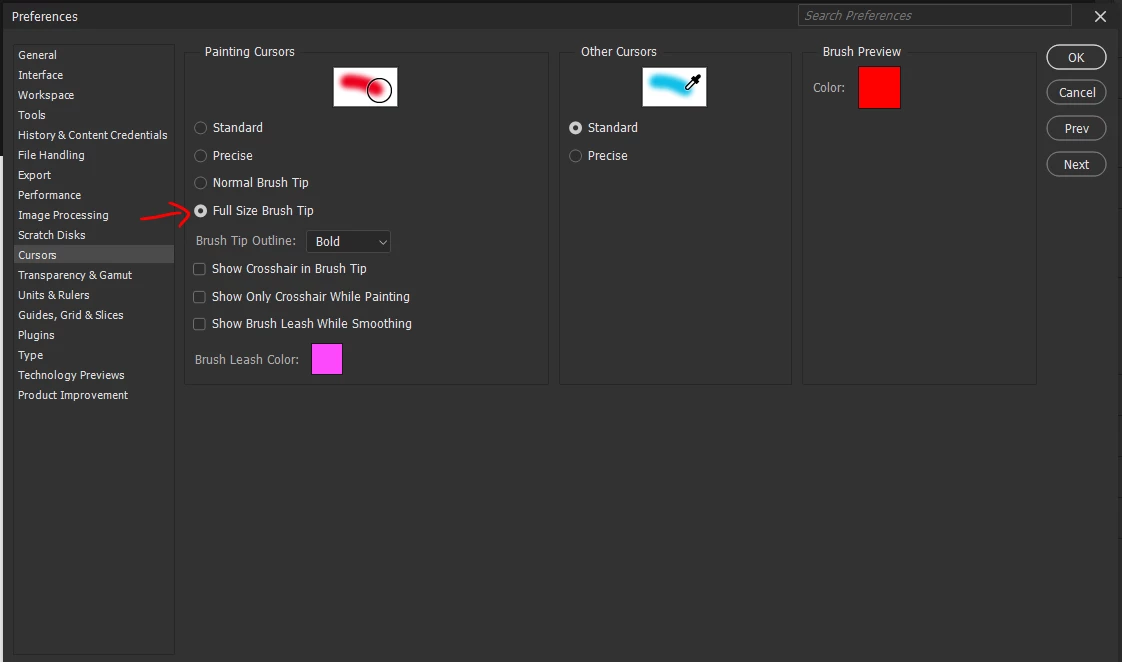
Did you try to change settings of Cursors Preferences? 
Choosing "Full Size Brush Tip" option should do what you want.

3 답변

aminadream작성자
Participant
October 1, 2024
Jeff Arola
Community Expert
Community Expert
October 1, 2024

In Photoshop go Photoshop 2024>Settings>Cursors>Painting Cursors and check Full Size Brush Tip


Didn't see the other post with the same answer

https://community.adobe.com/t5/photoshop-ecosystem-bugs/constrain-brush-softness-to-the-actual-size-of-the-brush/idi-p/14890381

aminadream작성자
Participant
October 1, 2024

Thank you!

aminadream작성자
Participant
October 1, 2024

Right now, when you choose a brush hardness of 0 (maximum softness), the feathering extends beyond the brush's displayed radius. I need to be able to constrain it so that it is fully contained within the size I have set for the brush.


As you can see in the attached video, as I paint with a hardness of 0, the paint exceeds the brush border by at least 50%. I'd like to constrain it to the size of the brush, so that all of the feathering lives inside the brush's border.

fbeaume
Community Expert
fbeaumeCommunity Expert답변
Community Expert
October 1, 2024


Did you try to change settings of Cursors Preferences? 
Choosing "Full Size Brush Tip" option should do what you want.