


Participant
June 11, 2023
Answered

Can someone tell me how to make photoshop ACTUALLY autosave?

  • June 11, 2023
  • 5 replies
  • 15760 views

Please help.

I'm so sick and tired of Photoshop refusing to autosave. I lost hours of work last week so I made sure I had autosaving turned ON in the current version of Photoshop I was using. It's set to autosave every 5 minutes, but I can't find any autosave files anywhere. There are no files in the auto-recovery folder. Why? Why does it have to be so hard to find an autosave file? Why is there not an "open autosave folder" "load autosave" or "recover" button in the dropdown menu? Have you never played a video game before? Play one and take note of how it handles autosaving. It shouldn't be a nightmarish quest to recover a saved file. 

This is where they are supposed to be, right? \AppData\Roaming\Adobe\Adobe Photoshop (Beta)\AutoRecover

This folder is empty. There is not a single file in there of any type. Why? When I have autosave on every 5 minutes, why is it empty? 

When I google this people claim that if Photoshop crashes, it should automatically recover what you were working on. Well, it has never done that for me. Certainly not this time. Can someone please just for the love of god tell me how I can make sure Photoshop is actually autosaving? I NEEED this functionality, but I can't get it to work. I've worked in IT for a decade and I can't fathom why Adobe can, while being the biggest name in creative apps, be the most unstable and poorly designed environment known to man. Autosaving shouldn't need to even be turned on. It should just happen on its own. But even with maximum effort, I can't make it do it. 
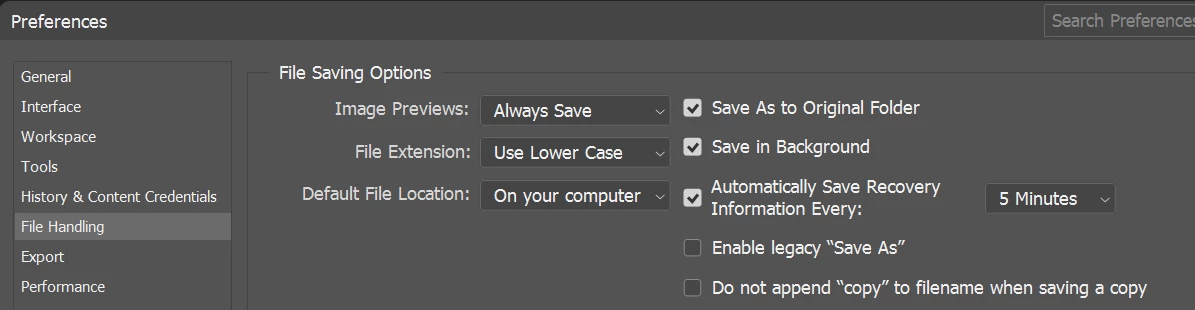
These are my settings. Do you know what would be nice? If it would tell me WHERE the files are! I've spent more time trying to work this out than it would have taken to just start my project over. 

I'm frustrated to tears and so confused, and I don't know what to do. I can't keep losing work like this, it's killing me. Please just tell me what I need to do to make it autosave. 

Forgive the rant, I am losing it.

Correct answer jane-e

@PolarBearon 


Years ago I got into two habits:

  • Save manually every time I do something right (fairly often)
  • Do an incremental save once or twice a day:
    Save, followed by Save As and add a number or the date to the filename. I move the older versions into an "archive" folder and eventually delete the older ones.


The newer .psdc format automatically saves versions and does what you are asking for. It requires that you save in the Cloud, which I prefer not to do.


Jane


5 replies

Participant
June 17, 2025

Posting again with the same issue from my work account. This is so annoying I have no words. Photoshop hanged with "unknown error" and I lost quite a bit of work. When I went back to my preferences the check mark on "Save recovery information" was not there even though I am SURE I had it checked. 

BRING BACK local autosave! This is ridiculous and shameful for the software that costs so much to have THIS bad of a user experience!

Participant
January 26, 2025

It's amazing something as basic as automatic autosave hasn't been added or at least, doesn't work properly on PS - and WITHOUT needing to save to cloud. 

I guess Adobe doesn't want us to own our own files?

Participating Frequently
January 8, 2025

I want to join your rant... Just lost couple hours of work because of this. Yes, I need to save more often, but I foget when I get into the flow. What am I supposed to do - set an alarm?!? Maybe Adobe, who gets paid subscription every month can set up autosave as all normal applicatoins do? It crashed on me, and when I opened Photoshop next time, the file was gone, no recovery information loaded. There should be a location where last 5 versions of your file are being saved, period. No "save more often", or "rely on the crash recovery thing" nonsense. So frustrated! Why After Effects does that (saving auto save information for your project) and Potoshop doesn't?!?!?!

Stephen Marsh
Community Expert
Community Expert
January 8, 2025
quote

Yes, I need to save more often, but I foget when I get into the flow. What am I supposed to do - set an alarm?!?


By @Anavelca


Some have gone to that extent, having Adobe Bridge running in the background, with a script notice popping up every X minutes reminding them to save:


https://community.adobe.com/t5/photoshop-ecosystem-discussions/reminder-to-save/m-p/10466042#M245264


https://community.adobe.com/t5/photoshop-ecosystem-discussions/automate-save-as-or-export-with-sequential-file-names/m-p/9003836#M88140

Participating Frequently
January 9, 2025

Yes, I know there might be various workarounds, crutches etc. to make something work, but imo, that is not how reputable software that costs good amount of money, paid to them every month, should operate. 

D Fosse
Community Expert
Community Expert
June 11, 2023

First of all: there is no point in looking for the files. You're not supposed to do that.


  • If Photoshop crashes, the recovery file will come up automatically on next launch.
  • If Photoshop closes normally, the contents of the recovery folder is deleted. You don't want to be flooded with recovered files every time you open the application, if everything works normally.


In other words - either it comes up on its own, or there's nothing there.


To initiate the autorecovery process, the file has to be saved to disk at least once. This is to prevent the process from running for every random file you open and then dismiss again without intending to keep it. Saving it tells Photoshop that this is one you want to keep.


Participant
June 11, 2023

Then I don't understand why it didn't recover my file after the crash. And the file in question had been saved many times before the crash. 

Participant
January 10, 2024

@PolarBearon 


Years ago I got into two habits:

  • Save manually every time I do something right (fairly often)
  • Do an incremental save once or twice a day:
    Save, followed by Save As and add a number or the date to the filename. I move the older versions into an "archive" folder and eventually delete the older ones.


The newer .psdc format automatically saves versions and does what you are asking for. It requires that you save in the Cloud, which I prefer not to do.


Jane


Answers like this don't really help. I frequently save, but if photoshop for some reason decides to crash and corrupt my file in the process, and then doesn't do autosave (like it's supposed to do, and as every other creative app does, without having to check any boxes or folders,  and would be expected of the biggest creative company in the world) the fault is in the software and not the user. 


The fact that you got used to coping with the outdated software is not an excuse for Adobe. Please, stop replying with comments like yours when people are frustrated, and with good reason. Try a little empathy.


Have a nice day!

kglad
Community Expert
Community Expert
June 11, 2023

in the future, to find the best place to post your message, use the list here, https://community.adobe.com/


p.s. i don't think the adobe website, and forums in particular, are easy to navigate, so don't spend a lot of time searching that forum list. do your best and we'll move the post if it helps you get responses.


<moved from using the community bugs >