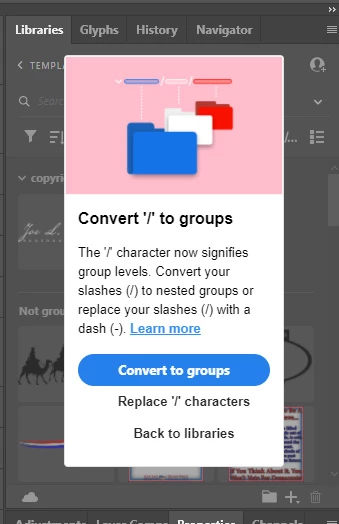
For anyone else having this problem that adobe created. I figured out what they did that broke the libraries. I opened the creative cloud app, created a new library and coppied everything from the one that wouldn't work to the new library. Then in photopshop I clicked on the "convert to groups". I looked at all the files in the new library to check the filenames, and not a single one of them had the "/" character in the filename. I've never used the "/" character in any filename in any instance anywhere since I've been using computers for the last 30 years so I knew it wasn't in any of them, but I double checked anyway, because someone is going to ask or insist that there is...
I did have a file with a URL in it, which was IN THE FILE ITSELF, NOT IN THE FILENAME. Thankfully it was an item in the library that I no longer use so I deleted it through the creative cloud app and now it's working like it used to work and I can delete the new library that I created to check it with. I had to delete it from the original library through the creative cloud app because I didn't want anything changed in it and couldn't do it through photoshop because I couldn't get past that stupid block.
Here's the rub:
1. If I want something sorted in groups, I'll do it myself. I don't want things sorted the way someone at adobe 'thinks' it should be sorted and grouped and rearranged.
2. I don't want any characters replaced with something else. In the case of a URL if you replace the HTTP://, with HTTP:--, it's going to look pretty stupid when you export it as an image.
3. Adobe should constrain this to FILENAMES ONLY and NOT INCLUDE what is in the file itself. I'm not a programmer but it should be easy for any programmer that's worth his salt to be able to include a simple "catch and try" string to constrain it to filenames only and exclude the contents of the library item.




 AdChoices