


Participating Frequently
August 5, 2017
Answered

Can't change object colour

  • August 5, 2017
  • 1 reply
  • 10909 views

Hi,

My boss gave me a file to edit and change the colour of. I can change some of the colours except for the main background for the button. Could someone maybe help me out and figure out how to change the colour of the entire button?

Here's the photoshop file: https://ufile.io/camv9

Thanks,
    This topic has been closed for replies.
    Correct answer italosan

    Yes!!!


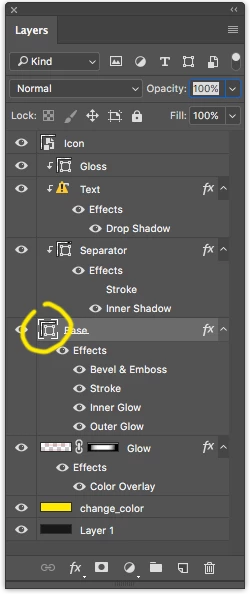
    pretty easy then, just double click the highlighted layer Icon, the color dialogue will show up, chose your color. Done.

    but beware there are different layer styles who contributes to your button appeareance (such stroke, inner glow etc.)

    Hope this helps.

    1 reply

    italosan
    Community Expert
    August 5, 2017

    Hi n36626986 ,
    do you mean in this way?

    n36626986Author
    Participating Frequently
    August 5, 2017

    No mate, I mean the actual button itself. Like turn the entire green colour scheme to red or blue or something.

    italosan
    italosanCorrect answer
    Community Expert
    August 5, 2017

    Yes!!!


    pretty easy then, just double click the highlighted layer Icon, the color dialogue will show up, chose your color. Done.

    but beware there are different layer styles who contributes to your button appeareance (such stroke, inner glow etc.)

    Hope this helps.