

Participating Frequently
November 20, 2017
Answered

Can't save as PNG?

  • November 20, 2017
  • 4 replies
  • 64400 views

What causes lead you to not being able to save as a PNG?


No Save As PNG
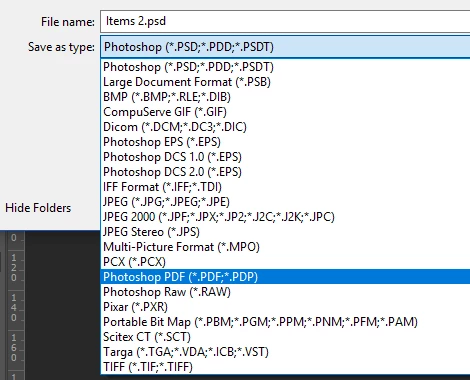
Can't export image sequence as PNG.
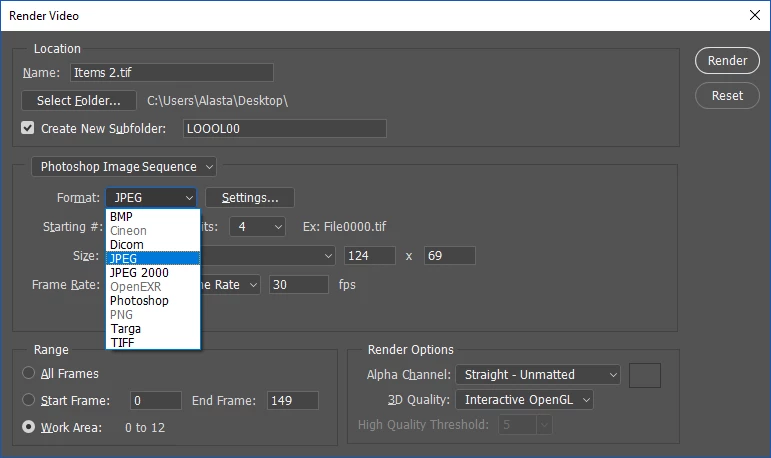
Been doing PNGs for years

    This topic has been closed for replies.
    Correct answer Jeff Arola

    That did not help.

    I just went back to version 18 (2017), and it works great! I can now export PNG files perfectly! I'll just stick with this version.

    It might be a bug or something.


    Not be able to Export as a PNG Sequence is a confirmed bug, so i wonder if the Save As png is related to that?

    Photoshop CC 2018: PNG Image Sequence Export Not Working | Photoshop Family Customer Community

    4 replies

    Participant
    December 13, 2019

     Recreate your file as an RGB and copy all your old layers over to this new file. Or just change Image - Mode - RGB and than try to save as PNG. It works!

    Participant
    May 5, 2018

    Thanks alot for the work around. Just got CC and new PS. Have been using an old version for years. THIS IS A BIG PROBLEM ADOBE!!!

    Jeff Arola
    Community Expert
    Community Expert
    May 5, 2018

    The bug mentioned here is supposed to have been fixed in the 19.1 update to photoshop cc 2018.

    What exact version of photoshop are you using?

    Look in photoshop under Help>System Info and the top line is the photoshop version.

    What is the Color Mode and Bit depth of the document your trying to save as a PNG?

    Image>Mode in photoshop.

    Inspiring
    June 24, 2019

    I just had what I initially THOUGHT was the same bug in 2019...and in fact it was a color-mode issue as so many above have mentioned. CLASSIC problem - I opened a document that was made for print (i.e. in CMYK mode) and I need it in a Premiere project. I applied some effects (primarily bevel/emboss and shadow) and the colors did look weird, was going to fix in Premiere...but it wouldn't import into Premiere (generic error!) Tried to save as PNG and no dice, no option. Changed to RGB and problem solved. BOTH problems - the file imported as PSD, would save as PNG...AND the color issue solved itself.

    Apparently a file in CMYK mode won't save as PNG. No problem, just change to RGB.

    bricolagezero
    Participant
    April 18, 2018

    I have the save issue, and I used "File>Export>Export As..." as a workaround.

    Participant
    May 14, 2020

    This fix worked for me, thank you

    Mylenium
    Legend
    November 20, 2017

    Without knowing anything about your document and its settings, nobody can tel lyou much. You could simply be in a wrong color mode or something like that. Other than that this could be one of those endless PNG-related bugs in recent versions of ADobe products. Something is seriously broken....

    Mylenium

    Participating Frequently
    November 20, 2017

    Thanks for the response!

    I probably have default settings, unless I've accidently pressed some short cut somewhere. What other settings would be useful to know?

    And when I do the "Quick Export PNG" save option, that almost works, but it offsets the image when it saves so it's not useful

    Jeff Arola
    Community Expert
    Community Expert
    November 20, 2017

    What version of photoshop do you have?

    If your using CC 2018 (photoshop version 19.0) have you updated to 2018.0.1 (19.0.1)?

    Look under Help>System Info and first line to show the photoshop version.

    How to tell if you have 19.0.1

    Photoshop Version Displayed Incorrectly

    Help>Updates from within photoshop.
