

Answered
Can the space between lines be adjusted when using TEXT tool?
I'm new at using the text tool in PS CS5. Can the space between the lines of text be adjusted. I would like for the lines to be closer together than the default setting. Thanks.

I'm new at using the text tool in PS CS5. Can the space between the lines of text be adjusted. I would like for the lines to be closer together than the default setting. Thanks.
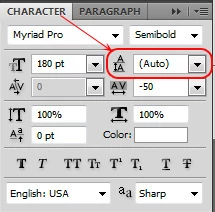
1.— Make sure the "Character" panel is selected in the Window menu of Photoshop; then
2.— Adjust the leading:
____________
Wo Tai Lao Le
我太老了
Already have an account? Login
Enter your E-mail address. We'll send you an e-mail with instructions to reset your password.
 AdChoices