



Cannot execute script in target engine 'main'! (#45) Object is invalid
**NOT SPAM** Please don't mark it as so, I'm trying to get help to find a solution to this error I'm running into, thank you!
Hey all I'm running into a ESTK error when running my script. The script will run a file, make it's checks and move on to the next file. It'll do this for a couple until it reaches a certain template and give me the error stated in the Subject Line. Any help would be greatly appreciated!
Goal: The goal of this script is to check a files text layers to see if the ALL CAPS setting is turned on and doesn't already exist for any layer, if true "<RT_f>" gets added to the layer name. If false, the file is meant to be closed and jump back into the for loop for the next file.
A couple things I need to adjust that I'm aware of are when the script opens the file and this prompt pops up
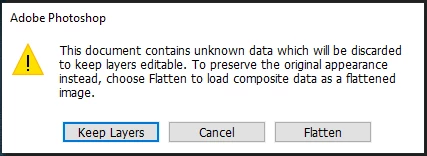
I still need to figure out how to always apply the "Keep Layers" option (if anyone know I would be forever thankful)
I will attach a couple files that will run fine against this script and a few that produce the Subject Line error.
Script:
//#target Photoshop
var files = Folder('/c/temps/psd').getFiles(/.psd$/i)
for (var i = 0; i < files.length; i++) {
  var fileRef = files[i]
  var docRef = app.open(fileRef)
  var ifChanges = false
  $.writeln(fileRef)
  try {
    for (var a = 0; a < docRef.layers.length; a++) {
      var curLayer = docRef.layers[a]
      try {
        if (
          curLayer.kind == LayerKind.TEXT &&
          curLayer.textItem.capitalization == TextCase.ALLCAPS &&
          curLayer.name.indexOf('<RT_f>') == -1
        ) {
          curLayer.name = '<RT_f>' + curLayer.name
          ifChanges = true
        }
      } catch (e) {
        docRef.close(SaveOptions.DONOTSAVECHANGES);
        continue;
      }
    }
  if (ifChanges) {
    $.writeln(fileRef.Name)
    docRef.save();
  }

  docRef.close();
  } catch (e) {
    docRef.close(SaveOptions.DONOTSAVECHANGES);
    continue;
  }


}
The console log was added to help me identify which file the error was populating for (file will be included) and to hopefully get an answer as to why some files returned 'undefined' (but I'm not too worried about this one.
That being said I have already googled that error and nothing has popped up. The only solution I have tried is to simply delete that file BUT there are multiple files that populate the error message from the Subject Line.
In the files provided 'BCBH-KW10224-3K001.psd' is a sample file that will bring up this error in ESTK
I have to run this against 18k files so any help and/or solutions would be incredibly appreciated.
 AdChoices