


Participating Frequently
April 13, 2017
Question

Cannot invert layer mask after upgrade

  • April 13, 2017
  • 5 replies
  • 1877 views

Every time Photoshop starts doing something funky. I feel a total loss of control. This forum have proven helpful more than once. Now I have a new issue that I am unable to resolve and am crossing my fingers for help here.

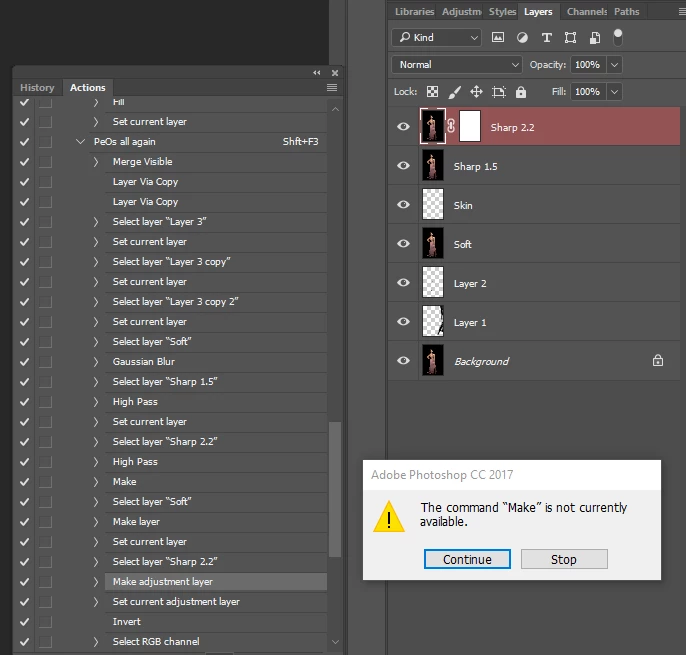
I created a macro that is putting up a bunch of layers for me with various functions for people photography. After the latest update to 2017.1.0 20170309.r.207 my macro errors half way. I have debugged it and am seeing that the step that no longer work is when I invert a layer mask with Ctrl+i.

For some reason the layer is marked as red. When I stop the macro I cant even select the layer mask. I can put a layer mask on another layer, invert it with ctrl + i. If I go back to the layer Sharp 2.2, I still cant mark the layer mask for any modification.

Why is the layer red? And why cant I access the layer mask? Appreciate all help.

PeO.
    This topic has been closed for replies.

    5 replies

    Participating Frequently
    April 13, 2017

    I just tried a different image and do not have the issue. Something has probably gone corrupt in the file I was working. Thank you everyone for chiming in.

    JJMack
    Community Expert
    April 13, 2017

    I do not know why the step fails. The action not script was able to select that layer 6 steps before high pass filter it 2.2 px and add a reveal all layer mask.  I do not know why it is red I do not see where the layer was created.  The Action then processed layer  soft and created layer skin and was able to select layer Sharp 2.2 again.  IMO Make adjustment layer should be available.

    JJMack
    Participating Frequently
    April 13, 2017

    And a second hint. When I open a three layer tif with just minor edits, before any action, I get the last layer also the be red marked. This has never happened before. The background in the image is black. When on I click on any layer, the red marking "follows". Only when I double click on the layer I get the layer style window popping up and the layer marking turns grey as it normally would be.

    Again, thanks for all the help!!

    PeO.

    JJMack
    Community Expert
    April 13, 2017

    It looks like you have targeted the layers content on a layer that has a layer mask and you are trying to adds a layer mask with perhaps Alt+Click on the add layer mask icon in the bottom of the layers palette. Being there is a Layer mask already on the layer Make is not currently available.

    By Macro I believe you mean some Action you have. Please post it. Expanded so we can see the option recorded. The Action failed in Make Adjustment layer.  Since CS4 the has be a problem with actions wilt make adjustment layer.  These steps usually do not fail however how the play may not be the way they were recorded.  Adobe added two option to the Adjustment layer Palette the introduced in CS4.  These option work more like Photoshop Preferences and changing them can effect how  make adjustment layer steps play.  Actions and scripts have  no control or access to the options.

    If you never touch these options you should be OK. leave these set as they come from Adobe.

    JJMack
    quantaikei
    New Participant
    April 13, 2017

    you restart PS

    Participating Frequently
    April 13, 2017

    Yes I have tried that. And restarted computer. On the edge of uninstalling and reinstalling.

    Chuck Uebele
    Community Expert
    April 13, 2017

    It looks like it's stopping on creating the adjustment layer rather than inverting the mask. What type of adjustment layer is suppose to be made? Have you tried double clicking on that step to rerecord just that step?

    Participating Frequently
    April 13, 2017

    It is a curves layer that is coming. I have a feeling it is the red marking on 'Sharp 2.2' that is initiated a problem though.