


Participant
November 21, 2022
Question

Cannot Open Photoshop 2022 PSD file on Photoshop 2021 version

  • November 21, 2022
  • 2 replies
  • 640 views

Hello guys,


New in here!

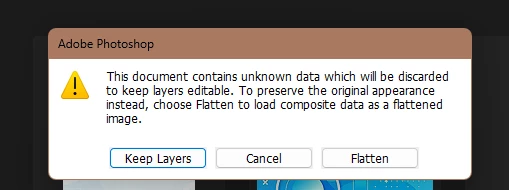
I wish to know why some of the layers have been lost when I'm opening a 2022 version PSD file on my Photoshop 2021 version. Any solutions on how to resolve this issue? Thank you.


This topic has been closed for replies.

2 replies

PECourtejoie
Community Expert
Community Expert
November 21, 2022

Hi, @Rhodel27237462xfat as @Mylenium pointed out, you get this message whenever you use a new, or updated function saved on a file in an older version of Photoshop.

Do you remember if you used smart objects? Neural filters?

Please check the file in Ps 2022 and report.

Mylenium
Legend
November 21, 2022

Without knowing what exactly you did with the file nobody can tell you much, but the warning pretty much means what it says - you used some feature that simply doesn't exist and thus cannot be opened as an editable layer. What that is only you can know. In such a case the layer would have needed to be rasterized in PS 2022 to ensure backwards compatibility.


Mylenium