

Exit
  • Global community
    • Language:
      • Deutsch
      • English
      • Español
      • Français
      • Português
  • 日本語コミュニティ
  • 한국 커뮤니티
0

cannot open photoshop file

Community Beginner ,
Mar 20, 2018 Mar 20, 2018

I cannot open the Photoshop file, which i edited yesterday.

it shows this error
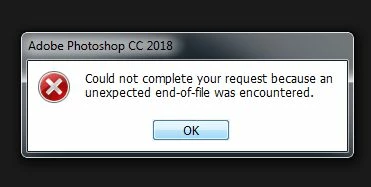
eror.jpg

can it be recovered.

233
Translate
Report
Community guidelines
Be kind and respectful, give credit to the original source of content, and search for duplicates before posting. Learn more
community guidelines
Adobe
Adobe Employee ,
Mar 20, 2018 Mar 20, 2018

Hi laxmish.shetty,

You may try resetting the Photoshop preferences back to defaults and check if that helps.

Refer: Preferences in Photoshop

Regards,

Mohit

Translate
Report
Community guidelines
Be kind and respectful, give credit to the original source of content, and search for duplicates before posting. Learn more
community guidelines
Community Beginner ,
Mar 20, 2018 Mar 20, 2018
LATEST

thank you, but it didn't work. may be the file is corrupt because of some other reason

Translate
Report
Community guidelines
Be kind and respectful, give credit to the original source of content, and search for duplicates before posting. Learn more
community guidelines
Community Expert ,
Mar 20, 2018 Mar 20, 2018

A quick Google search "Photoshop unexpected end-of-file encountered" turned up several possible solutions from special software to trying to open the file in Illustrator. Bottom line: you have a damaged file and without a backup or Mac's Time Machine the chances of recovering the file are slim and the causes vary. I know the following advice is after the fact but in the future consider, as you work on file,  now and then save the file with a number sequence, such as: filename_1, filename_2, etc.

Translate
Report
Community guidelines
Be kind and respectful, give credit to the original source of content, and search for duplicates before posting. Learn more
community guidelines
