

Participating Frequently
June 9, 2017
Answered

Cant open files in PS

  • June 9, 2017
  • 3 replies
  • 753 views

when I try to open a file this happens: delete and reinstall dont work
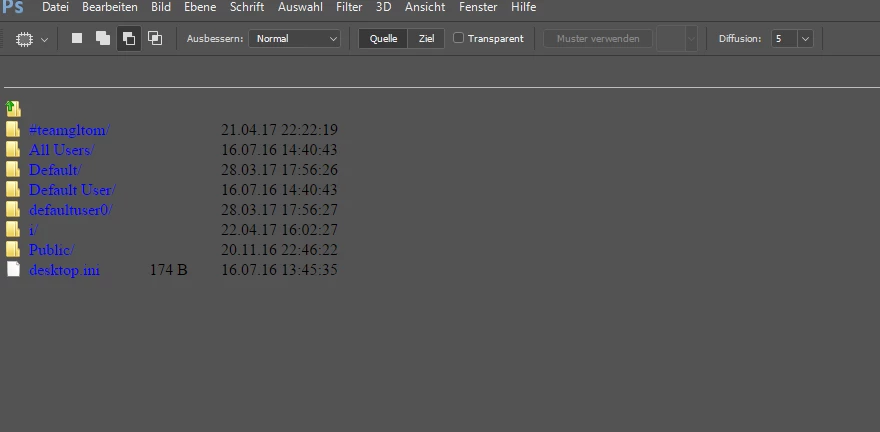
This topic has been closed for replies.
Correct answer davescm

Hi Thomas

When something really bizarre starts to happen with Photoshop, and what you show is far from normal, then the advice is to reset Preferences.

To do this go to Preferences - General and click on "Reset Preferences on Quit"

Then close and restart Photoshop

Dave

3 replies

Agent3
Participant
September 29, 2017

I get the same screen in both Photoshop and Premier. I tried resetting preferences and have the same issue. Also tried reinstalling. odd thing is this only happens on some days, then works fine for a week or two, but when I really need it to work there seems to be nothing I can do.

davescm
Community Expert
davescmCommunity ExpertCorrect answer
Community Expert
June 10, 2017

Hi Thomas

When something really bizarre starts to happen with Photoshop, and what you show is far from normal, then the advice is to reset Preferences.

To do this go to Preferences - General and click on "Reset Preferences on Quit"

Then close and restart Photoshop

Dave

Community Expert
June 10, 2017

are they .PSD files? Ive never seen anything like this happen.

headTrix, Inc. | Adobe Certified Training & Consulting
Participating Frequently
June 10, 2017

Psd, jpg,png- same problem

Community Expert
June 12, 2017

did you try Dave's advice? Deleting preferences? Or perhaps uninstalling Photoshop altogether and installing the latest version to see if that helps.

headTrix, Inc. | Adobe Certified Training & Consulting
